DatelTime-continued
Taking pictures with imprinted date/time
1
2
54
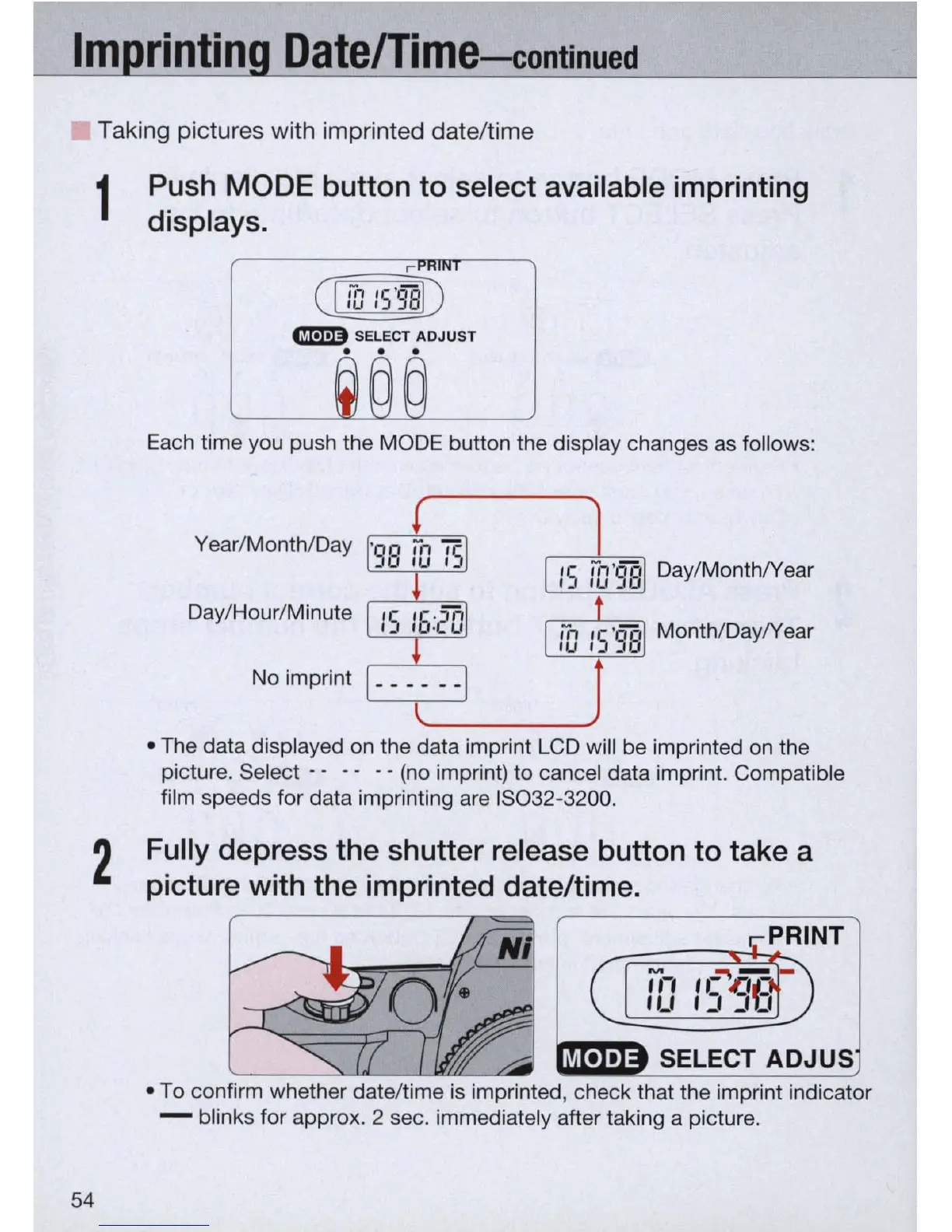
Push
MODE
button to select available imprinting
displays.
CIilliID
GB
SELECT
ADJUS
T
. . .
Each time you push the MODE button the display changes as fo
ll
ows:
Year/Month/Day
Day/MonthlYear
Day/Hour/Minute
Month/DaylYear
No
im
print
• The data displayed on the data imprint
LC
D wi
ll
be imprinted on t
he
picture. Select - - - - - -
(no
imprint) to cancel data imp
ri
nt. Compati
bl
e
film speeds for data imprinting are 1
5032
-3200.
Fully depress the shutter release button to take a
picture with the imprinted date/time.
• To confirm whether date/time
is
imprinted, check that the imprint indicator
- blinks for approx. 2 sec. immediately after taking a picture.


 To Next Page
 Loading...









