18
EN
Taking pictures with [PC]
Taking pictures with [PC]
1 Use FGHI to select the direction that the
frames are combined.
2 Press the shutter button to take the fi rst frame.
The edge of the fi rst frame is displayed faintly on
the screen.
3 Compose the next shot so that the edge of the
fi rst frame displayed faintly on the screen overlaps
the subject of the second frame, and press the
shutter button.
4 Repeat step 3 until the desired number of frames
are taken, and then press the A button or
button when fi nished.
Panorama shooting is possible for up to 10
frames.
The shot images are combined into a single
panorama image by the PC software.
● For details on installing the PC software, refer
to (p. 49). In addition, refer to the PC software
help guide for details on how to make panorama
images.
Viewing images
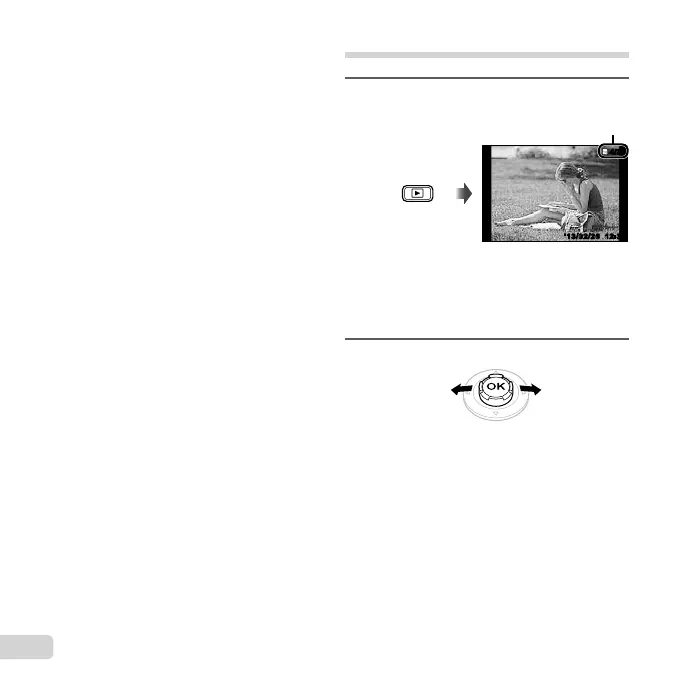
1
Press the q button.
Number of frames/
Total number of images
12:30’13/02/26’13/02/26 12:30
4/30
4/30
Playback image
● Pictures taken using Q mode or sequential
shooting function are displayed as a group.
Press the zoom lever to the T side to play back
the image in the group.
2
Use HI to select an image.
Displays
previous
image
Displays
next image
● Hold I to fast forward and hold H to reverse.
● Press the q button again to return to the
shooting screen.
To play sound recordings
To play sound recorded with an image, select the
image and press the A button.
● Press FG to adjust volume.


 To Next Page
 Loading...