29
EN
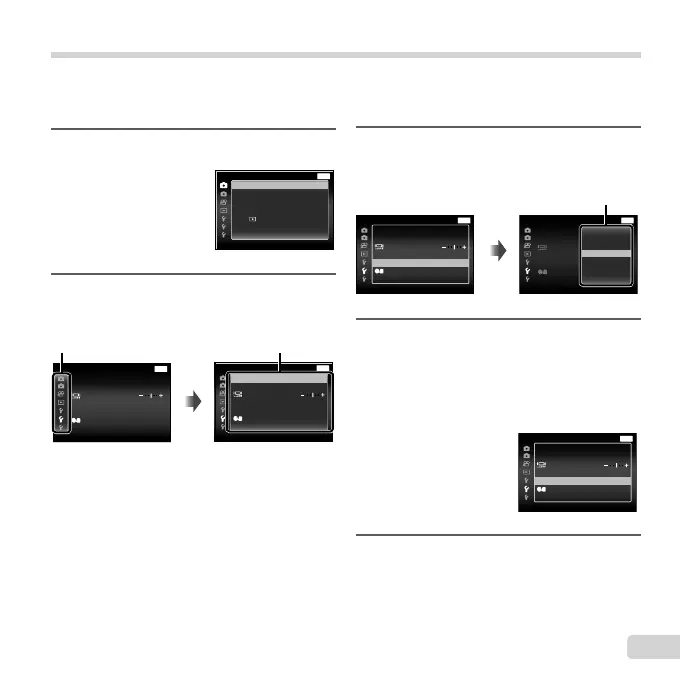
Using the setup menu
Press the button during shooting or playback to display the setup menu.
The setup menu provides access to a variety of camera settings, such as shooting and playback functions,
time and date settings, and display options.
3
Use FG to select the desired
submenu 1 and then press the A
button.
MENU
Settings Menu 2
File Name
Back
Power SavePower Save
Off
Pixel Mapping
TV Out
Reset
English
’13.02.26 12:30
X
Power SavePower Save
Pixel Mapping
MENU
Settings Menu 2 Back
File NameFile Name Reset
TV Out
X
’13.02.26 12:30
On
Off
Submenu 2
4
Use FG to select the desired
submenu 2 and then press the A
button.
● Once a setting is selected, the display returns
to the Submenu 1.
● There may be additional operations.
MENU
Settings Menu 2 Back
File Name
Power SavePower Save
On
Pixel Mapping
TV Out
Reset
English
X
’13.02.26 12:30
5
Press the button to
complete the setting.
1
Press the button.
● The setup menu is displayed.
MENU
Camera Menu 1 Back
ResetReset
ESP
OnImage Stabilizer
Compression
Shadow Adjust
AF Mode
Digital Zoom
ESP/
Normal
Auto
Face/iESP
Off
2
Press H to select the page tabs.
Use FG to select the desired
page tab and press I.
MENU
Settings Menu 2 Back
Pixel Mapping
Power SavePower Save
TV Out
English
Off
File Name Reset
’13.02.26 12:30
X
Page tab
File Name
MENU
Settings Menu 2 Back
Reset
English
Off
Power SavePower Save
TV Out
Pixel Mapping
’13.02.26 12:30
X
Submenu 1


 To Next Page
 Loading...