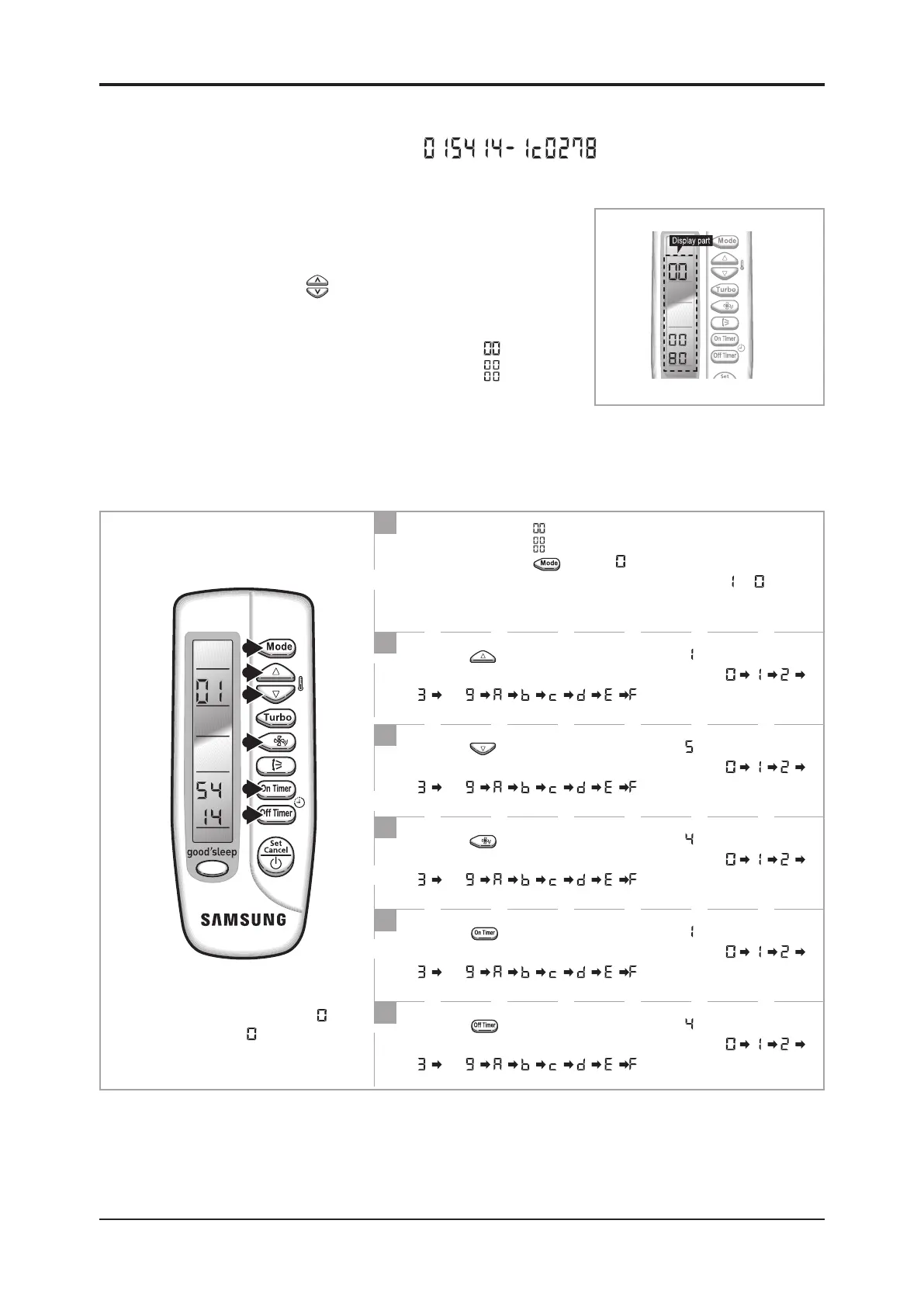
3-3 Setting Option Setup Method
Option No. :
Step 1 : Enter the Option Setup mode.
1
st
Take out the batteries of remote control.
2
nd
Press the temp.
button simultaneously and
insert the battery again.
3
rd
Make sure the remote control display shown as .
Step 2 : Enter the Option Setup mode and select your option according to the following procedure.
Setting is not required if you must
a value which has a default.
1
The default value is .
Otherwise, push the button to
.
Every time you push the button, the display panel reads
or
repeatedly.
2
Push the button to set the display panel to .
Every time you push the button, the display panel reads
. . .
repeatedly.
3
Push the button to set the display panel to .
Every time you push the button, the display panel reads
. . .
repeatedly.
4
Push the button to set the display panel to .
Every time you push the button, the display panel reads
. . .
repeatedly.
5
Push the button to set the display panel to .
Every time you push the button, the display panel reads
. . .
repeatedly.
6
Push the button to set the display panel to .
Every time you push the button, the display panel reads
. . .
repeatedly.


 To Next Page
 Loading...