43
Pop-upMessages
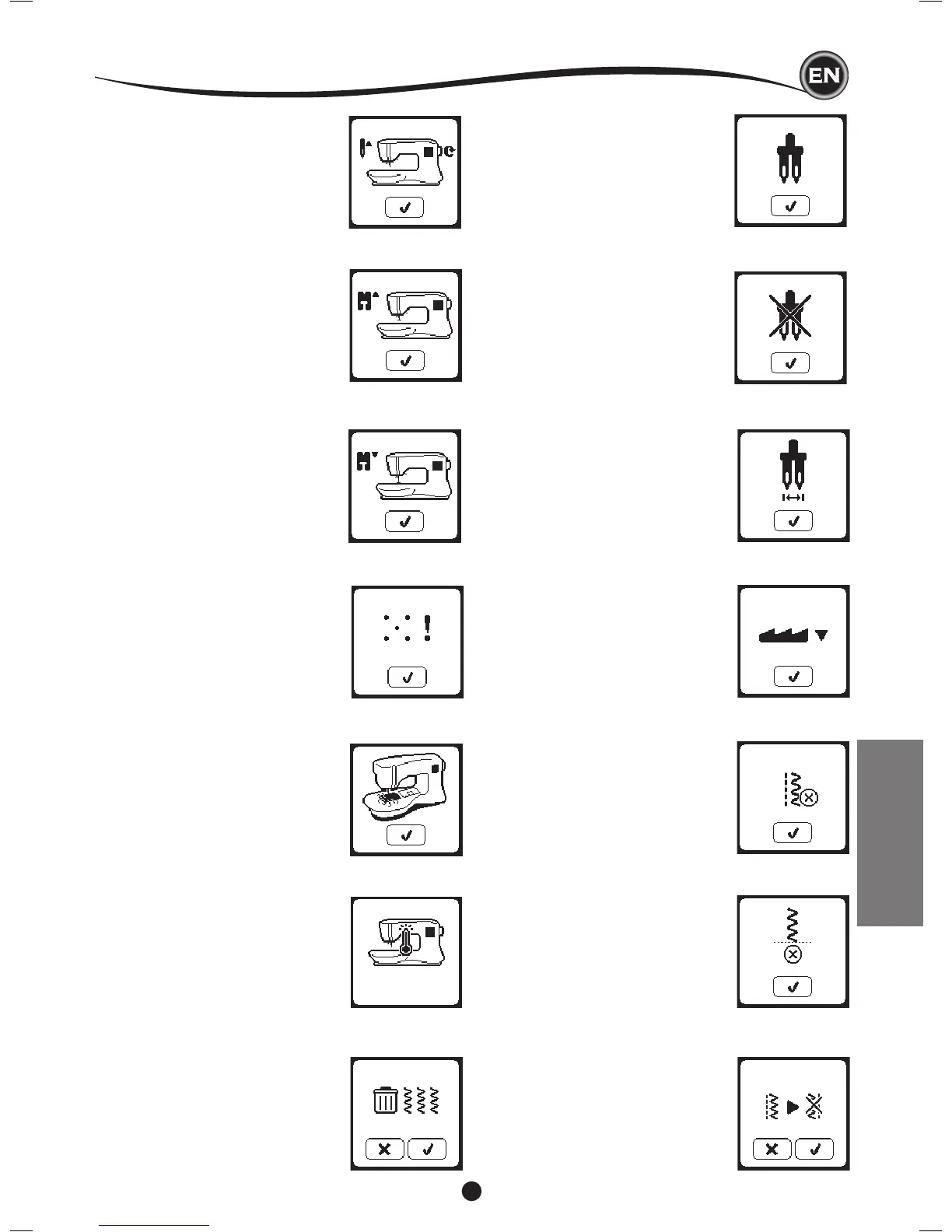
MachineSetforTwinNeedle
This pop-up message will appear when
Twin Needle program is activated.
Check the needle and press the “
✓
”
button to continue.
ThisStitchCannotBeSewnwith
Twin Needle
This message will appear when a stitch
that cannot be used with twin needle, is
selected.Press the “
✓
” button and select
another pattern or reset the twin needle
program.
Stitch Width Limited for Twin
Needle
This message will appear when stitch
width is adjusted to the limit.
Press the “
✓
” button to continue.
CalibrationFailed
If calibration has not completed correctly,
pop-up message will appear. Press the “
✓
”
button and retry the calibration.
Lower the Feed Teeth Lever
When sewing on a button, this pop-up will
appear. Lower the feed teeth lever and
press the “
✓
” button to continue.
ThisStitchCannotbeCombined
Some patterns may not be combined
into the sequence. If you select a pattern
that cannot be combined, a message
will appear on screen to alert you of this.
Press the “
✓
” button.
RaisetheNeedle
If the needle is in lowered position and
need to be raised before function can
be executed, this pop-up message is
shown. Raise the needle and press the “
✓
”
button to close the pop-up message.
ProgramTooLongtoAddMore
Stitches
The sequence can contain a maximum
of 40 patterns and letters. Message will
appear when you come to the limit.
Press the “
✓
” button.
MainMotorOverload
If you are sewing on very heavy fabric or
if the machine is blocked when sewing,
the main motor can get overloaded and
the machine will stop sewing. The pop-up
message will close when the main motor
and power supply are secure.
Lower the Presser Foot
This pop-up will appear when you start
the sewing without lowering the presser
foot. Press the “
✓
” button and lower the
presser foot lifter to start to sew.
RaisethePresserFoot
This pop-up will appear when the function
has chosen that the presser foot must be
up position. Press the “
✓
” button and raise
the presser foot lifter.
ThreadJam
If upper or bobbin thread is jammed under
the needle plate, machine will stop and
pop-up this message.
Remove the needle plate (see page 45)
Remove the thread jam and reset needle
plate. Press the “
✓
” button.
POP-UP MESSAGES
DeleteProgram
When deleting all patterns, a pop up will
appear, press the “
✓
” button. Machine will
delete all selected patterns and letters. To
cancel, press the “X” button.
Overwrite
If the selected folder already has a
memorized sequence in it, a message will
appear asking to overwrite the previous
sequence or not. To overwrite (deleting
previous sequence), press the “
✓
”. To
cancel (exit), press the “X”. The message
will disappear.


 To Next Page
 Loading...