HBD-TZ210/TZ230/TZ510/TZ630/TZ710
11
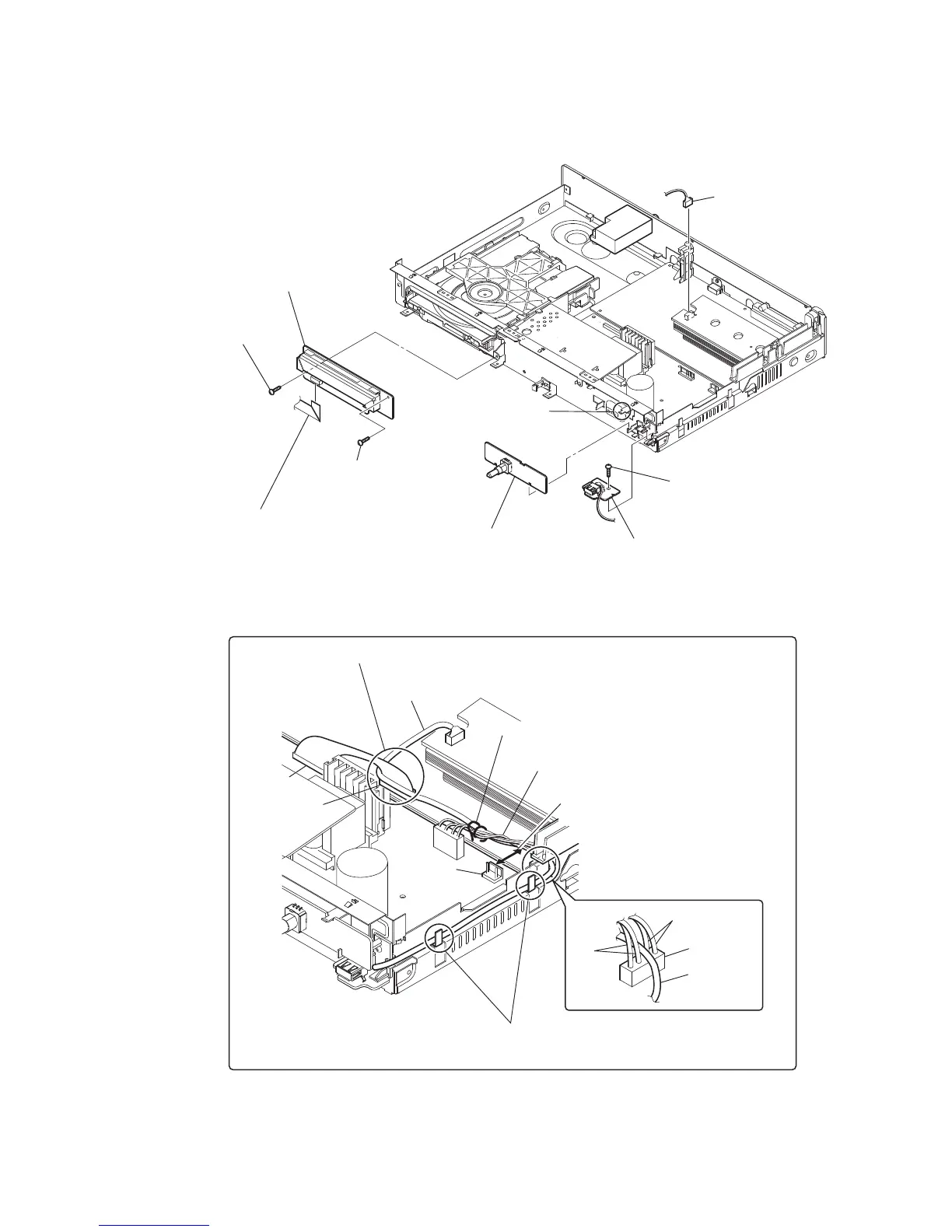
2-4. FL BOARD, USB KEY BOARD, USB BOARD
1 wire (flat type) (11 core) (CN5005)
2 screw
(+BV3 (3-CR))
3 screw
(+BV3 (3-CR))
8 screw
(+BV3 (3-CR))
4 FL board
9 USB board
6 USB KEY board
5 claw
7 CN2101 (5P)
Arranging the USB wire
Have the USB wire spread on the inside
of the claws of the chassis.
USB wire
USB wire
CN3000
CN509
CN901
CN906
brack
red
Tie up with LP3002.
Pass the wire from CN509 over the USB wire and insert it into CN906.
Draw the USB wire through CN3000.
Keep a distance of more than 6.5 mm
between the wire and CN901.
Keep the wire tied up from lying on
the heat sink and the POWER board.


 To Next Page
 Loading...