Listening to the radio18
GB
Manually selecting the
frequency
— Manual tuning
Use
–
?K, k?
+
or K
–
,
+
k to change the frequency.
1
2
4
3
3, 4
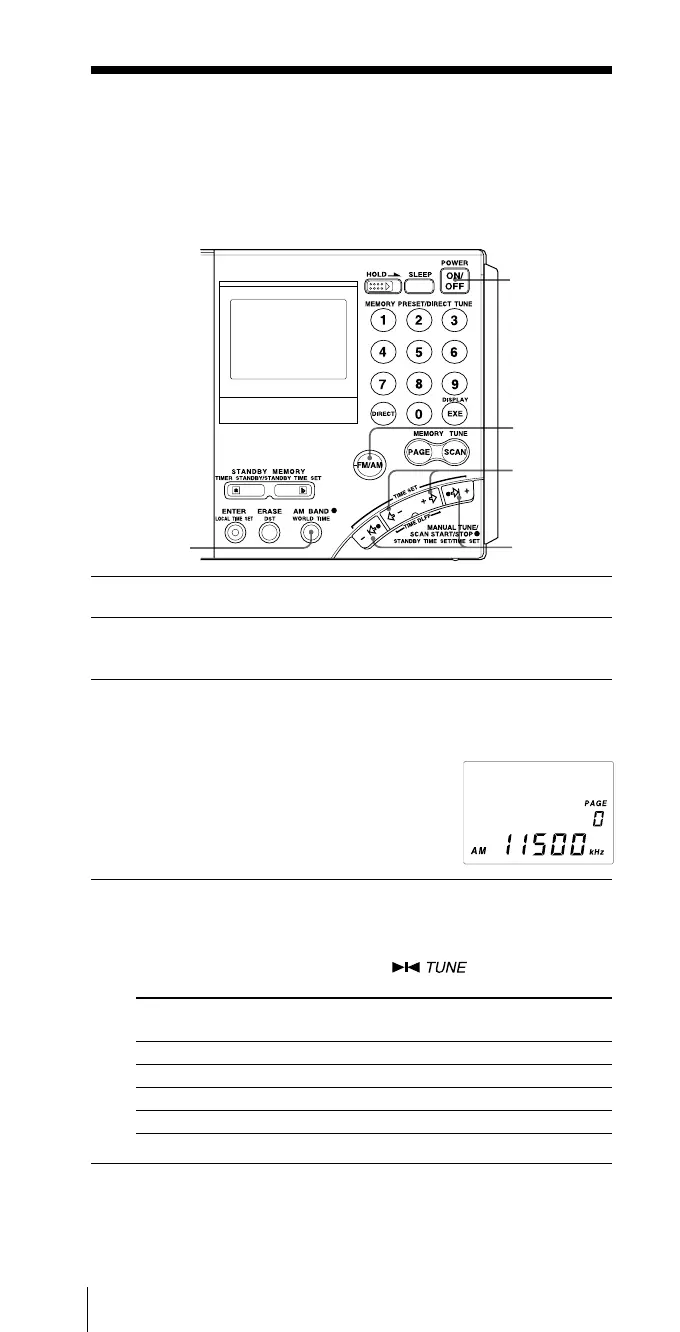
1 Press POWER ON/OFF to turn on the radio.
2 Press FM/AM to select either band.
To listen to SW, MW or LW broadcasts, select AM.
3 For AM bands, hold down AM BAND and press
–
?K
or k?
+
to select MW (medium wave), LW (long wave)
or meter band (short wave).
The lowest frequency of the band (meter
band) will appear in the display each time
the button is pressed.
For FM, skip this step.
4 Press
–
?K, k?
+
or K
–
,
+
k repeatedly to tune in to
the desired station.
The frequency changes in the channel steps shown below each
time the button is pressed, and the “ ” appears when a
station is tuned in.
Band When outer
–
?K or k?
+
When inner K
–
or
+
k
is pressed is pressed
FM 0.05 MHz 0.05 MHz
SW 5 kHz 1 kHz
MW 9 kHz or 10 kHz 1 kHz
LW 9 kHz 1 kHz


 To Next Page
 Loading...