EasyManua.ls Logo

Sony SA-WCT800 - SUB-POWER Board

Sony SA-WCT800
32 pages
Print Icon
To Next Page IconTo Next Page
To Previous Page IconTo Previous Page
Loading...
SA-WCT800
9
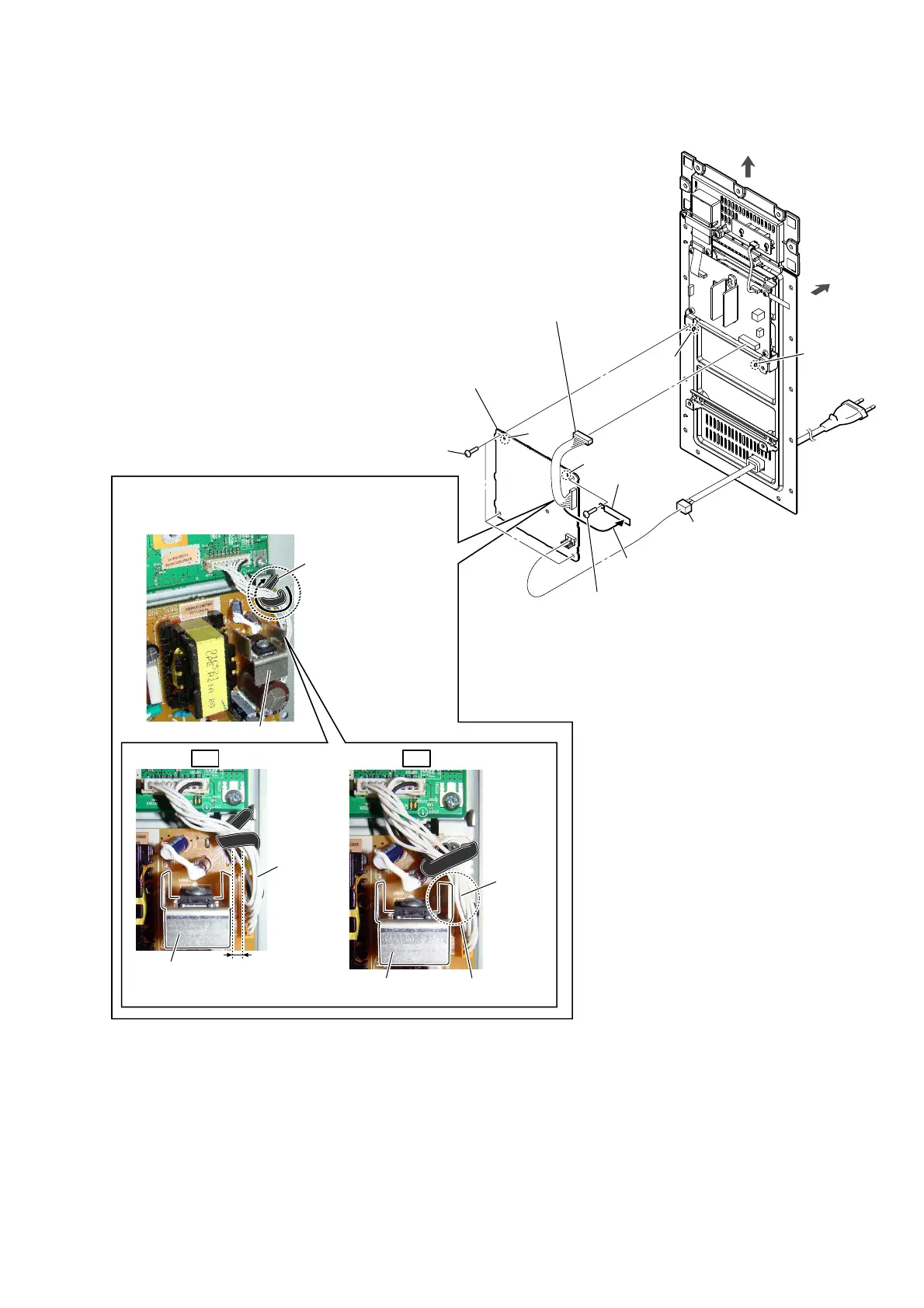
2-5. SUB-POWER BOARD
2 Remove the cable from
the wiring stopper.
4 screw
(BVTP3 u 8)
5 wiring stopper
block
4 three screws
(BVTP3 u 8)
1 power cord connector
(CN901)
OK NG
:LUHVHWWLQJ
Note 3:
Fix the cable so that it does not come in contact with
the heat sink.
3 connector (CN7201)
Note 1:
Before connect this connector,
refer to “CAPACITOR
ELECTRICAL DISCHARGE
PROCESSING” on page 3.
rear side
top side
hole
hole
rib
rib
6 SUB-POWER board
Note 2:
When installing the SUB-POWER board,
align the two ribs and two holes.
heat sink
Cable comes in contact
with the heat sink.
heat sink
wiring stopper
There is a gap between
cable and heat sink.
cable
cable
heat sink

Related product manuals