EasyManua.ls Logo

Sony Trinitron KV-35S26 - Learning Menu Selection

Sony Trinitron KV-35S26
36 pages
Print Icon
To Next Page IconTo Next Page
To Previous Page IconTo Previous Page
Loading...
MM
&
Adjusting
your
SET
UP
(menus)
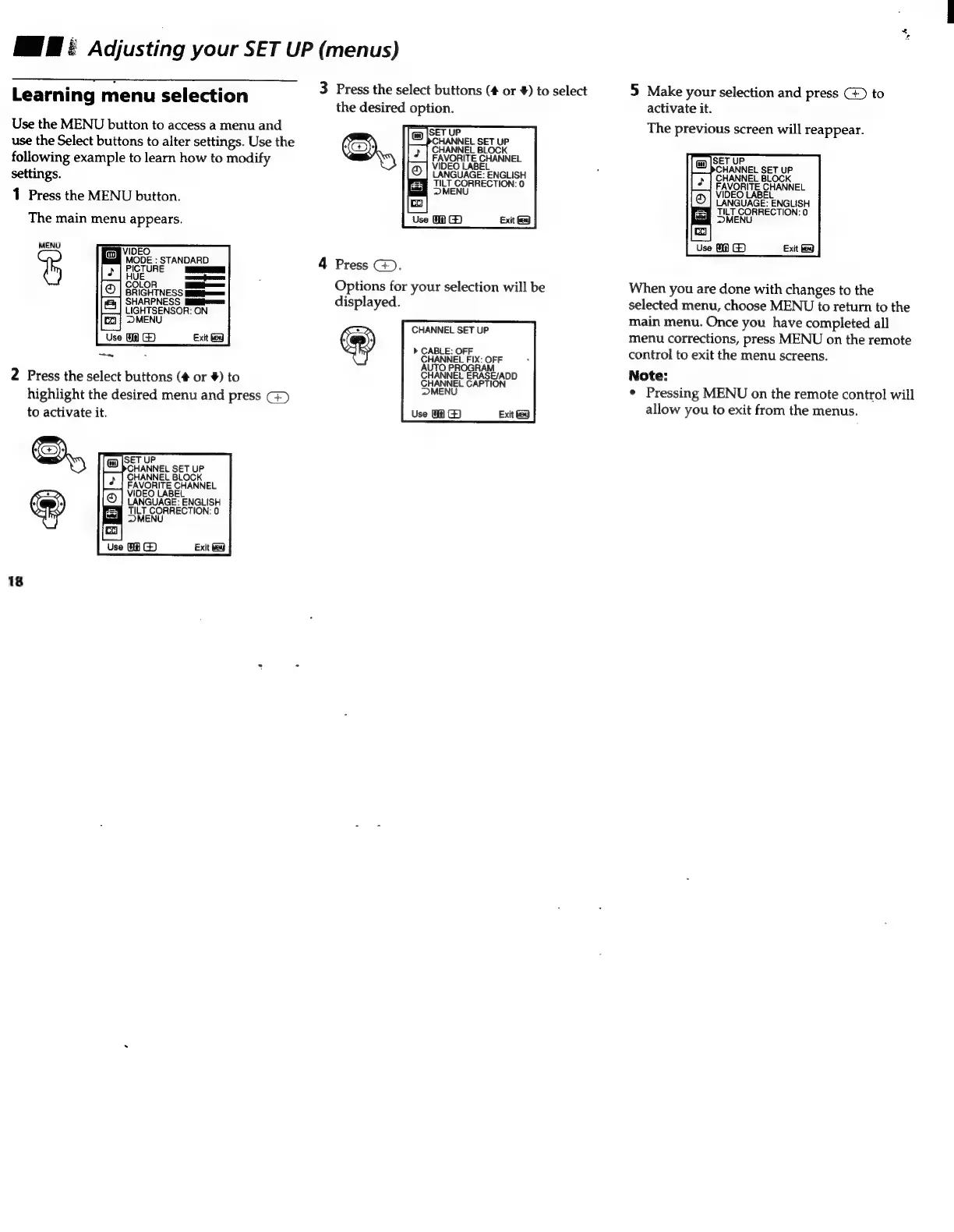
3
Press
the
select
buttons
(#
or
#)
to
select
5
Make
your
selection
and
press
to
the
desired
option.
activate
it.
The
previous
screen
will
reappear.
Learning
menu
selection
Use
the
MENU
button
to
access
a
menu
and
use
the
Select
buttons
to
alter
settings.
Use
the
following
example
to
learn
how
to
modify
settings.
1
Press
the
MENU
button.
The
main
menu
appears.
SET
UP
CHANNEL
BET
UP
CHANNEL
BLOCK
FAVORITE
CHANNEL
o|
VIDEO
LABEL
LANGUAGE:
ENGLISH
LANGU.
AGE:
"ENGLISH
ul
LT
CORRECTION:
0
Bay
TLT
CORRECTION:
0
~
MENU
Use
Exit
MENU
Use
MA
Œ
VIDEO
PICTOR
Re
ANDARD
4
Press
©.
;
Options
for
your
selection
will
be
When
you
are
done
with
changes
to
the
displayed.
selected
menu,
choose
MENU
to
return
to
the
ESS
LIGHTSENSOR:
ON
MENU
STANNEL
CCT
UE
main
menu.
Once
you
have
completed
all
Use
Ua
®©
Exit
HA
menu
corrections,
press
MENU
on
the
remote
A
P
CABLE
OFE
Moien
l
control
to
exit
the
menu
screens.
AUTO
PROGRAM
Note:
2
Press
the
select
buttons
(#
or
#)
to
SHANNEL
ERASEYADD
pI
;
highlight
the
desired
menu
and
press
MENU
¢
Pressing
MENU
on
the
remote
control
will
to
activate
it
Use
WA
Œ
Eii
allow
you
to
exit
from
the
menus.
9
a
Cy
E
ENGLISH
LANGUA
aay
CORRECTION:
0
Use
MA
@
Exit
18

Other manuals for Sony Trinitron KV-35S26

Related product manuals