Introduction
VoiceLive 3 – Reference manual (2014-03-29) 14
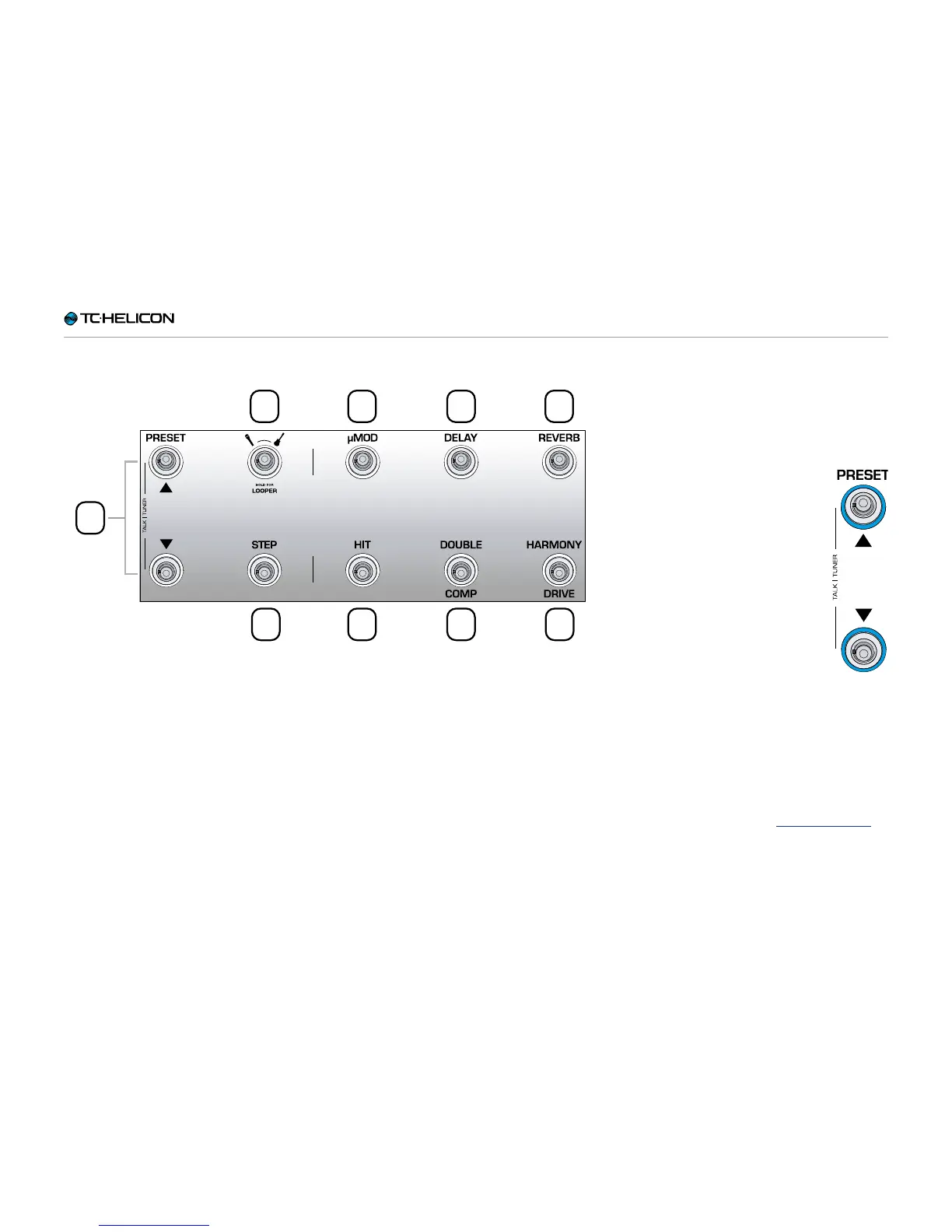
Footswitches overview
1
2
3
4 5 6
7 8 9
Below is a description of the footswitches on
VoiceLive3. Some switches will be discussed in
more detail later in the manual.
1. Preset up / Preset down footswitches
– Tap the Preset Up/Preset Down
footswitches to move through
Presets.
– Hold the Preset Up/Preset
Down footswitches to quickly
scroll through Presets.
– Tap both footswitches simul-
taneously to enter Talk/Tuner
mode.
Talk/Tuner mode mutes guitar
output, activates the guitar tun-
er and bypasses all vocal ef-
fects so you can speak to your
audience.
You can still tap the Preset Up and
Down Preset buttons while in Talk/Tuner mode
to change presets. This is great for changing
presets while addressing the audience to queue
sounds for your next song.
To exit Talk/Tuner, press any button other than
Preset Up or Preset Down.
For more information, see “Talk/Tuner Mode”.


 To Next Page
 Loading...