CANCEL
OTHER FUNCTIONS FOR THE TIMER RECORDING
NOTES:
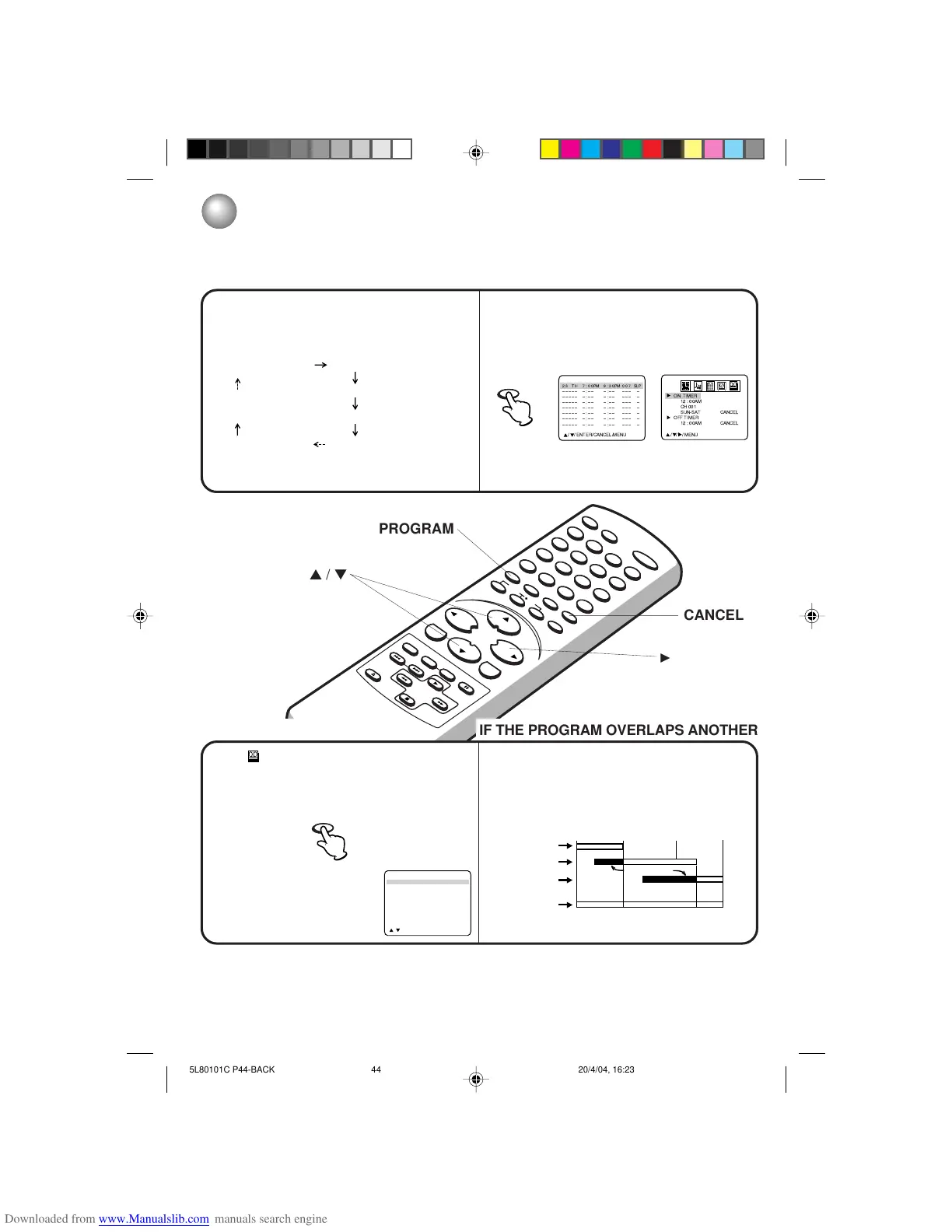
TO SET DAILY/WEEKLY TIMER
The everyday/every week recording can be made continuously until the recording is canceled or the tape
reaches the end.
During timer recording, the automatic rewinding mechanism does not function.
You can correct or cancel the programmed setting in program confirm mode.
•
•
•
The current day (Friday) SUN-SAT (Sunday to Saturday)
MON-SAT (Monday to Saturday)
One month later
minus one day MON-FRI (Monday to Friday)
WKL-FRI WKL-THU (Weekly Thursday)
(Weekly Friday)
Example
When setting the date in the step 4 on page 42, press
B repeatedly.
The setting changes as follows:
TO CONFIRM THE SETTINGS
Press PROGRAM once. The TV screen displays the
timer program list.
Press PROGRAM again. The TV screen displays
the ON/OFF timer setting.
Press PROGRAM 3 times. The screen returns to the
normal screen.
TO CANCEL A PROGRAM
Select option in the menu.
Press ▲ or ▼ to select “TIMER REC SET”, then
press
A
. Press ▲ or ▼ to select the unnecessary
program, and press CANCEL to cancel the program.
– – – – –
– – – – –
– – – – –
– – – – –
– – – – –
– – – – –
– – – – –
– : – – – : – – – – – –
– – – – –
– : – – – : – – – – – –
– : – – – : – – – – – –
– : – – – : – – – – – –
– : – – – : – – – – – –
– : – – – : – – – – – –
– : – – – : – – – – – –
– : – – – : – – – – – –
//
ENTER/MENU
NOTE:
Do not overlap programs as portions of the
conflicting programs will be lost. The first
recording time has priority over the next
recording time as shown in the diagram.
(once)
(twice)
8 : 00
11 : 00
9 : 00
10 : 00
Program 1
Prog.1
Deleted Parts
Non Recorded Portion Parts
Prog.2 Prog.3
Program 2
Program 3
Recording
Control Settings
23 TH
ÐÐÐÐÐ
ÐÐÐÐÐ
ÐÐÐÐÐ
ÐÐÐÐÐ
ÐÐÐÐÐ
ÐÐÐÐÐ
ÐÐÐÐÐ
7:00PM 9:30PM 007
Ð:ÐÐ Ð:ÐÐ ÐÐÐ Ð
Ð:ÐÐ Ð:ÐÐ ÐÐÐ Ð
Ð:ÐÐ Ð:ÐÐ ÐÐÐ Ð
Ð:ÐÐ Ð:ÐÐ ÐÐÐ Ð
Ð:ÐÐ Ð:ÐÐ ÐÐÐ Ð
Ð:ÐÐ Ð:ÐÐ ÐÐÐ Ð
Ð:ÐÐ Ð:ÐÐ ÐÐÐ Ð
//
ENTER/CANCEL/MENU
SLP
IF THE PROGRAM OVERLAPS ANOTHER



 To Next Page
 Loading...