Instrument and control functions
3-12
3
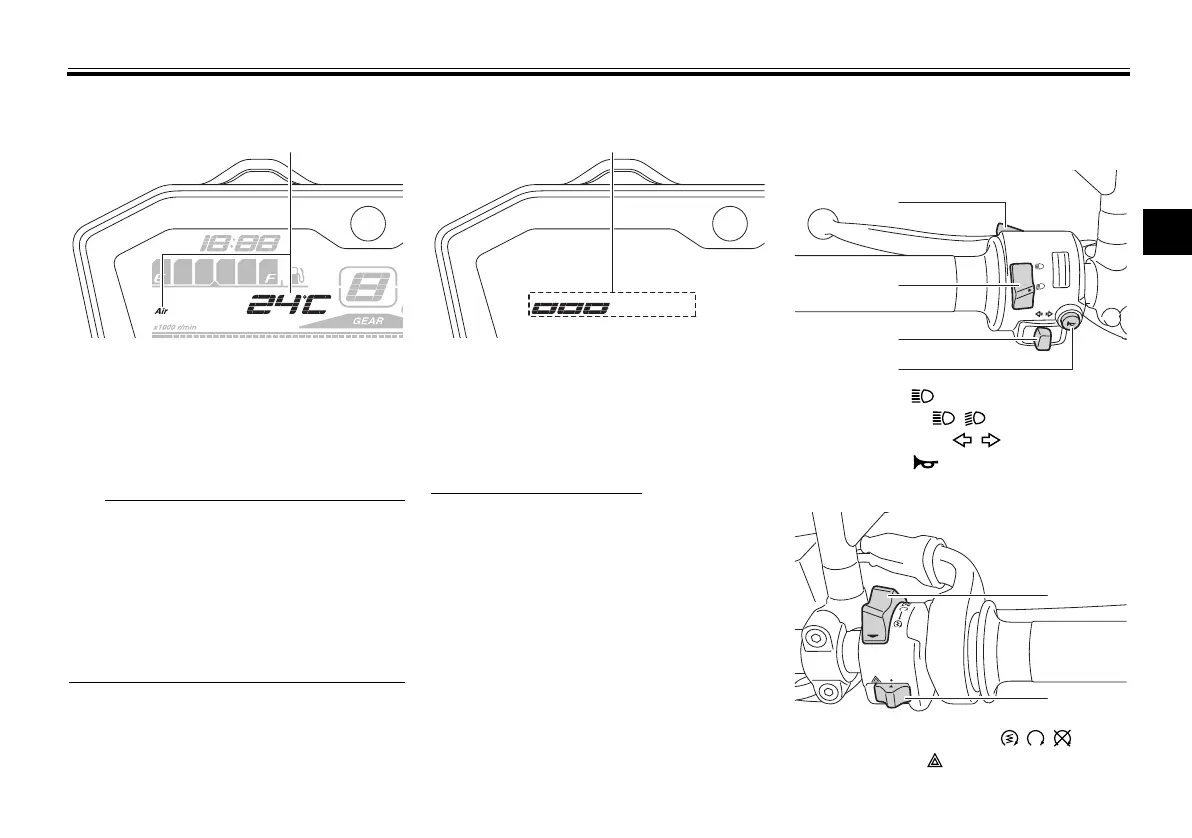
Air temperature
This shows the air temperature from
–9 °C to 99 °C in 1 °C increments.
The temperature displayed may vary
from the ambient temperature.
When the temperature is below
–9 °C, “LO” will be displayed.
The accuracy of the temperature
reading may be affected by engine
heat when riding slowly (under 20
km/h [12 mi/h]) or when stopped
at traffic signals, etc.
Brightness control mode
The brightness control mode allows
you to adjust the brightness level of the
multi-function meter unit.
To adjust the brightness
1. Turn the key to “OFF”.
2. Push and hold the left set button.
3. Turn the key to “ON” and continue
pushing the left set button until the
display switches to the brightness
control mode.
4. Push the right set button to set the
brightness level.
5. Push the left set button to confirm
the selected brightness level and
exit the brightness control mode.
EAU1234M
Handlebar switches
Left
Right
1. Air temperature display
1. Brightness level display
1. Pass switch “ ”
2. Dimmer switch “ / ”
3. Turn signal switch “ / ”
4. Horn switch “ ”
1. Start/Engine stop switch “ / / ”
2. Hazard switch “ ”
UBU2E0E0.book Page 12 Friday, September 9, 2016 9:23 AM


 To Next Page
 Loading...