33
5.2 Connecting the activity watch to a smartphone
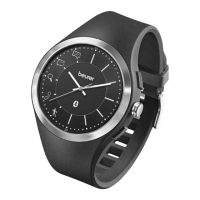
To allow you to utilise all the features of the activity watch to the full, the watch
should first be connected to your smartphone. Only one smartphone may be
connected to the activity watch at any one time.
Ensure that your smartphone is compatible with the activity watch. You
can find a list of all compatible smartphones using the QR code on the
product packaging or by going to www.beurer.com
1.
Download the “beurer Health Manager” app from the App Store / Google
Play Store.
2. Activate Bluetooth
®
on your smartphone.
3. Start the “beurer Health Manager” app.
4. In the app, select Settings Add device AW 85 and follow the instruc
-
tions in the app.
5.3 Setting the time manually
In addition to automatic time synchronisation, you can also adjust
your activity watch manually at any time.
1. Pull out the crown on the activity watch.
2. Turn the crown to set the time
.
3. The push the crown back in.
5.4 Synchronising the time using your smartphone
You are able to synchronise the time on your activity watch with the time on
your smartphone. Proceed as follows:


 To Next Page
 Loading...