EasyManua.ls Logo

Canon EOS 300 - Command Dial

Canon EOS 300
76 pages
Print Icon
To Next Page IconTo Next Page
To Previous Page IconTo Previous Page
Loading...
Nomenclature
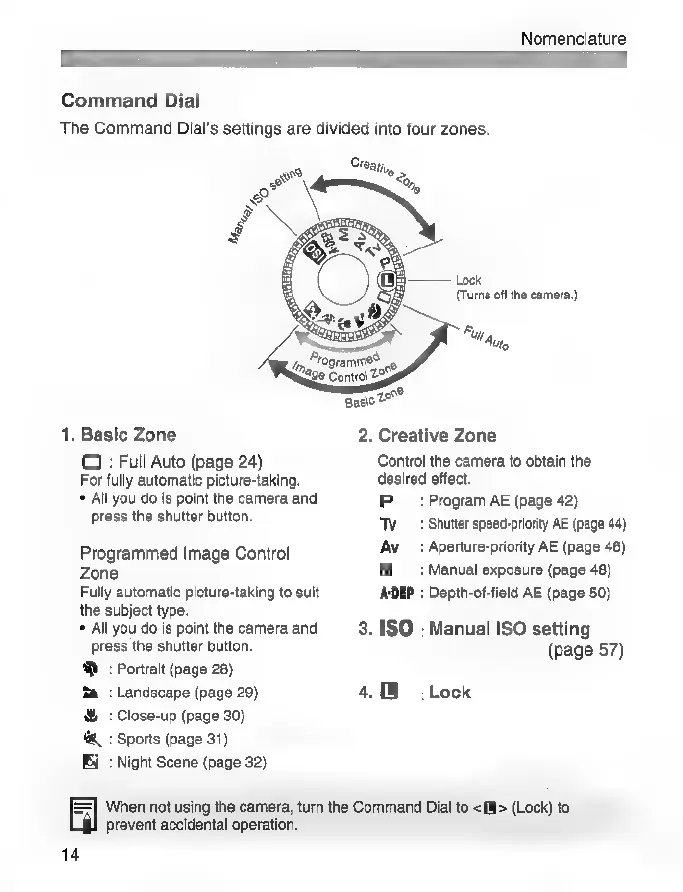
Command
Dial
The
Command
Dial's
settings
are
divided
into
four
zones.
Ста,
à
Lock
(Turns
off
the
camera.)
А
V
Au,
Programme?
Че
Coni
257
Basic
29^
1.
Basic
Zone
2.
Creative
Zone
O
:
Full
Auto
(page
24)
Control
the
camera
to
obtain
the
For
fully
automatic
picture-taking.
desired
effect.
*
All
you
do
is
point
the
camera
and
P
:Program
AE
(page
42)
press
the
shutter
button.
Ту:
Shutter
speed-priority
AE
(page
44)
Programmed
Image
Control
Aw
:Aperture-priority
AE
(page
46)
Zone
M
:Manual
exposure
(раде
48)
Fully
automatic
picture-taking
to
suit
АОЕР
:
Depth-of-field
AE
(page
50)
the
subject
type.
*
All
you
do
is
point
the
camera
and
3.
150
:
Manual
ISO
setting
press
the
shutter
button.
(page
57)
®D
:
Portrait
(page
28)
Та
:
Landscape
(page
29)
#
:
Close-up
(page
30)
4.
:
Sports
(page
31)
Ei
:
Night
Scene
(page
32)
Lock
When
not
using
the
camera,
turn
the
Command
Dial
to
<>
(Lock)
to
prevent
accidental
operation.
14

Related product manuals