EasyManua.ls Logo

Canon EOS 300 - Troubleshooting Guide

Canon EOS 300
76 pages
Print Icon
To Next Page IconTo Next Page
To Previous Page IconTo Previous Page
Loading...
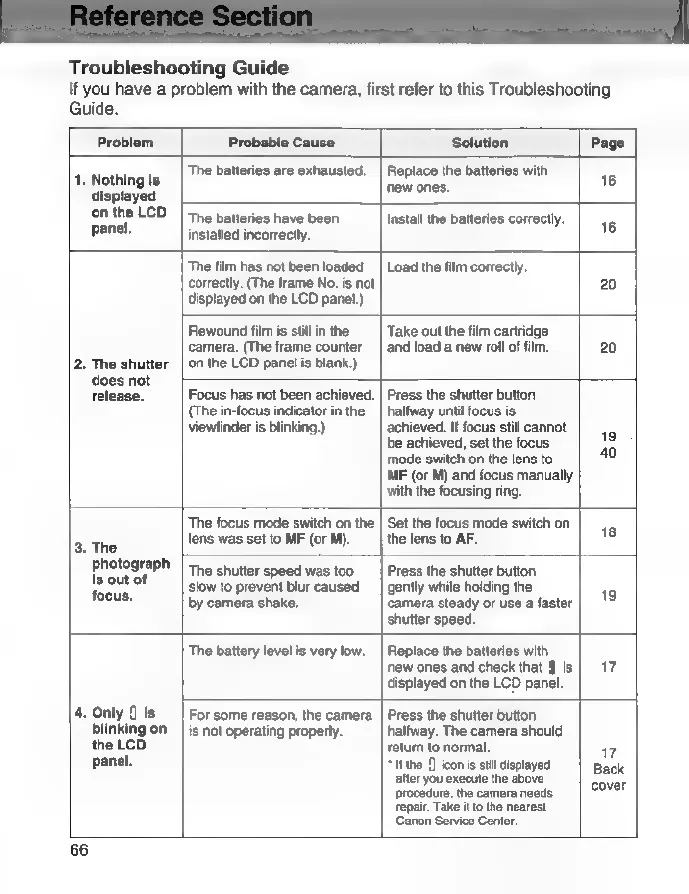
Troubleshooting
Guide
If
you
have
a
problem
with
the
camera,
first
refer
to
this
Troubleshooting
Guide.
Problem
Probable
Cause
Solution
Page
4.
Nothingis
|
?9
belteres
are
exhausted.
|
Replace
he
batteries
with
"
displayed
:
on
the
LCD
|
тһе
batteries
have
been
Install
the
batteries
correctly.
6
panel.
installed
incorrectly.
1
The
іт
has
not
been
loaded
|
Load
the
film
correctly.
correctly.
(The
frame
No.
is
not
20
displayed
on
the
LCD
panel.)
Rewound
film
is
still
in
the
|
Take
out
the
film
cartridge
camera.
(The
frame
counter
|
and
load
a
new
roll
of
film.
20
2.
The
shutter
|
on
the
LCD
panel
is
blank.)
does
not
release.
|
Focus
has
not
been
achieved.
|
Press
the
shutter
button
(The
in-focus
indicator
in
the
|
halfway
until
focus
is
viewfinder
is
blinking.)
achieved.
If
focus
still
cannot
be
achieved,
set
the
focus
19
mode
switch
on
the
lens
to
2
MF
(or
M)
and
focus
manually
with
the
focusing
ring.
The
focus
mode
switch
on
the
|
Set
the
focus
mode
switch
on
ae
lens
was
set
to
MF
(or
М).
|
the
lens
to
AF.
18
.
The
|
photograph
The
shutter
speed
was
too
|
Press
the
shutter
button
pour
9
slow
to
prevent
blur
caused
|
gently
while
holding
the
38
:
by
camera
shake.
Camera
steady
or
use
a
faster
shutter
speed.
The
battery
level
is
very
low.
|
Replace
the
batteries
with
пем
ones
and
check
that
$
is
|
17
displayed
on
the
LCD
panel.
4.
Only
is
|
For
some
reason,
the
camera
|
Press
the
shutter
button
blinking
оп
|
is
not
operating
properly.
^
|halfway.
The
camera
should
the
LCD
return
to
normal.
17
panel.
“the
0
iconisstlldspayed
|
Buck
alter
you
execute
the
above
ber
procedure,
the
camera
needs
repair.
Take
it
to
the
nearest
Canon
Service
Center.
66

Related product manuals