EasyManua.ls Logo

Canon EOS 300 - Bulb Exposures

Canon EOS 300
76 pages
Print Icon
To Next Page IconTo Next Page
To Previous Page IconTo Previous Page
Loading...
Bulb
Exposures
A
bulb
exposure
starts
when
you
press
the
shutter
button
completely
and
ends
when
you
release
the
shutter
button.
Bulb
exposures
are
useful
when
long
exposures
are
required
for
night
scenes,
fireworks,
heavenly
bodies,
etc.
Remote
Switch
RS-60E3
(sold
separately)
is
convenient
since
it
frees
you
from
holding
down
the
shutter
button
during
bulb
exposures.
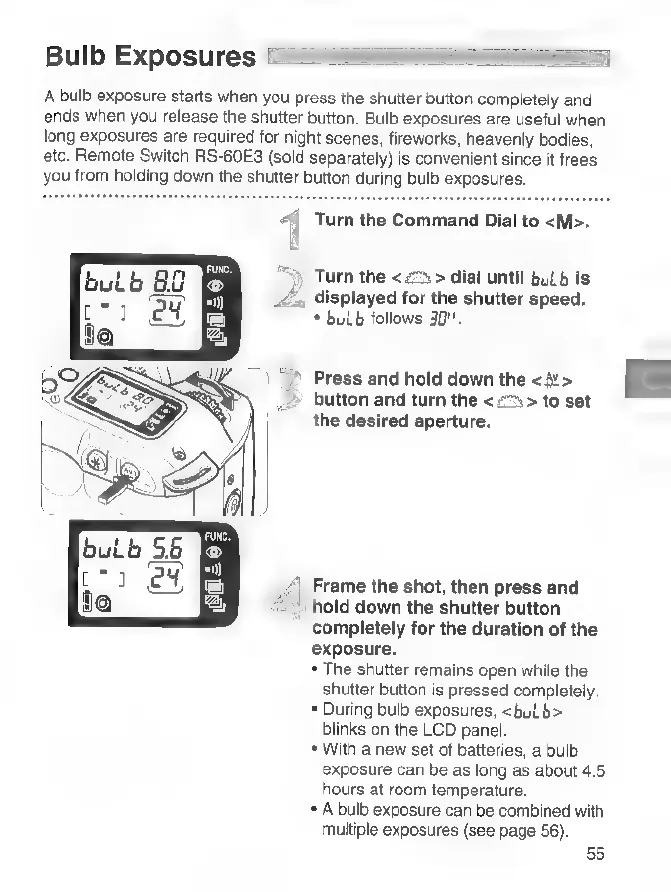
Turn
the
Command
Dial
to
«M».
Turn
the
<
2%
>
dial
until
bulb
is
displayed
for
the
shutter
speed.
*
bulb
follows
30".
Press
and
hold
down
the
<>
button
and
turn
the
<
>
to
set
the
desired
aperture.
Frame
the
shot,
then
press
and
hold
down
the
shutter
button
completely
for
the
duration
of
the
exposure.
*
The
shutter
remains
open
while
the
shutter
button
is
pressed
completely.
*
During
bulb
exposures,
«bulb
blinks
on
the
LCD
panel.
*
With
a
new
set
of
batteries,
a
bulb
exposure
can
be
as
long
as
about
4.5
hours
at
room
temperature.
*
A
bulb
exposure
can
be
combined
with
multiple
exposures
(see
page
56).
55

Related product manuals