EasyManua.ls Logo

Canon EOS 300 - Focusing Methods

Canon EOS 300
76 pages
Print Icon
To Next Page IconTo Next Page
To Previous Page IconTo Previous Page
Loading...
Focusing
Point
Selection
The
focusing
point
is
shown
as
a
little
box.
The
focusing
point
can
be
selected
automatically
or
manually.
In
the
Full
Auto,
Programmed
Image
Control
modes,
апа
<A:DEP>
mode,
the
focusing
point
is
selected
automatically.
In
the
<P
>,
«
Tv»,
<
Av»,
and
«M»
modes,
the
focusing
point
can
be
selected
automatically
or
manually.
Automatic
selection:
The
camera
selects
the
focusing
point
automatically.
Suited
for
snapshots.
Manual
selection:
You
can
select
any
one
of
the
seven
focusing
points
to
achieve
focus.
It
is
convenient
when
you
want
to
make
sure
the
target
subject
is
focused
or
when
you
want
to
retain
the
off-center
framing
of
the
subject.
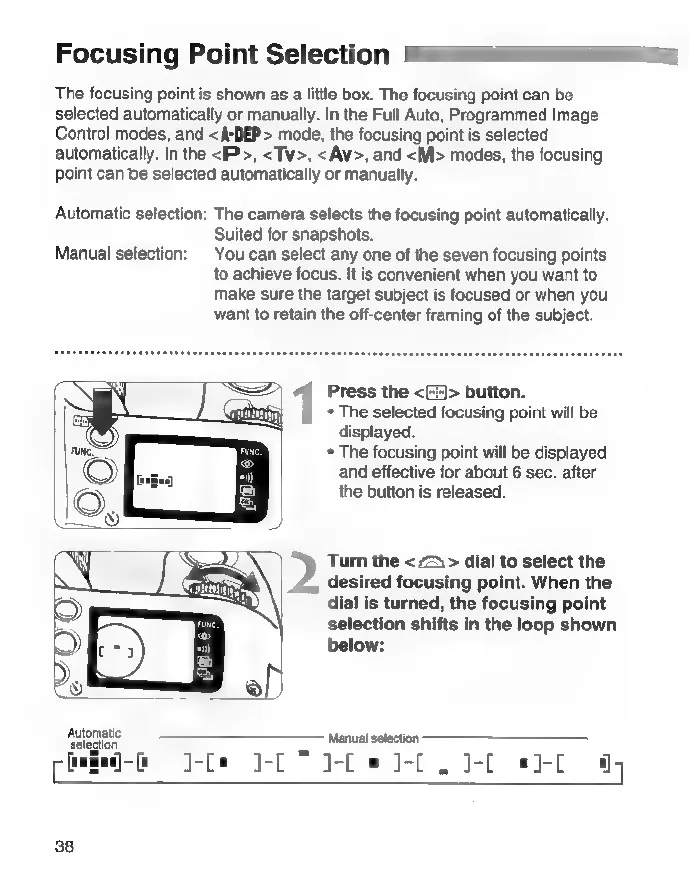
Press
the
<>
button.
*
The
selected
focusing
point
will
be
displayed.
*
The
focusing
point
will
be
displayed
and
effective
for
about
6
sec.
after
the
button
is
released.
Turn
the
<
гъ
>
dial
to
select
the
desired
focusing
point.
When
the
dial
is
turned,
the
focusing
point
selection
shifts
in
the
loop
shown
below:
Амотайо.
Manual
selection
po
п-в
o
1-[*
]-[
"
FD
0-С.
J-E
*1-[
17
38

Related product manuals