12
①
②
③
④
⑤
⑥
⑦
⑧
⑨
⑨
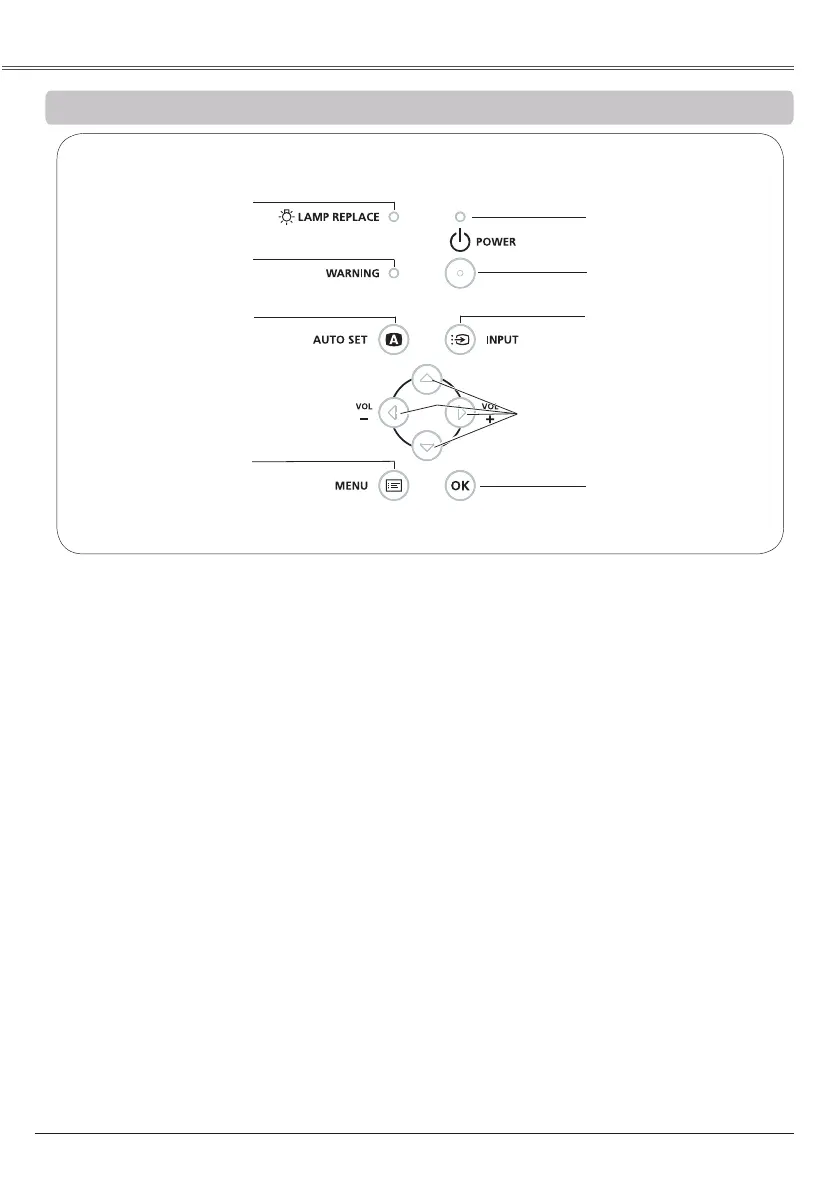
Lights yellow when the projection lamp
reaches its end of life (pp.63, 70).
⑧
– Lights red when the projector detects an
abnormal condition.
– Blinks red when the internal temperature of
the projector exceeds the operating range
(pp.60, 70).
④
Turn the projector on or off (pp.20-22).
⑤
– Lights red when the projector is in
stand-by mode.
– Lights green during operations.
– Blinks green in the Power management
mode (p.51).
③
Select an input source (pp.29, 38-39).
⑥
Open or close the On-Screen Menu (p.23).
② ▲▼◄►
–
– Select an item or adjust the value in the
On-Screen Menu (p.23).
– Pan the image in the Digital zoom +/- mode
(p.37).
– Adjust the volume level (Point ◄► buttons)
(p.26).
⑦
Execute the setting of Auto setup (includes
Auto input, Auto PC and Auto Keystone
functions) in the setting menu (pp.25, 47).
①
– Execute the selected item (p.23).
– Expand or compress the image in the
Digital zoom mode (p.37).


 To Next Page
 Loading...