Main Menu
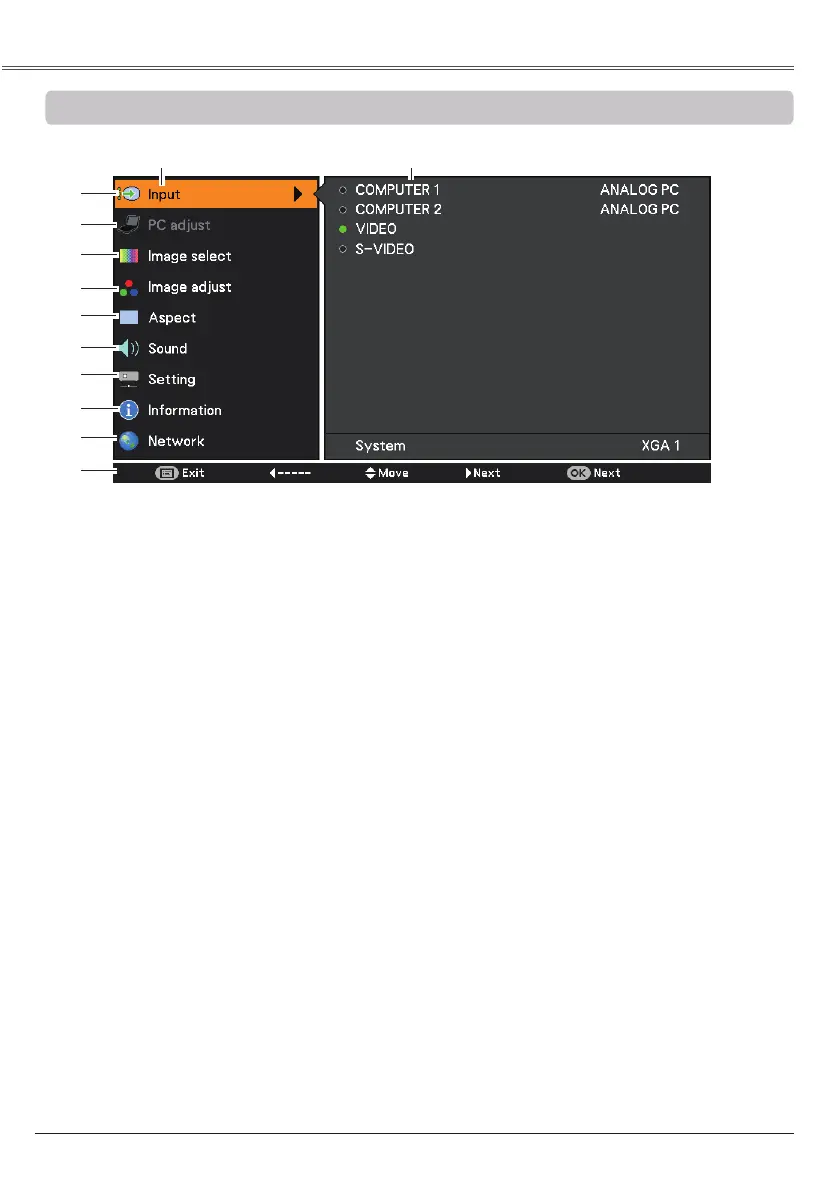
For detailed functions of each menu, see “Menu Tree” on pages 68-69.
Main Menu
③
For both of computer and Video sources, used to select an image mode from among ,
, , , and . (pp.34, 41)
④
For Computer source, used to adjust computer image [, , ,
, , ,
Reset and
]. (p.35)
For VIDEO source, used to adjust picture image [, , , Tint, ,
, , , , ,
Reset and
].
(pp.42-43)
②
Select , , , , ,
, , Reset, and to adjust the parameters to
match with the PC input signal format. (pp.31-33)
⑤
For Computer source, used to adjust size of the image [
,
Full,
, , True,
,
., , , Ceiling, Rear
and Reset]
.
(pp.36-37)
For VIDEO source, used to set size of image [,
Full,
, , ,
.,
, Ceiling, Rear
and Reset
]
.
(pp.44-45)
①
Used to select an input source from COMPUTER 1, COMPUTER 2, VIDEO or. (pp.29,
39)
⑥
Used to adjust the volume or mute the sound or set configurations to the MIC functions (p.26).
⑧
Display the input source information. (p.64)
⑩
The key operation is displayed.
⑦
Used to set the projector’s operating configurations. (pp.45-58)
⑨
See user’s manual of “Network Set-up and Operation”.
①
②
③
④
⑤
⑥
⑦
⑧
⑨
⑩
Sub-Menu


 To Next Page
 Loading...