1
2
Press the Point ◄ button to decrease the
contrast; press the Point ► button to increase
the contrast (from 0 to 63).
Press the Point ◄ button to decrease the
brightness; press the Point ► button to
increase the brightness (from 0 to 63).
Press the Point ◄ button to lighten R/G/B
tone; press the Point ► button to deepen
R/G/B tone (from 0 to 63).
Use the Point ◄► buttons to select the
desired Color temp. level (, , Mid or
).
Press the Point ◄ button decrease the intensity
of the color; press the Point ► button increase
the intensity of the color (from 0 to 63).
Press the Point ◄► buttons to adjust the tint
value to get a proper color balance (from 0 to
63).
Tint
• When the , or blue is adjusted, the Color temp. level will change to User.
• Tint cannot be selected when the video system is PAL, , or (p. 40).
• When oris selected in Image select, will change to
or .
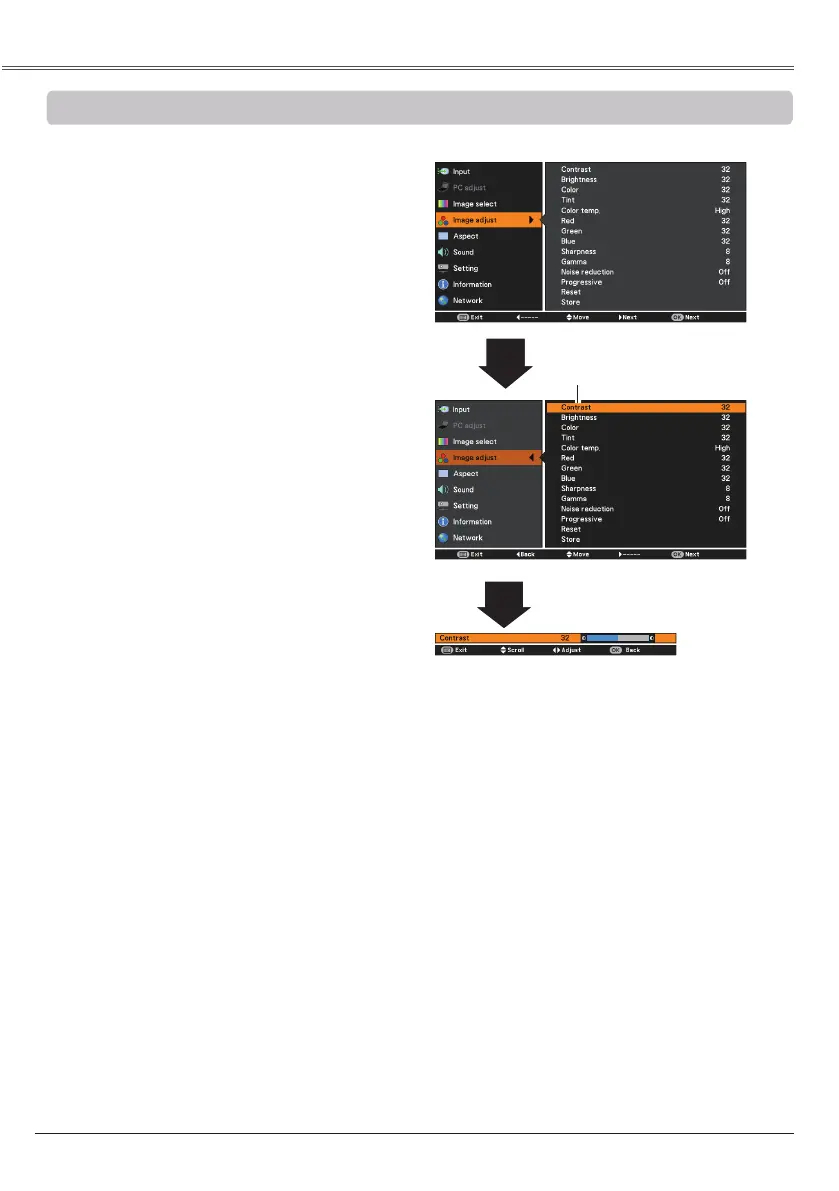
Press the MENU button to display the
On-Screen Menu. Use the Point ▲▼ buttons
to select and then press the
OK button.
Use the Point ▲▼ buttons select the desired
item and then press the OK button to display
the adjustment dialog box. Use the Point ◄►
buttons to adjust the setting value.
Selected Image mode
Use the Point ◄► buttons to
adjust the setting value.
Press the Point ◄ button to decrease the
sharpness of the image; press the Point ►
button to increase the sharpness of the image
(from 0 to 15).
Use the Point ◄► buttons to adjust the
gamma value to obtain a better balance of
contrast (from 0 to 15).


 To Next Page
 Loading...