56
E
Using the Full
Range of Features
Using Digital Effects
Use the camcorder’s digital effects for more interesting productions.
• Faders: Start or end scenes on a tape with a fade to or from black
( 57). Fade Trigger, Vertical Wipe, Horizontal Wipe,
Mosaic Fade*
• Effects: Add flavor to your recordings ( 58).
Art, Black and White, Sepia, Mosaic
* Available during PLAY (VCR) mode only
Notes:
• When you do not want to use digital effects, press the DIGITAL EFFECTS
button and select D.EFFECT | from the digital effects menu. Press the
DIGITAL EFFECTS button to close the menu.
• The camcorder remembers your chosen digital effect setting until you change it.
• Digital effects can be selected but not operated on a blank blue screen (appears
in PLAY (VCR) mode). The display continues to flash.
• Digital effects operated during PLAY (VCR) mode are not recorded onto the
original tape.
• Digital effects can be added to another tape when dubbing using the AV out
terminal (PLAY (VCR) mode), but not the DV out terminal.
• You cannot operate digital effects while photo/date searching.
• If you slide the program selector to [ (Easy Recording) while the digital effect
display is flashing, it will disappear from the display and reappear when you
return to Q (program AE) mode.
• The digital effect display will flash for 2 seconds after setting, even if
DISPLAYS is set to OFF in the menu.
Recording
Program
Faders
[
(Easy Recording)
MOVIE PHOTO
Q
(Program AE)
MOVIE PHOTO
Effects
ihi
ih
Playback
Reverse
Playback
Still picture
playback
Slow forward/
reverse playback
Forward/reverse
×2 playback
Faders
h
(Press PAUSE
to fade out)
Set only
h
(Press PLAY or
PAUSE to fade in)
Set only
Effects
h
h
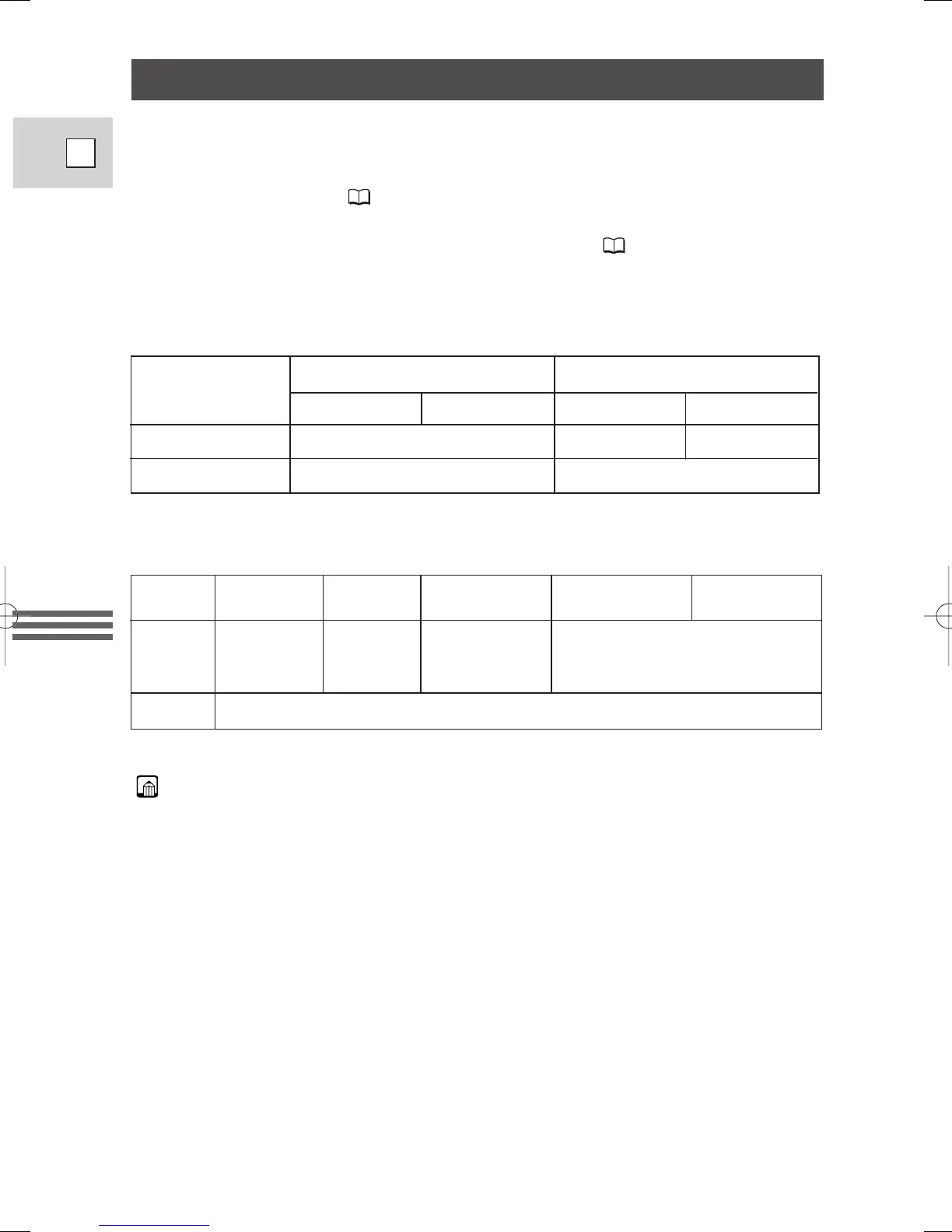
: Available
i
: Not available
Availability of digital effects in PLAY(VCR) playback modes
Availability of digital effects in CAMERA mode
h
: Available
3_ZR40_E(38-75) 2/5/02 17:28 Page 56


 To Next Page
 Loading...