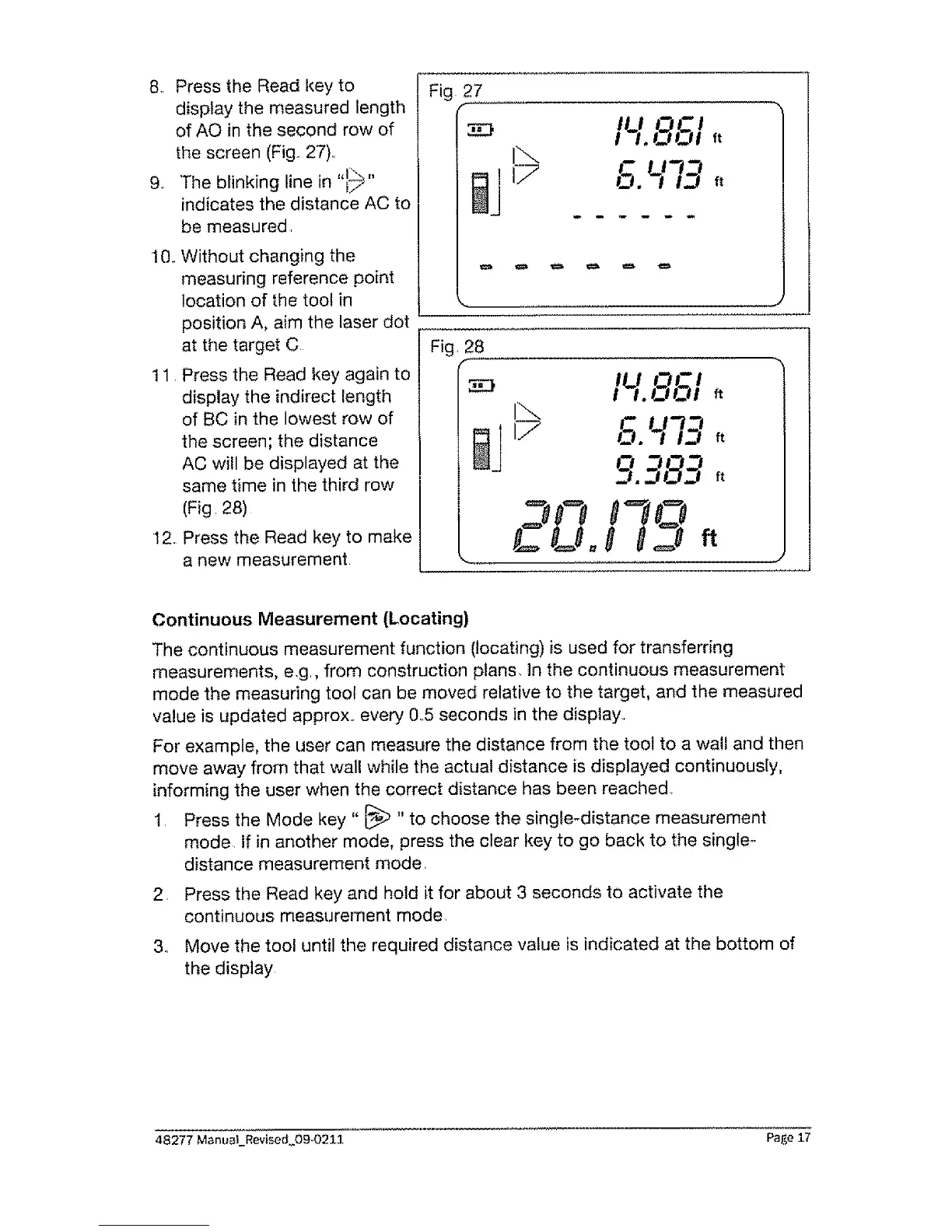
8,. Press the Read key to
display the measured length
of AO in the second row of
the screen (Fig., 27)..
9. The blinking line in "19"
indicates the distance AC to
be measured.
t0.. Without changing the
measuring reference point
location of the tool in
position A, aim the laser dot
at the target C
11. Press the Read key again to
display the indirect length
of BC in the lowest row of
the screen; the distance
AC will be displayed at the
same time in the third row
(Fig. 28)
12. Press the Read key to make
a new measurement
Fig 27
14.851,,
I'... c LJ'13
al 1/ O. ,,-, ,t
Continuous Measurement (Locating)
The continuous measurement function (locating) is used for transferring
measurements, eg., from construction plans, In the continuous measurement
mode the measuring tool can be moved relative to the target, and the measured
value is updated approx., every 0.5 seconds in the display.
For example, the user can measure the distance from the tool to a wall and then
move away from that wall while the actual distance is displayed continuous[y,
informing the user when the correct distance has been reached..
1. Press the Mode key" I_ "to choose the single-distance measurement
mode. tf in another mode, press the clear key to go back to the single-
distance measurement mode,
2. Press the Read key and hold it for about 3 seconds to activate the
continuous measurement mode.
3, Move the tool until the required distance value is indicated at the bottom of
the display
48277 Manual_Revised_09°0211 Page 17


 To Next Page
 Loading...