BRC1E53 Installer reference guide
4P419250-1
–
2015.10
22
Checking procedure of Error History
8. Checking procedure of Error History
<Basic screen>
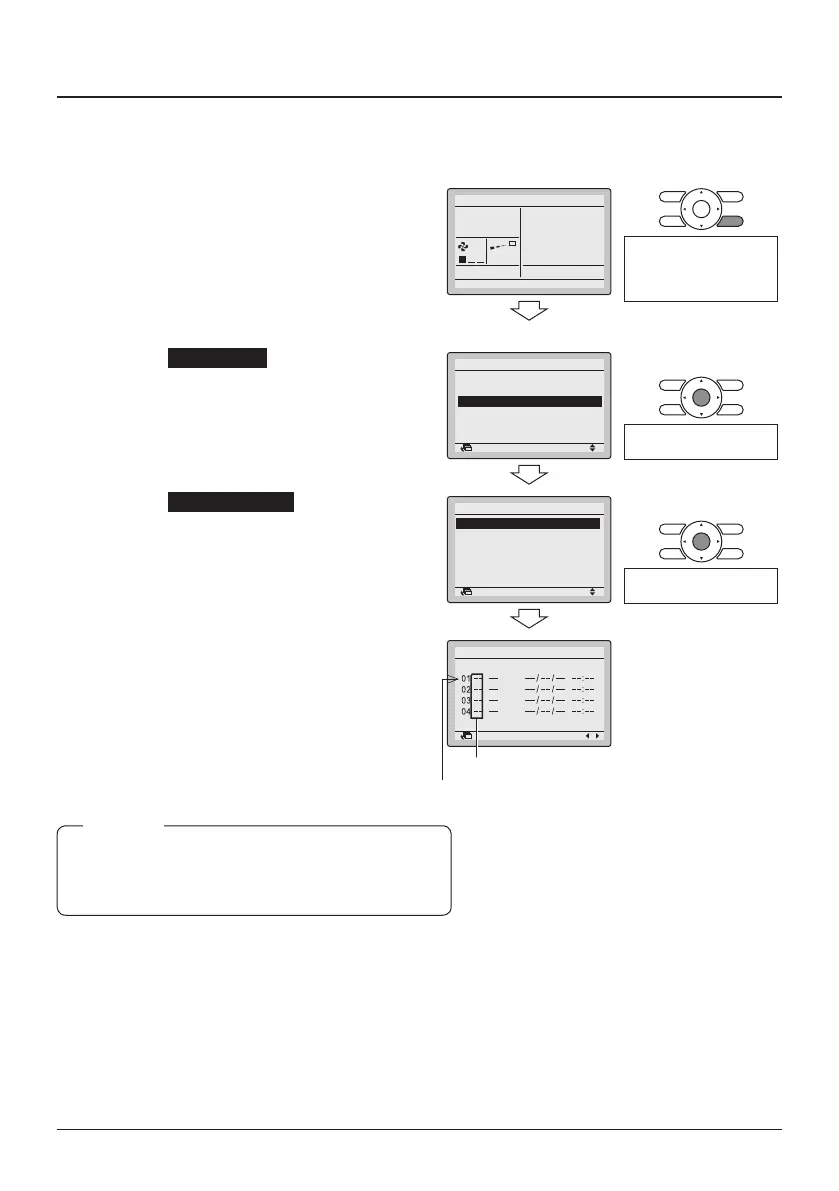
8-1 Press and hold the Cancel button for
4 seconds or longer in the Basic
screen. The Service Settings menu is
displayed.
8-1
Cool
Set to
28°C
<Service Settings>
Press and hold the Cancel
button for 4 seconds or
longer while the backlight
is lit.
8-2 Select Error History and press the
Menu/Enter button. The Error History
menu is displayed.
8-2
2/3
Indoor Unit Airnet Address
Outdoor Unit Airnet Address
Error History
Indoor Unit Status
Outdoor Unit Status
Forced Fan ON
Service Settings
SettingReturn
Press the Menu/Enter
button.
8-3 Select RC Error History and press
the Menu/Enter button. The error
codes and unit No. can be conrmed
in the RC Error History screen.
8-3
2/2
RC Error History
Indoor Unit Error History
Error History
SettingReturn
Press the Menu/Enter
button.
8-4 In the RC Error History screen the
last 10 items are displayed in order.
8-5 Press the Cancel button in the RC
Error History screen 3 times.
The Basic screen returns.
8-4
8-5
1/3
Unit Error Date Time
RC Error History
Return
In the Indoor Unit Error History the error history of
each indoor unit can be independantly consulted.
The last 5 items are displayed in order.
NOTE
Unit No.
Latest record



 To Next Page
 Loading...









