Steps
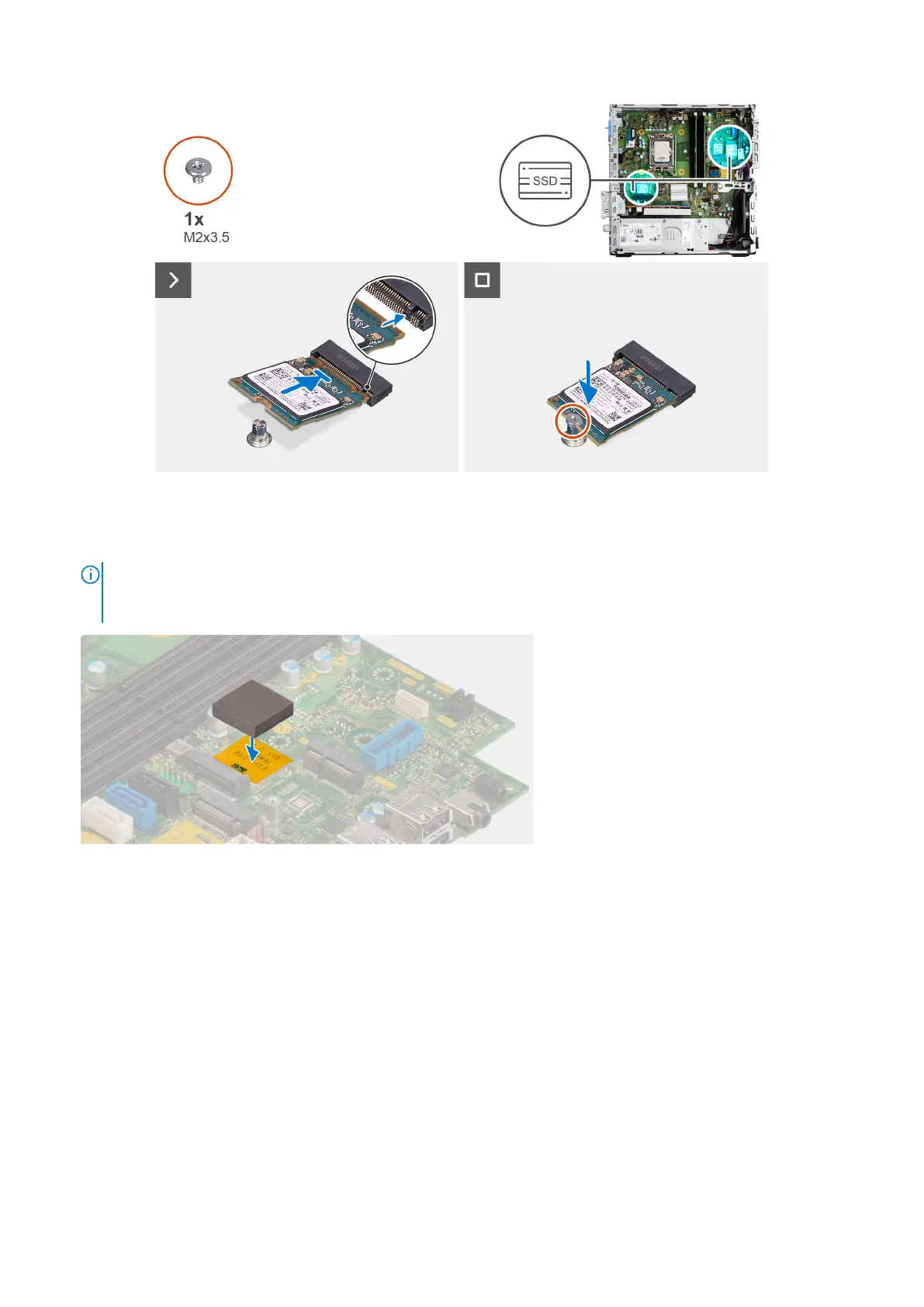
1. Peel off the protection film on the thermal pad and align and adhere the thermal pad on the M.2 2230 solid-state drive slot
on the system board.
NOTE:
The thermal pad is re-usable. The thermal pad is pre-installed on systems shipped with solid-state drive. If the
solid-state drive is purchased separately, the thermal pad is not bundled with the solid-state drive kit and is to be
purchased separately.
2. Peel off the protection mylar on the thermal pad.
3. Align the notch on the M.2230 solid-state drive with the tab on the M.2 card slot on the system board.
4. Slide the M.2230 solid-state drive into the M.2 card slot on the system board.
5. Replace the screw (M2x3.5) to secure the M.2230 solid-state drive to the system board.
Next steps
1. Install the disk-drive cage.
2. Install the 3.5-inch hard drive if applicable.
3. Install the 2.5-inch hard drive if applicable.
4. Install the front bezel.
5. Install the side cover.
6. Follow the procedure in After working inside your computer.
58
Rimozione e installazione delle unità sostituibili dal cliente (CRU)


 To Next Page
 Loading...