EXPAND 80 Bluetooth Speakerphone
Good to know28
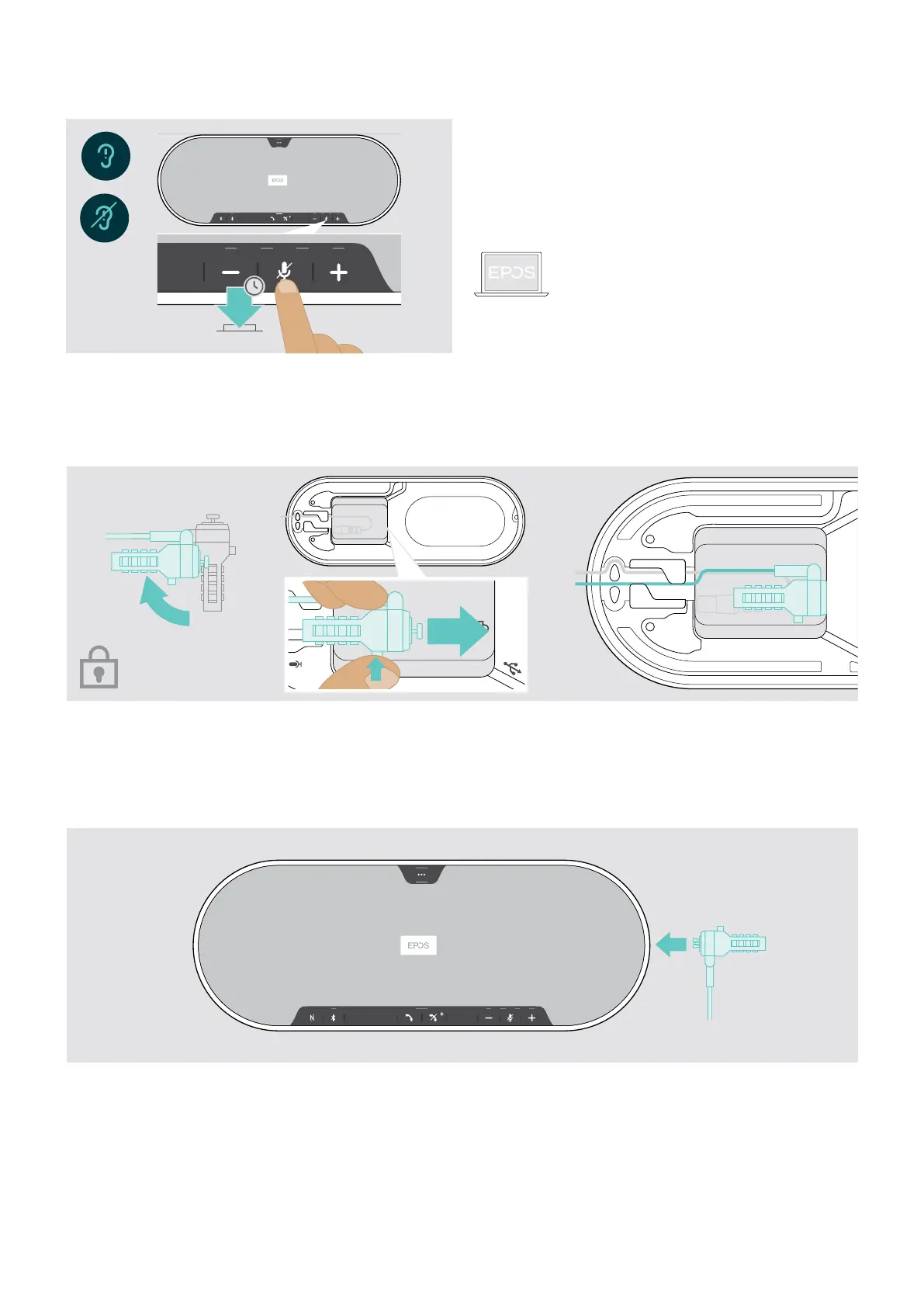
Enabling / disabling voice prompts
5s
In idle mode (no active call or music reproduction):
X Press and hold the mute button until the speakerphone
announces a voice prompt for on or o.
If the voice prompts are deactivated you hear tones
instead.
You can also change this setting via
EPOS Connect.
Using an optional Kensington
®
lock
You can secure your speakerphone e. g. on a table of a meeting room with an optional Kensington lock.
You can connect the Kensington lock both inside A or outside B the product.
A
The Kensington lock slot inside the speakerphone is optimized for combination locks with T-bar interface and wire with
less than Ø 5 mm.
X Mount the cable – see instructions of Kensington lock.
X Rotate the lock and insert into the Kensington slot.
X Put the cable into the cable channel to secure it.
B
The Kensington slot outside the product supports most common Kensington locks.
X Mount the cable – see instructions of Kensington lock.
X Insert the lock into Kensington slot.


 To Next Page
 Loading...