Garmin © 2005 31 c340 Owner’s Manual
APPENDIX
Updating the c340 Software and Map Data
Garmin periodically updates its software and map data. If you register your unit, you will receive
notification of software and map updates.
Check the Garmin Web site at http://www.garmin.com/unlock/update.jsp to see if an update for your
map software is available. Also check http://www.garmin.com/products/sp340/ and select the Software
Updates link to see if an update to the c340’s internal software is available.
See page 20 for instructions on how to find your current MapSource software and version number.
Resetting Your c340
If your unit locks up, press the Power button to turn off the unit, then press again to turn the unit back
on. If this does not help, reset your c340.
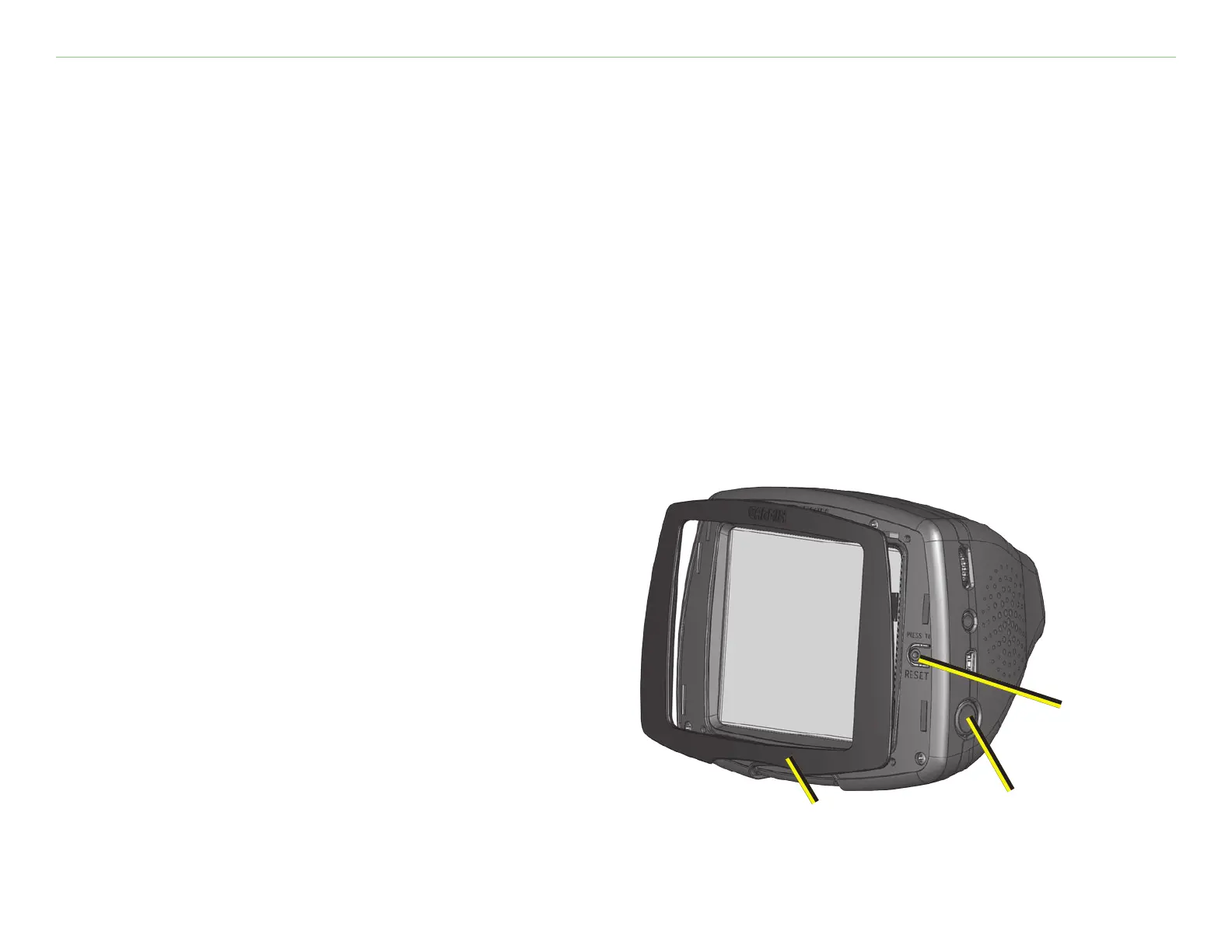
To reset the c340:
1. Place your thumb nail in the groove located
under the Garmin logo on the face plate.
2. Gently pull off the face plate.
3. Press the
Reset button.
4. Turn the unit back on; it will operate
normally.
Reset button
Power button
Face plate



 To Next Page
 Loading...