8
OVERVIEW
------------------------------------------------------------------------------------------------------------------------------------
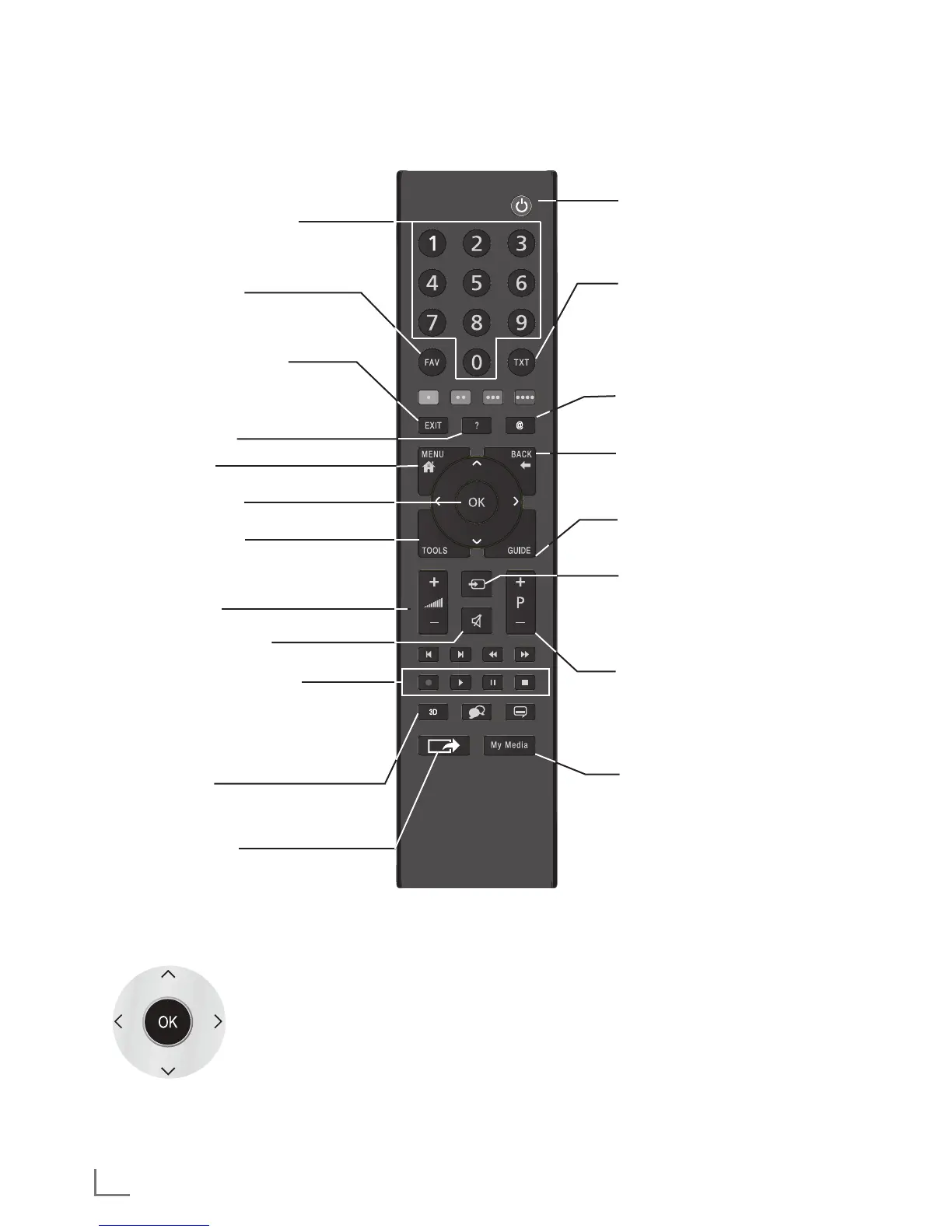
Remote control - main functions
Cursor Control
Moves the cursor up and down in the
menus.
Moves the cursor left/right in menus.
Opens channel list;
activates various functions.
Turns on and off the television set
(stand-by).
Opens the pre-selection menu for AV
channels.
Then make the selection with »
<
« or
»
>
« and press »OK« to accept.
Turns volume on/off (mute).
Opens 3D menu.
Zapping function;
switches the menus back one menu
level.
Opens the menu.
Opens the Tools menu;
opens/closes the control menu when
playing a file in DLNA menu.
Switches between teletext and TV
modes.
Opens MyApps menu.
Switches on from standby;
selects stations step by step
Adjusts the volume.
Displays information.
Exits menu and applications.
Opens the channel list.
Opens the electronic TV guide..
Switches on from standby mode;
selects channels directly.
Selects the channel list
(»ALL«, »FAV 1« to »FAV 4«).
Record, playback, pause or stop.
(only digital television channels).
Opens Screen share.
Opens Media Player menu.


 To Next Page
 Loading...