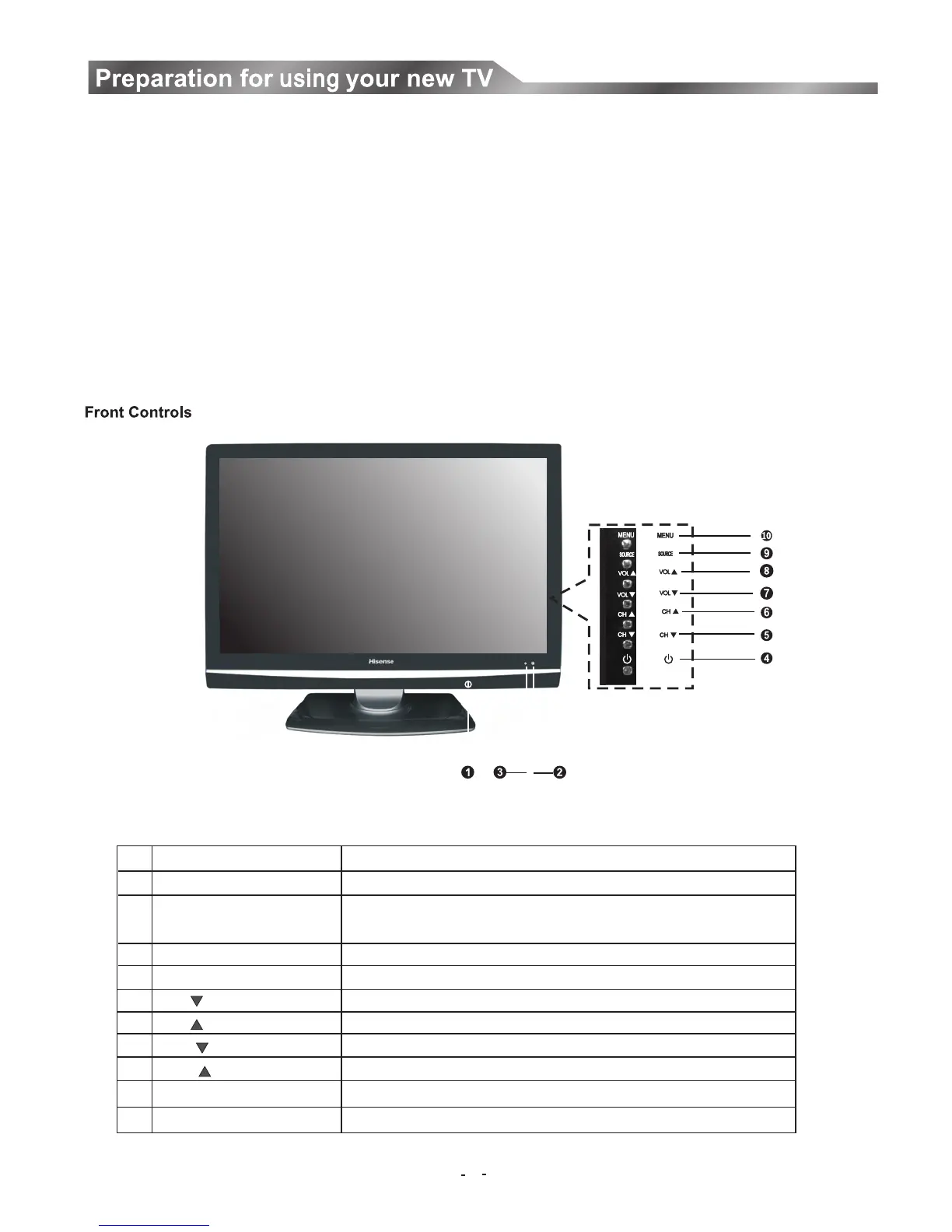
Component
POWER Switch
POWER Indicator
Remote sensor
(power standby ) button
CH button
CH button
VOL button
VOL button
SOURCE button
MENU button
NO.
1
2
3
4
5
6
7
8
9
10
Component Description
Press to turn the main power ON or OFF.
There will be no light when the power switch is in the off position.
Receives signals from the remote control. Do not block.
Press to turn your TV on or off (standby mode).
Press to change the channel up.
Press to change the channel down.
Press to decrease the volume.
Press to increase the volume.
Press to select the signal source for your TV.
Press to activate the on-screen display (OSD).
Red indicates standby mode. Blue shows that the unit is on.
You can operate your TV by using the buttons on the front panel or on the remote control. The terminals on the backside provide all
the connections you will need to connect other equipment to your TV.
1. Place the TV on a sturdy platform (away from direct sunlight for optimal viewing).
2. Place the TV far enough from the walls to allow proper ventilation. Inadequate ventilation may cause overheating which may
damage the TV.(150mm minimum recommended distance around covered enclosure)
Note: Please contact retail dealer for wall mounting.
Selecting a location for the TV
Learning about your TV
(NOTE: POWER Button switch location on bottom of front cabinet.)
7


 To Next Page
 Loading...