272
uuAudio System Basic OperationuApple CarPlay
TM
Apple CarPlay
TM
If you connect an Apple CarPlay-compatible iPhone to the system via the 1.5A USB
port, you can use the audio/information screen, instead of the iPhone display, to
make a phone call, listen to music, view maps (navigation), and access messages.
2 USB Ports P. 201
■
Phone
Access the contact list, make phone calls, or listen to voice mail.
■
Messages
Check and reply to text messages, or have messages read to you.
■
Music
Play music stored on your iPhone.
■
Apple CarPlay Menu
1Apple CarPlay
TM
Only iPhone 5 or newer versions with iOS 8.4 or later
are compatible with Apple CarPlay.
Park in a safe place before connecting your iPhone to
Apple CarPlay and when launching any compatible
apps.
To use Apple CarPlay, connect the USB cable to the
USB port (1.5A). The USB port (1.0A) will not enable
Apple CarPlay operation.
2 USB Ports P. 201
To directly access the Apple CarPlay phone function,
press Phone on the home screen. While connected
to Apple CarPlay, calls are only made through Apple
CarPlay. If you want to make a call with Bluetooth®
HandsFreeLink®, turn Apple CarPlay OFF or detach
the USB cable from your iPhone.
2 Setting Up Apple CarPlay P. 273
When your iPhone is connected to Apple CarPlay, it is
not possible to use the Bluetooth® Audio or
Bluetooth® HandsFreeLink®. However, other
previously paired phones can stream audio via
Bluetooth® while Apple CarPlay is connected.
2 Phone Setup P. 339
For details on countries and regions where Apple
CarPlay is available, as well as information pertaining
to function, refer to the Apple homepage.
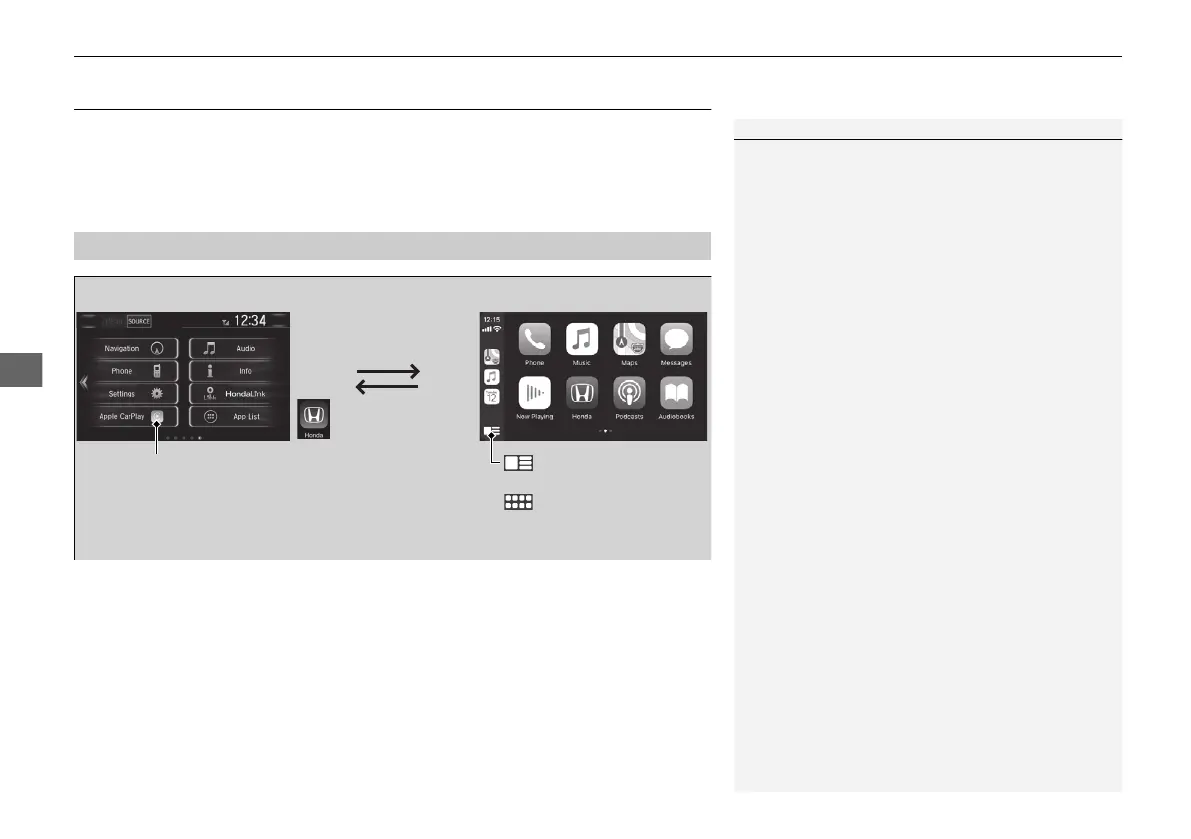
: Select the Honda
icon to go back to
the Home screen
Home screen
Apple CarPlay icon
Apple CarPlay menu screen
: Go back to the Apple
CarPlay Dashboard screen
: Go back to the Apple
CarPlay menu screen
21 CLARITY FCV CSS-31TRT6400_02.book 272 ページ 2020年9月25日 金曜日 午後3時15分


 To Next Page
 Loading...