EasyManua.ls Logo

HP HP-67 - Fixed Point Display

HP HP-67
364 pages
Print Icon
To Next Page IconTo Next Page
To Previous Page IconTo Previous Page
Loading...
44
Display
Control
5
4
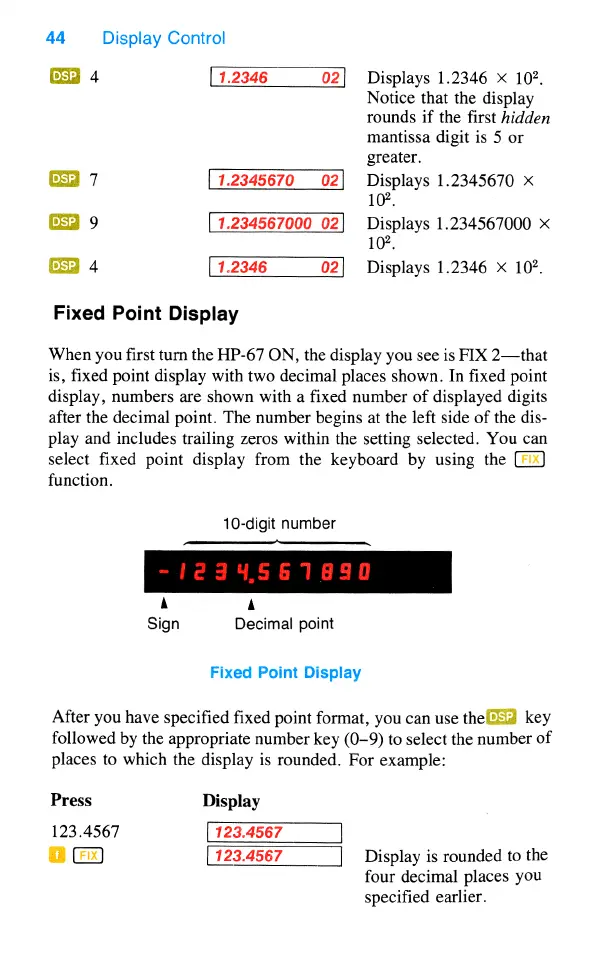
1.2346
02]
Displays
1.2346
X
102,
Notice
that
the
display
rounds
if
the
first
hidden
mantissa
digit
is
5
or
greater.
53
7
Displays
1.2345670
X
102,
EEd
9
1.234567000
02]
Displays
1.234567000
X
102,
CE3
4
1.2346
02]
Displays
1.2346
X
102
Fixed
Point
Display
When
you
first
turn
the
HP-67
ON,
the
display
you
see
is
FIX
2—that
is,
fixed point
display
with
two
decimal
places
shown.
In
fixed
point
display,
numbers
are
shown
with
a fixed
number
of
displayed
digits
after
the
decimal
point.
The
number
begins
at
the
left
side
of
the
dis-
play
and
includes
trailing
zeros
within
the
setting
selected.
You
can
select
fixed
point
display
from
the
keyboard
by
using
the
function.
10-digit
number
e—
A
A
Sign
Decimal
point
Fixed
Point
Display
After
you
have
specified
fixed
point
format,
you
can
use
the
5
key
followed
by
the
appropriate
number
key
(0-9)
to
select
the
number
of
places
to
which
the
display
is
rounded.
For
example:
Press
Display
123.4567
o
123.4567
Display
is
rounded
to
the
four
decimal
places
you
specified
earlier.

Table of Contents

Other manuals for HP HP-67

Related product manuals