


 Need help?
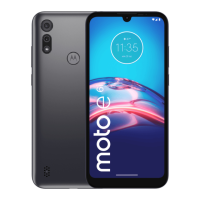
Do you have a question about the Motorola Moto e and is the answer not in the manual?
Learn about the physical components and their functions.
Instructions for managing SIM and SD card insertion and removal.
Learn how to set up emergency information and services.
Understand the layout and elements of your phone's home screen.
Guidance for new smartphone users transitioning to Android.
Understand the meaning of icons displayed in the status bar.
Customize your phone's home screen, widgets, shortcuts, and folders.
Learn to set up and customize your phone's lock screen features.
Steps to turn on and connect to available Wi-Fi networks.
Manage your phone's data usage, set warnings, and restrict background data.
Troubleshoot issues if your phone is performing slowly or is unstable.
Steps to resolve issues when your phone fails to start or power on.
Learn about the physical components and their functions.
Instructions for managing SIM and SD card insertion and removal.
Learn how to set up emergency information and services.
Understand the layout and elements of your phone's home screen.
Guidance for new smartphone users transitioning to Android.
Understand the meaning of icons displayed in the status bar.
Customize your phone's home screen, widgets, shortcuts, and folders.
Learn to set up and customize your phone's lock screen features.
Steps to turn on and connect to available Wi-Fi networks.
Manage your phone's data usage, set warnings, and restrict background data.
Troubleshoot issues if your phone is performing slowly or is unstable.
Steps to resolve issues when your phone fails to start or power on.
 General
| Brand | Motorola |
|---|---|
| Model | Moto e |
| Category | Cell Phone |
| Language | English |


 To Next Page