NAPCO Gemini C-Series Control Panel Programming Instructions--Volume 1
NAPCO Security Group
Programming Instructions, Volume 1 Page 61
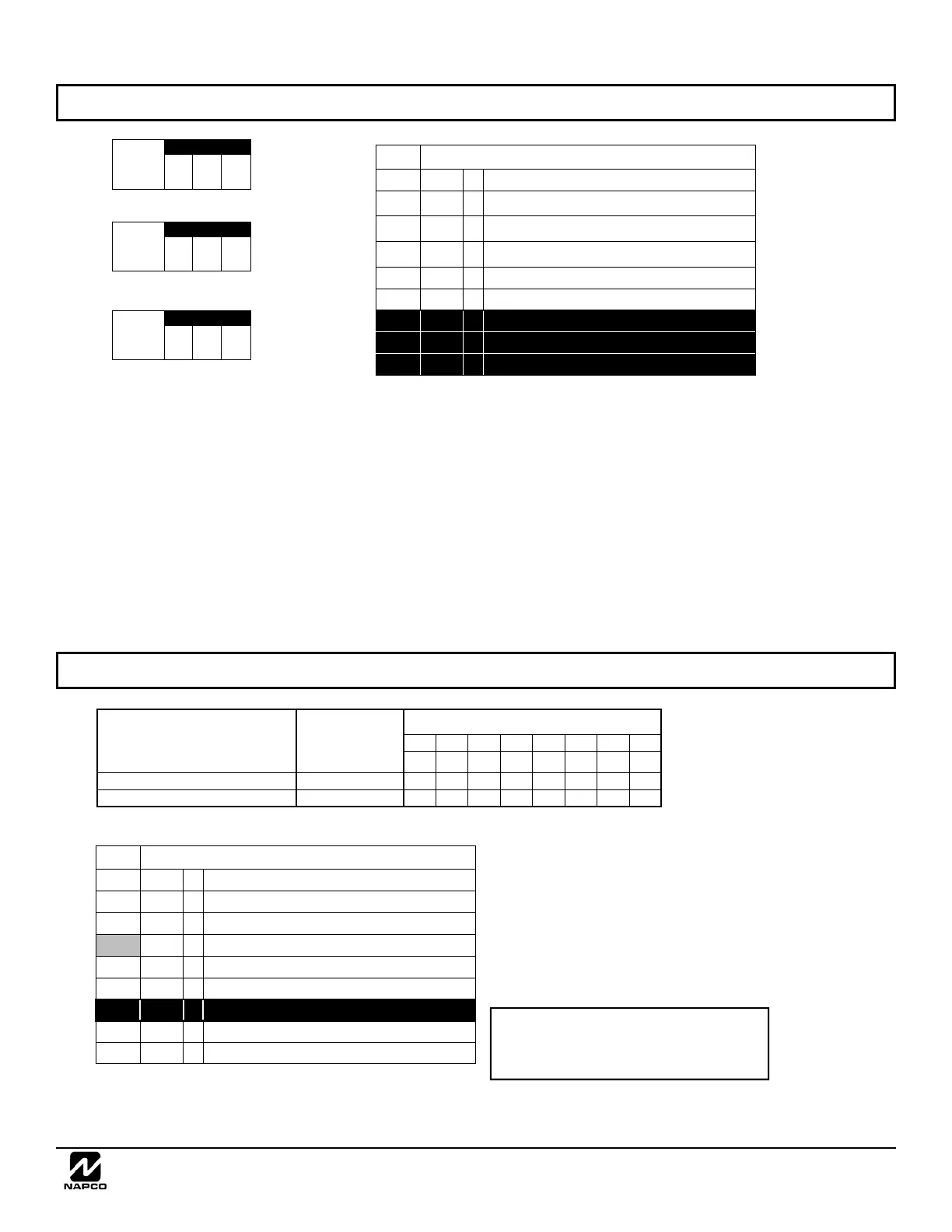
CS AREA & SYSTEM REPORTING OPTIONS (ADDRESS 1715-1718)
* NOTE: If neither TouchTone Dialing nor
TouchTone w/Rotary Backup is selected, then
system defaults automatically to Rotary Dialing.
Leave blank (•) to select Rotary Dialing.
1718
Default
Option
OFF
1
Backup Report on Telco 2
OFF
2
Touch-tone Dialing Only *
ON
3
Touch-tone Dialing w/Rotary Backup *
OFF
4
Transmit “402” Opening/Closing Code
OFF 5
Cancel Next Test Timer on any Report
6
Reserved
OFF 7
Disable Wait for Handshake
OFF 8
Handshake for Local Telemetry
CS System Report Options
CS AREA & SYSTEM REPORTING OPTIONS:
1. Select the desired option entering the
option number (1-8) for each digit.
2. Enter corresponding option number in
address location.
NOTE: Dark shaded data value box shows
option not available.
3. Press U to save.
CS Area Reporting Options
AREAS 1 8
A1 A2 A3 A4 A5 A6 A7 A8
1 2 3 4 5 6 7 8
DISABLE OPENING REPORTS
1715
DISABLE CLOSING REPORTS
1716
ADDRESS
1717
CS Telco Options
Default
Option
OFF
1
Home Auto Panel Status Change to
Serial Port at 9600 baud
OFF
2
Home Auto Alarm Report to Serial Port
if Programming Telco 1
OFF
3
Home Auto Alarm Report to Serial Port
if Programming Telco 3
OFF
4
Enable Telco Line 1
OFF 5
Enable Telco Line 2
6
Reserved
7
Reserved
8
Reserved
ADDRESS 1712
[Default = 000]
Hang Up
Redial
Delay
(sec.)
ADDRESS 1711
[Default = 016]
Anti-Jam
Time
(sec.)
ADDRESS 1710
[Default = 000]
Line Seize
Time
(sec.)
TELCO OPTIONS AND TIMEOUTS (ADDRESS 1710-1712 & 1717)



 To Next Page
 Loading...