Tour of the Remote Control Tour of the Remote Control
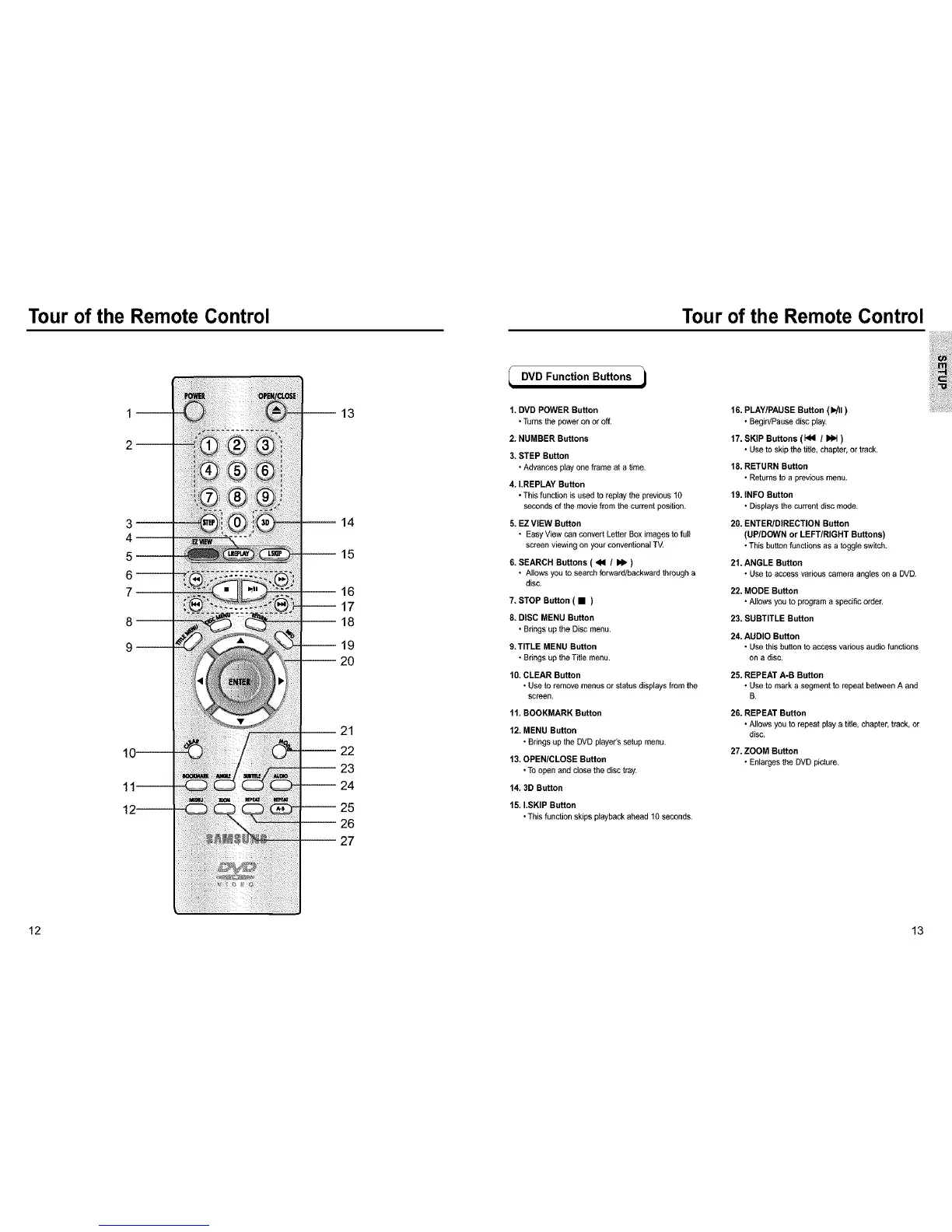
_DVD Function Buttons
1. DVD POWER Button
• Turnsthe poweronor off.
2. NUMBER Buttons
3. STEP Button
• Advancesplayone frame at a time.
4. I.REPLAY Button
• This function is usedto replaythe previousfO
secondsof the movie from the current position.
5. EZ VIEW Button
• EasyView can convertLetter Boximagestofull
screenviewingon your conventionalTM
6. SEARCH Buttons ( <4 / _ )
• Allowsyou to search forward/backwardthrougha
disc.
7. STOP Button ( • )
8. DISC MENU Button
• Brings up theDisc menu.
9.TITLE MENU Button
• Brings up the Title menu.
10. CLEAR Button
• Use to removemenusor statusdisplaysfrom the
screen.
11.BOOKMARK Button
12. MENU Button
• Brings up theDVD player's setupmenu.
13. OPEN/CLOSE Button
• To open and closethe disc tray.
14. 3D Button
15. I.SKIP Button
• This function skips playbackahead 10seconds.
16. PLAY/PAUSE Button (1_11)
• Begin/Pausedisc play.
17. SKIP Buttons (Id4 / _ )
• Use to skipthe title,chapter,or track.
18. RETURN Button
• Returnsto a previous menu.
19. INFO Button
• Displaysthe currentdisc mode.
20. ENTERIDIRECTION Button
(UP/DOWN or LEFT/RIGHT Buttons)
• This buttonfunctions as a toggleswitch.
21. ANGLE Button
• Use to accessvarious camera angleson a DVD.
22. MODE Button
• Allowsyou to programaspecific order.
23. SUBTITLE Button
24. AUDIO Button
• Use thisbutton toaccessvadous audio functions
on a disc.
25. REPEAT A-B Button
• Use to marka segment to repeat betweenA and
B.
26. REPEAT Button
• Allowsyou to repeat play a title,chapter,track,or
disc.
27. ZOOM Button
• Enlargesthe DVD picture.
12 13



 To Next Page
 Loading...