Getting started
Getting started
13
Step 2: Charging the
battery pack
You can charge the battery by attaching the
“InfoLITHIUM” battery pack (M series)
to your camcorder.
b Notes
• You cannot use batteries other than the
“InfoLITHIUM” battery pack (M series) (p. 119).
• Do not short-circuit the DC plug of the AC Adaptor
with any metallic objects. This may cause a
malfunction.
• Use a nearby wall outlet when using the AC
Adaptor. Disconnect the AC Adaptor from the wall
outlet immediately if any malfunction occurs.
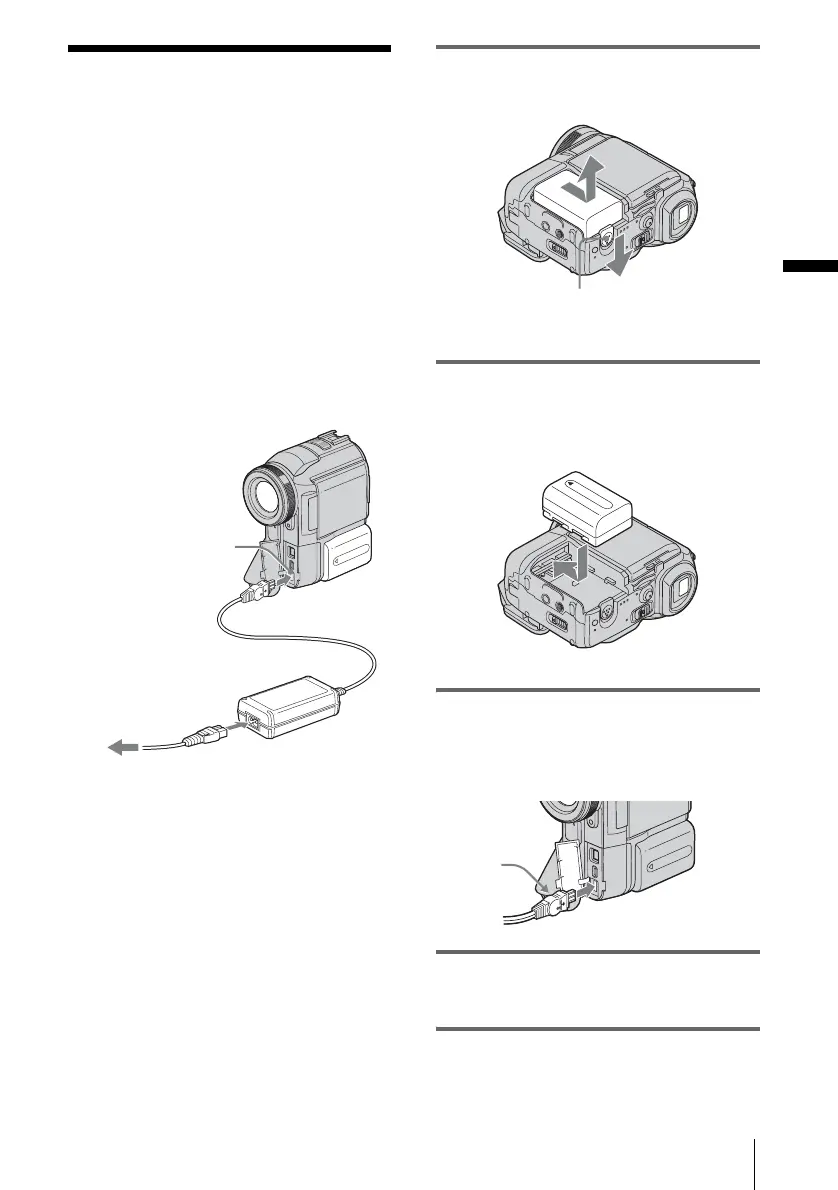
1 Slide the battery release lever and
remove the battery terminal cover.
2 Attach the battery pack by sliding it in
the direction of the arrow until it
clicks.
3 With the b mark on the DC plug
facing the jack cover, connect the AC
Adaptor to the DC IN jack on your
camcorder.
4 Connect the power cord to the AC
Adaptor.
5 Connect the power cord to the wall
outlet.
To the wall outlet
DC plug
DC IN jack
Power cord
AC Adaptor
Battery
Battey release lever
b mark
,continued


 To Next Page
 Loading...












