20
Recording/Playback
Recording and playback with ease
(Easy Handycam operation)
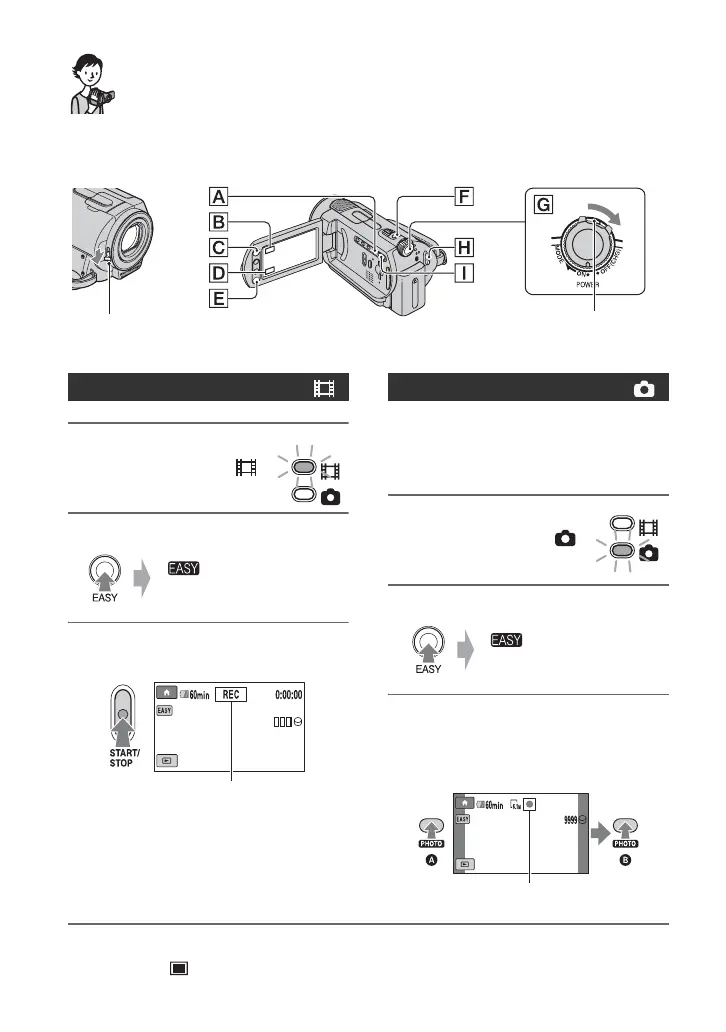
Easy Handycam operation makes nearly all settings automatic so that you can perform
recording or playback operation without detailed settings. It also makes screen font size larger
for easy viewing.
1 Turn the POWER
switch G until the
(Movie) lamp lights up.
2 Press EASY A.
3 Press START/STOP H (or E) to
start recording.*
To stop recording, press START/STOP
again.
Still images are recorded on the hard disk in
the default setting. You can change the
recording media of still images to a
“Memory Stick Duo” (p. 27).
1 Turn the POWER
switch G until the
(Still) lamp lights up.
2 Press EASY A .
3
Press PHOTO F lightly to adjust
the focus
A
(a beep sounds), then
press it fully
B
(a shutter click
sounds).**
* The setting of [REC MODE] is fixed to [SP] (p. 54).
** The setting of [ QUALITY] is fixed to [FINE] (p. 58).
Open the lens cover (DCR-SR32E/SR33E/
SR42E/SR52E/SR62E/SR72E/SR82E) (p. 19)
If the POWER switch is set to OFF (CHG),
turn it while pressing the green button.
Recording movies
appears on
the LCD screen.
[STBY] b [REC]
Recording still images
appears on
the LCD screen.
Flashing b Lights up



 To Next Page
 Loading...