22
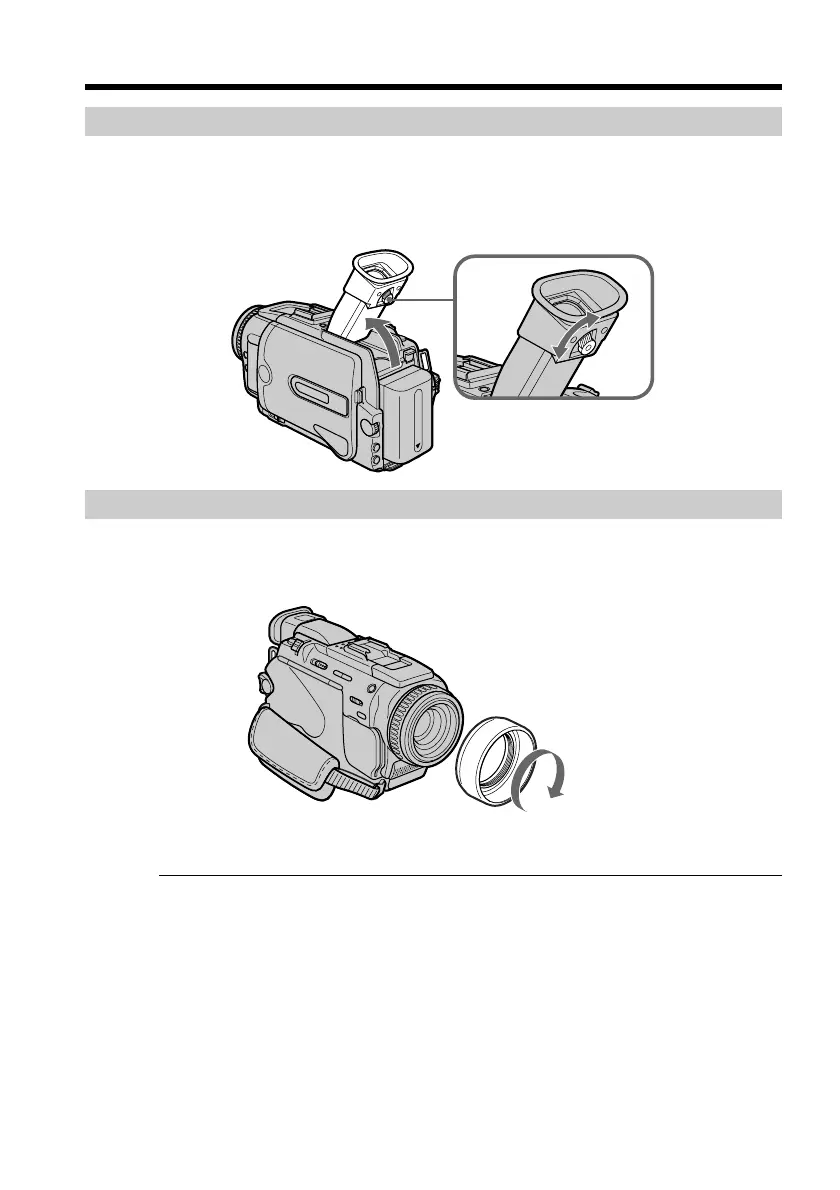
Adjusting the viewfinder
If you record pictures with the LCD panel closed, check the picture with the viewfinder.
Adjust the viewfinder lens to your eyesight so that the indicators in the viewfinder
come into sharp focus.
Lift up the viewfinder and move the viewfinder lens adjustment lever.
Attaching the supplied lens hood
To record fine pictures under strong light, we recommend attaching the lens hood. Also
the lens cap can be attached even with the lens hood on.
Notes
•When you use the Remote Commander and the lens hood, the Remote Commander
may not function properly because the lens hood blocks the infrared rays from the
Remote Commander. In such case, remove the lens hood from your camcorder.
•You cannot attach filters or other objects onto the lens hood. If you do so forcibly, you
will no longer be able to remove filters or other objects from the lens.
Viewfinder backlight
You can change the brightness of the backlight.
Select VF B.L. in the menu settings only when using the battery pack.
When you use the filter (optional)
The shadow of the lens hood may appear in the corners of the screen.
Recording a picture


 To Next Page
 Loading...