12
EN
Having the Camera
Memorize the Setting
—Presetting feature
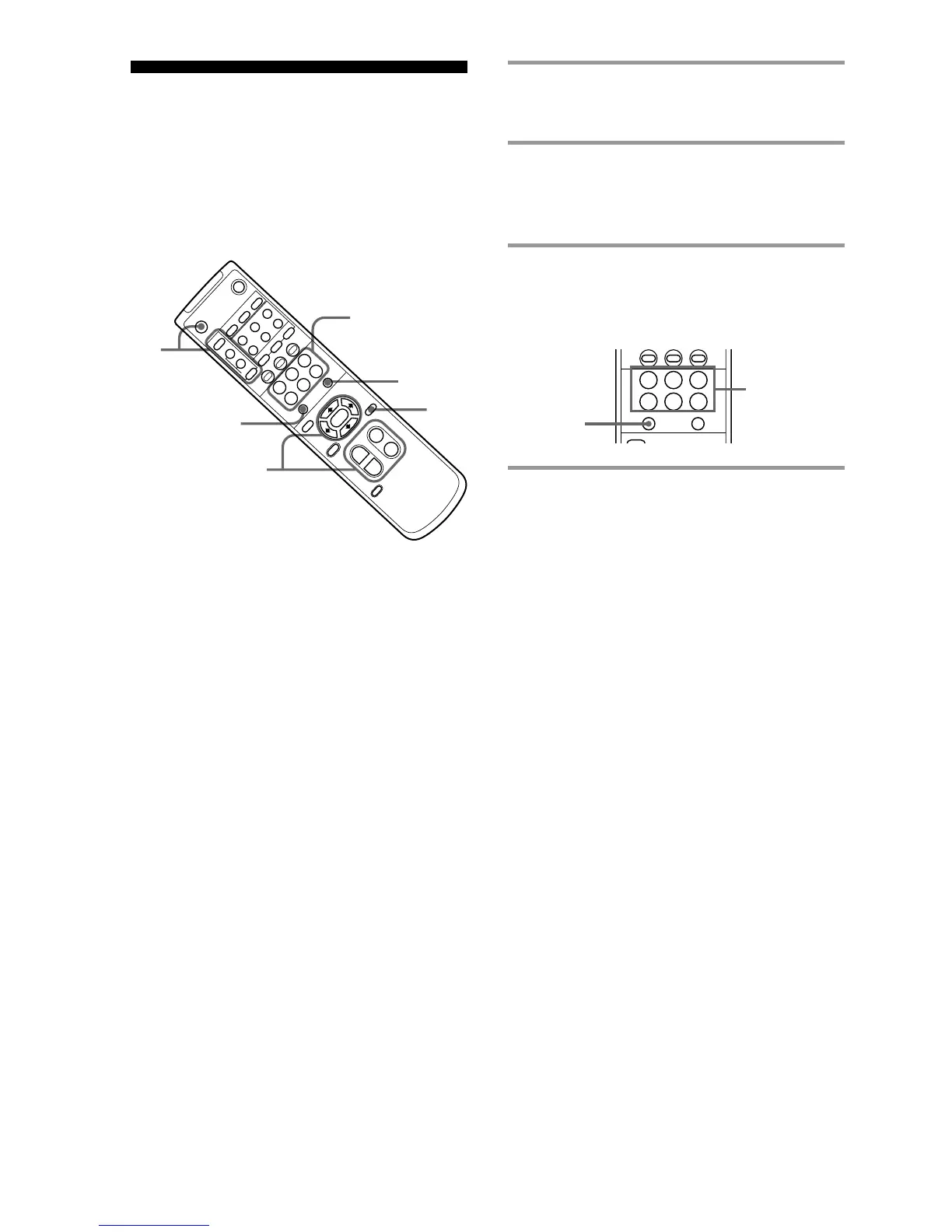
Up to six combinations of the setting (position,
zooming, focusing and back lighting) can be preset.
1 Press the PAN-TILT RESET button to
reset the pan/tilt position.
2 Adjust the position, zooming, focusing,
and back lighting of the camera. (See on
page 11.)
3 While holding down the PRESET
button, press either of the POSITION
buttons 1 – 6.
MENU
PRESET
RESET
POSITION
PAN-TILT/CURSOR
STD REV
123
456
While
holding
down
Press the
POSITION
button on
which the
settings are
to be preset.
1
2
2
3
POSITION
(1 – 6)
3
PRESET
RESET
1
AUTO
2
3
CAMERA SELECT
ON/OFFFAR ENTRYOFFSET
FOCUS
POWER
BACK LIGHT
CHASE
AT
MD
NEAR
MENU
HOME
CURSOR
L/R
DIRECTION SET
PAN-TILT
RESET
AUTO ZOOM
AE
ON/OFF
MANUAL
DETECTFRAME
PRESET
RESET
POSITION
PAN-TILT/CURSOR
SLOW·
ZOOM·
FAST
TT
WW
DATA SCREEN
STD REV
123
456
START/STOP FRAME DISPLAY


 To Next Page
 Loading...