– 14 –
WAX
RM-EA002 / RM-ED002
Connecting optional equipment
Using Optional Equipment
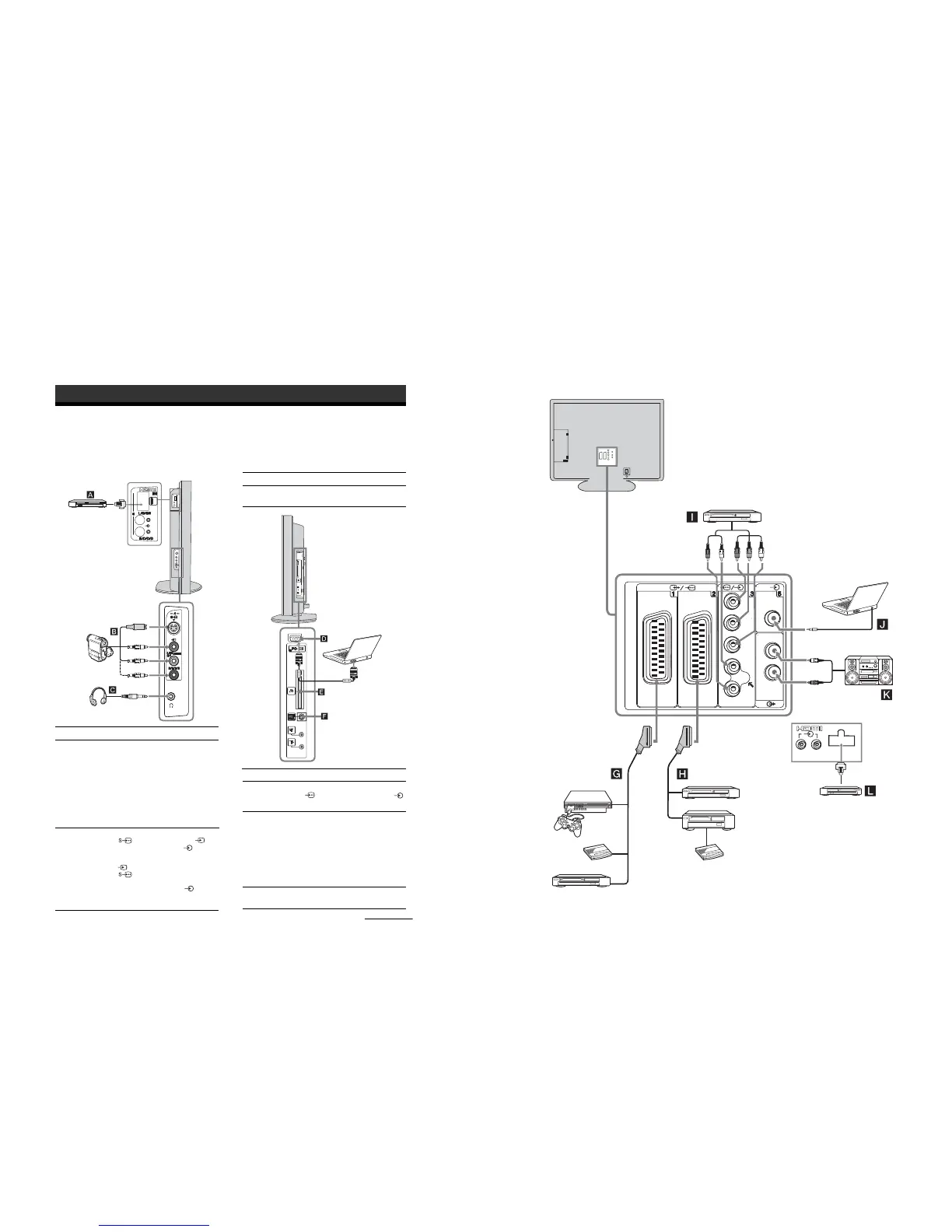
You can connect a wide range of optional equipment to your TV. Connecting cables are not supplied.
Connecting to the side of the TV
To connect Do this
Digital satellite
receiver
A
,
L
S VHS/Hi 8/DVC
camcorder
B
Connect only to the HDMI IN 5
socket. The digital video and audio
signals are input from the digital
satellite receiver. If the digital
satellite receiver has a DVI socket
and not an HDMI socket, connect
the DVI socket to the HDMI IN 5
socket, and connect the audio
socket to the audio sockets HDMI
IN 5. The digital video and
analogue audio signals are input
from the digital satellite receiver.
Connect to the S video socket
4 or the video socket 4,
and the audio sockets 4. To
avoid picture noise, do not connect
the camcorder to the video socket
4 and the S video socket
4 at the same time. If you
connect mono equipment, connect
to the L/G/S/I sockets 4, and
set “Dual Sound” to “A”
(page 24).
Headphones
S VHS/Hi8/DVC
camcorder
Digital satellite
receiver/DVD
Headphones
C
Connect to the i socket to listen to
sound from the TV on headphones.
To connect Do this
Personal Computer
D
Connect to the PC Input socket
5 and the audio socket
J
on the rear of the TV (page 37).
CAM (Conditional
Access Module)
E
For encripted PPV
(Pay per View)
services.
Remove the dummy card from the
CAM slot and insert the CAM.
Insert the viewing card into the
CAM.
Modem connector
F
For future use only.
To connect Do this
Continued
(KDL-S32A11E,
KDL-S26A11E only)
Notes:
• Switch off the TV before inserting the CAM.
• Keep always the dummy card into the CAM slot when
you remove the CAM.
R/D/D/D L/G/S/I
(SmartLink)
Y
PR/
C
R
PB/
C
B
L/G/
S/I
R/D/D/D
R/D/
D/D
L/G/
S/I
PC
Connecting to the rear of the TV
DVD player
with component output
Decoder
DVD recorder / Hard disc
recorder
VCR
Decoder
Hi-Fi
PlayStation 2
(KDL-S40A11E only)
Digital satellite receiver/
DVD
DVD


 To Next Page
 Loading...