22
Menu Operations
Executing a phantom
When a phantom is executed from a remote control panel,
operation is performed according to the phantom table set
on this menu.
You can specify a certain level for switching, or turn each
level ON (1)/OFF (0) independently.
When all the levels are set to “0,” the level value will
follow the level setting for the destination name set in the
phantom table. (This setting is made with the primary
station menu item “E: SET LEVEL TABLE.”
The display windows show the following:
Phantom name: Output connector name < Input connector name
-Level 1-8
If there is a protected destination in the phantom, the
operation may vary depending on the setting of
“PHANTOM PROTECT (MKS-8082 only)” (page 31) of
“Menu Item Z: SET PANEL STATUS”.
When set to PART PROT: Switching of the protected
destination in the phantom data is not executed. The
concept of the protect function is directly applied to
the phantom switching.
When set to FULL PROT: None of the crosspoints are
switched if any destination in the phantom is
protected.
This mode regards the phantom as a single switching
operation and does not execute if any part cannot be
switched.
When set to BUTTON LINK: When the XPT HOLD
button on the unit is lit, none of the crosspoints are
switched.
This mode regards the protect function as panel
protection, and no switching can be executed from the
panel if its XPT HOLD button is lit.
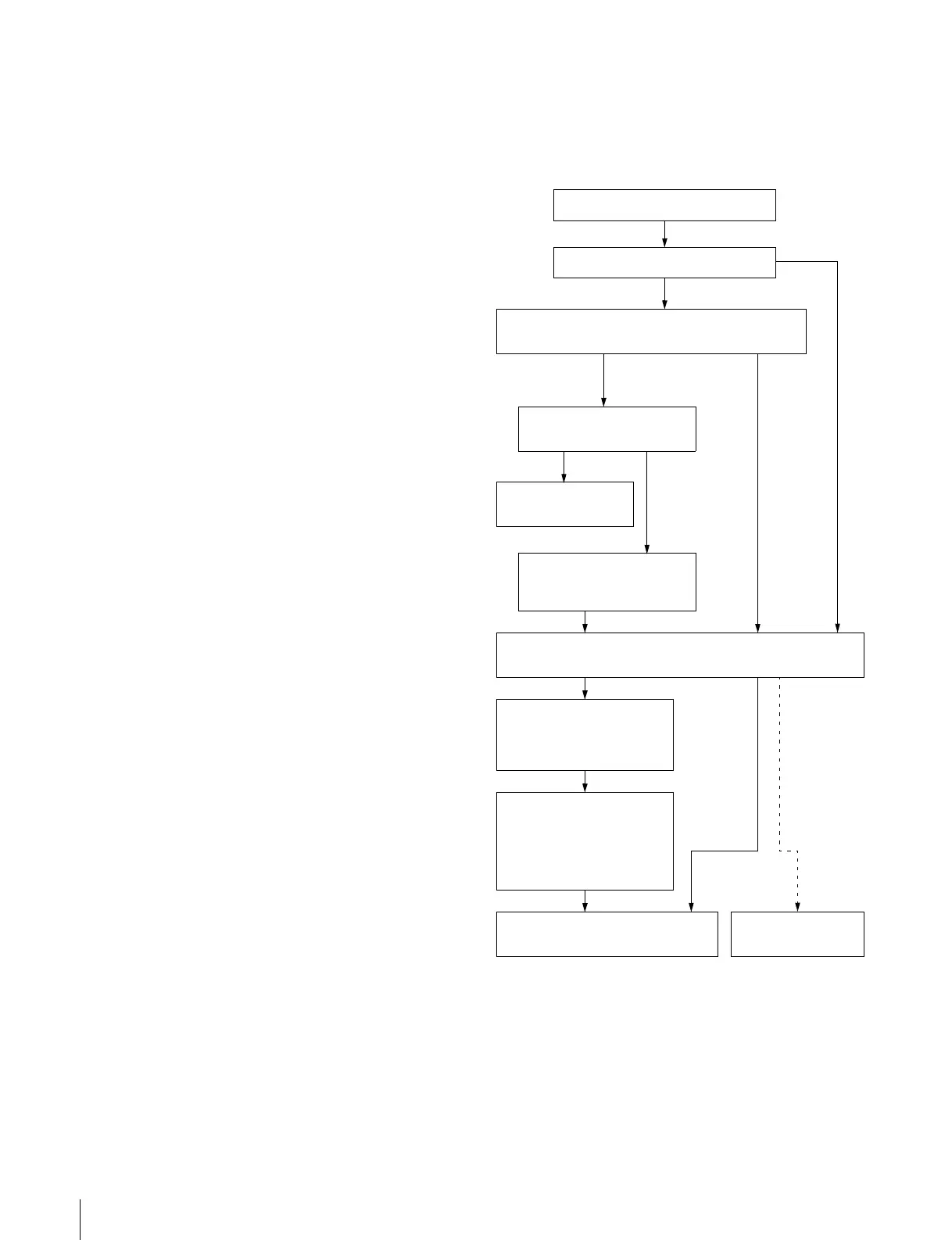
Processing when the TAKE button is
pressed
When you select a source then press the button on which
the TAKE function has been set (TAKE button), the unit
carries out the following processing:
The unit is in RTR mode.
No
Yes
The unit checks whether the selected source name is
listed in the phantom table.
Checks whether the phantom
data are for a global phantom.
Output the GLOBAL
PHANTOM number.
Selects the sources and
destinations listed in the
phantom table.
The TAKE button is pressed.
When the source
name is listed in
the table
When the
source
name is not
listed in the
table
Checks whether secret or protect is set for the selected
sources and destinations.
When secret
or protected
has not been
set
When secret
or protect has
been set
Excludes sources and
destinations for which
secret or protect have been
set from the selection.
Checks the level setting of
each of the remaining sources
and destinations for each
name. When the level setting
is off, the setting in the
destination table is selected.
Outputs a request for signal switching
to the S-BUS.
Executes nothing.
NoYes


 To Next Page
 Loading...