7-21
Appendix
Restoring the Factory Default Settings
Since the VB-C50i/VB-C50iR supports a wide variety of functions, we recommend that you make
a note of the settings for each function (→ P.7-23). If you want to redo the settings from the
beginning because you have forgotten them or for some other reason, first restore the factory
default settings.
* Please refer to page 7-23 for more about the factory default settings.
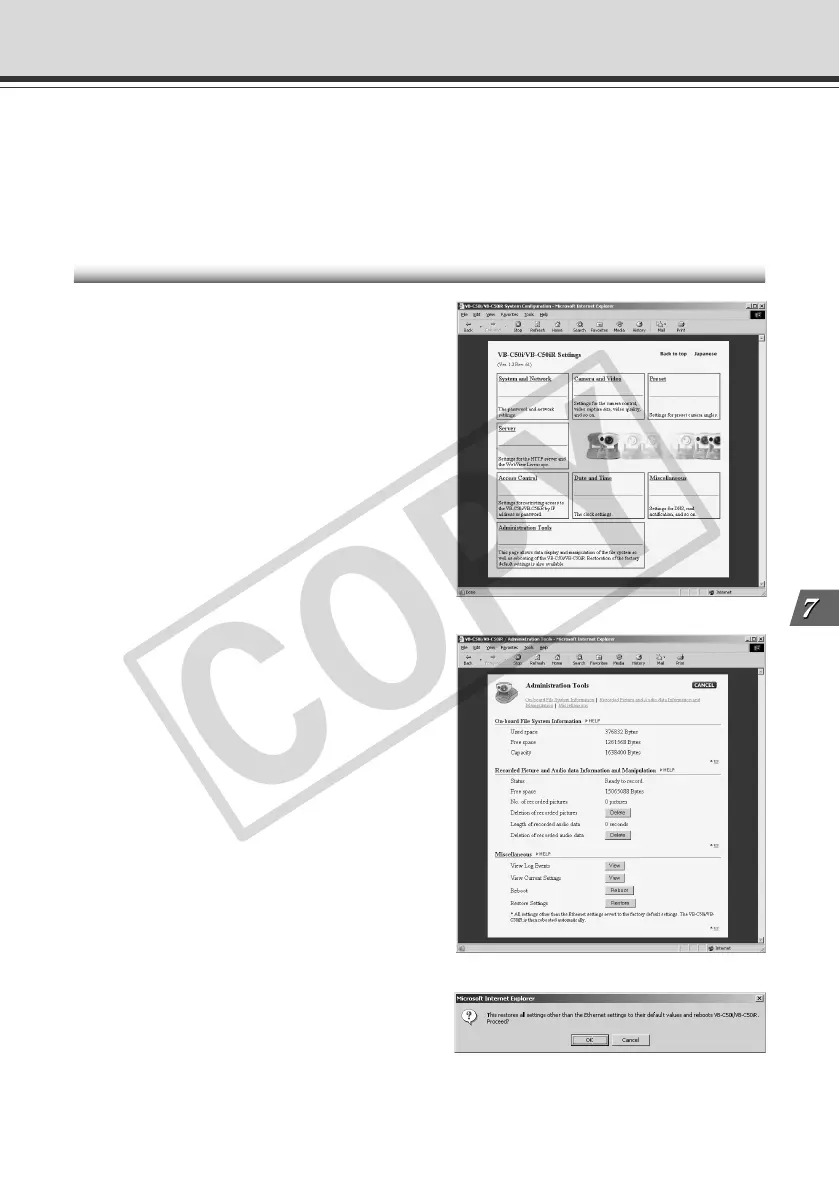
Restoring the Factory Default Settings from the Administration Tools Page via a Web Browser
1. Launch the Web browser and display
the settings title page.
The VB-C50i/VB-C50iR’s IP address, user
name, and administration password are
required when displaying the settings title page
(→ P.3-3).
2. On the settings title page, click
“Administration Tools”.
The Administration Tools page appears.
3. Click the “Restore” button for
“Restore Settings”.
When the “Restore” button is clicked, the
confirmation message appears. To proceed
with restoring the default settings, click the
“OK” button.
007-VBC50i-E-US 06.7.6, 11:38 AM21



 To Next Page
 Loading...








