Easy
Recording
Program
AE
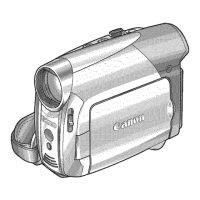
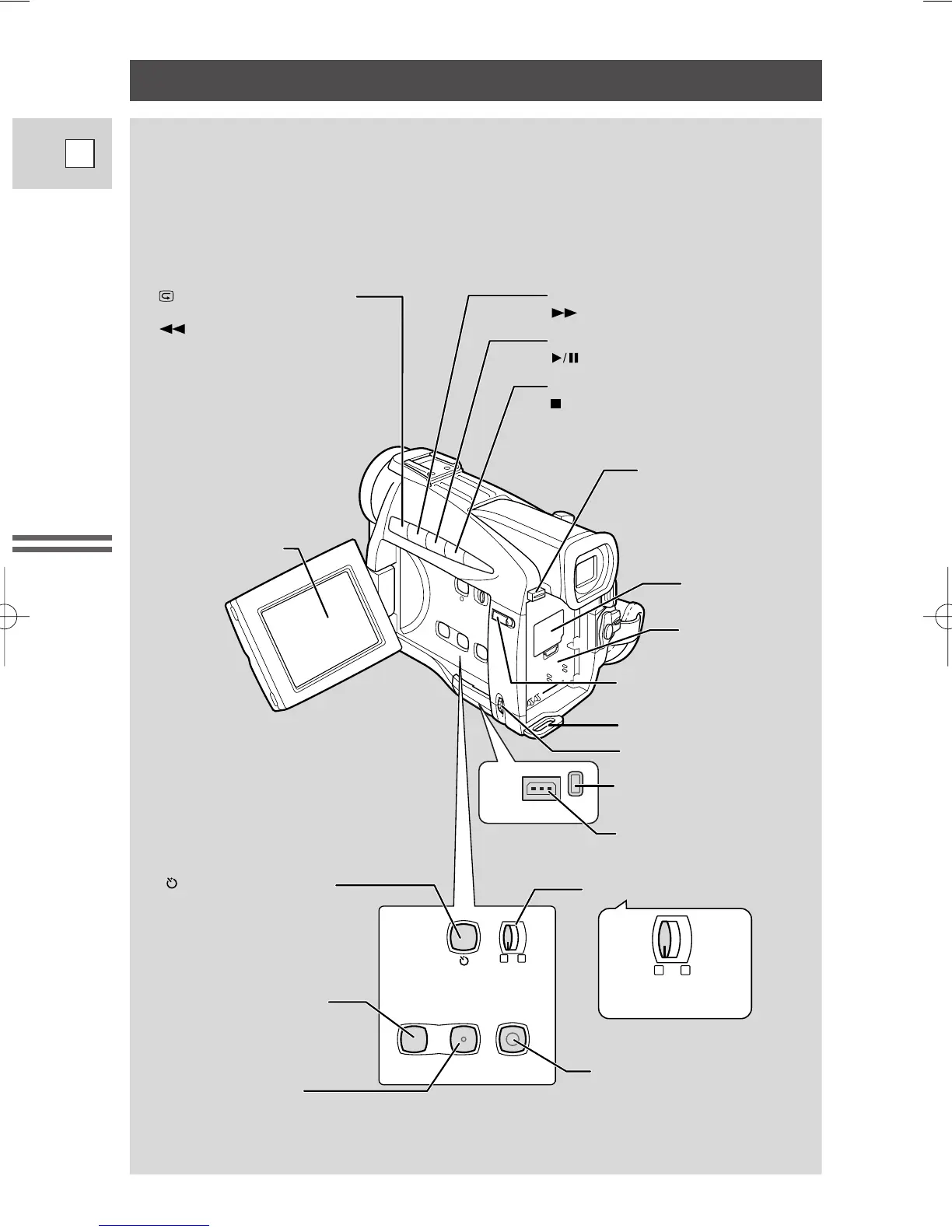
Program selector (p. 50)
DC IN
9.5V
CHARGE
MENU button (p. 38)
LCD screen (p. 23)
FOCUS button (p. 66)/
(play/pause) button (p. 26)
AE SHIFT button (p. 63)/
(stop) button (p. 26)
BATT. (battery) RELEASE
button (p. 13)
Backup battery
cover (p. 92)
Battery attachment
unit (p. 12)
LCD panel OPEN button (p. 23)
Strap attachment bar (p. 89)
Selector dial (p. 29, 38)
CHARGE indicator (p. 12)
DC IN terminal (p. 11)
REC SEARCH
+
button (p. 49)/
(fast forward) button (p. 26)
Record review button (p. 49)/
REC (record) SEARCH
–
button(p. 49)/
(rewind) button (p. 26)
REC PAUSE
(LINE-IN)
DIGITAL
EFFECTS
ON/OFF
MENU
DIGITAL EFFECTS button
(p. 57)
Digital effects ON/OFF
button (p. 57)
Self-timer button (p. 61)/
REC PAUSE (LINE-IN)
button
(p. 76, 78)
P
P


 To Next Page
 Loading...