6.5.6 PCBs
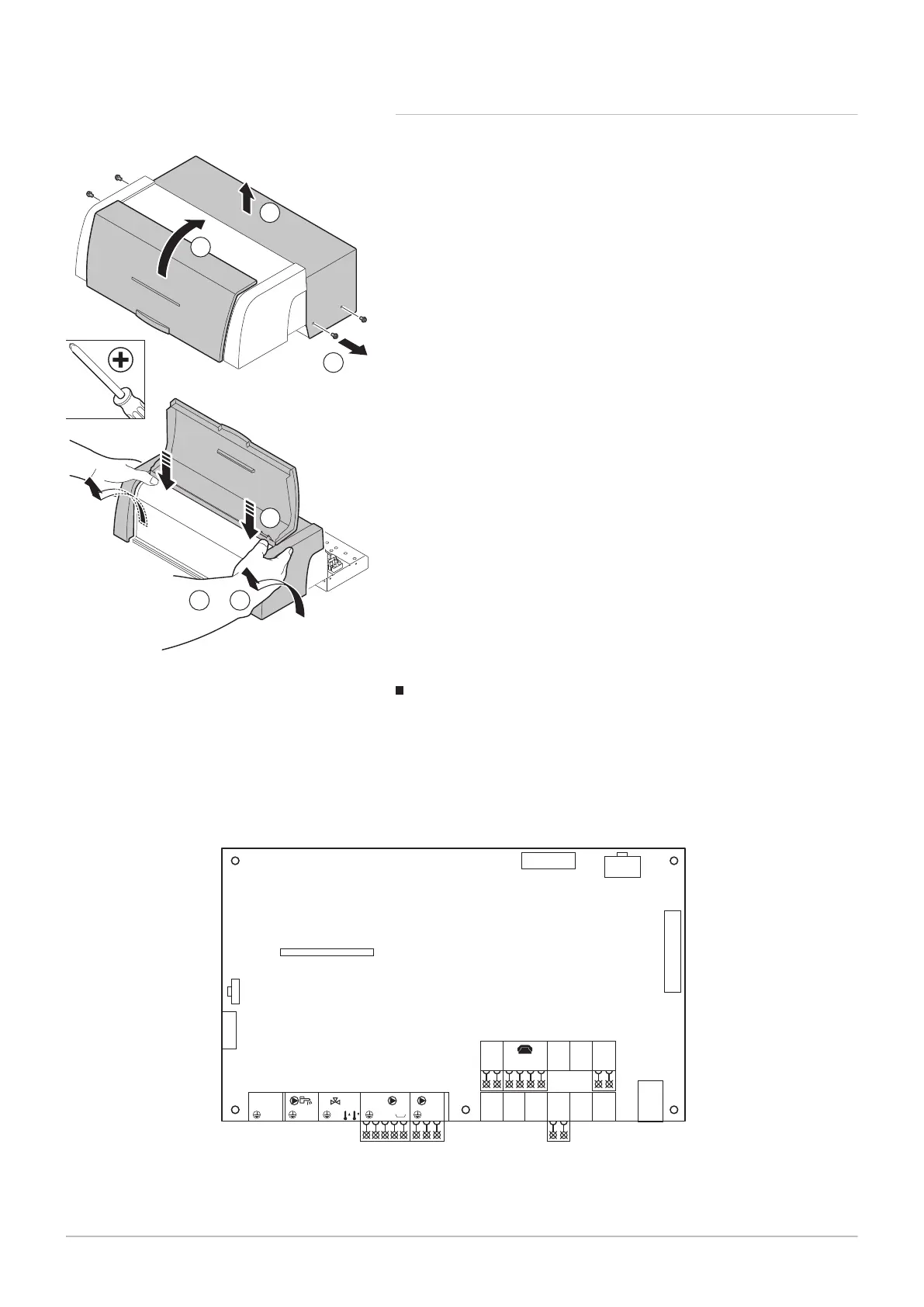
The PCBs are positioned in the PCB housing behind the control panel.
1. Unscrew the 4 lateral retaining screws in the control panel.
2. Remove the protective cover.
3. Open the front cover.
4. Use both thumbs to press the top of the control panel downwards a
little.
5. While maintaining some of the pressure you are applying to the top of
the control panel, use both hands to tip the casing forwards and
upwards.
Connection options for the SCU-D4 control PCB
Fig.34 SCU-D4 control PCB
SCU-D4
N
TS + BB
LN L N
Alim
230 V - 50 Hz
L N N L
A
2
S SYST
1 2
+ S ECS S EXTTA - S DEP C S DEP B
1 2 1 2 1 2 1 2 1
+
0-10V
- 4
S CAMB S AMBB S AMP A
3 2 1 2 1 2 1 2 1
J10
J7
J4
J6
J5
J2
J1
J9
J8
For connection options to the SCU-D4 control PCB:
Fig.33 Open housing for PCBs
6 Installation
42 7600532 - v.11 - 13122018


 To Next Page
 Loading...