23
MEDIA
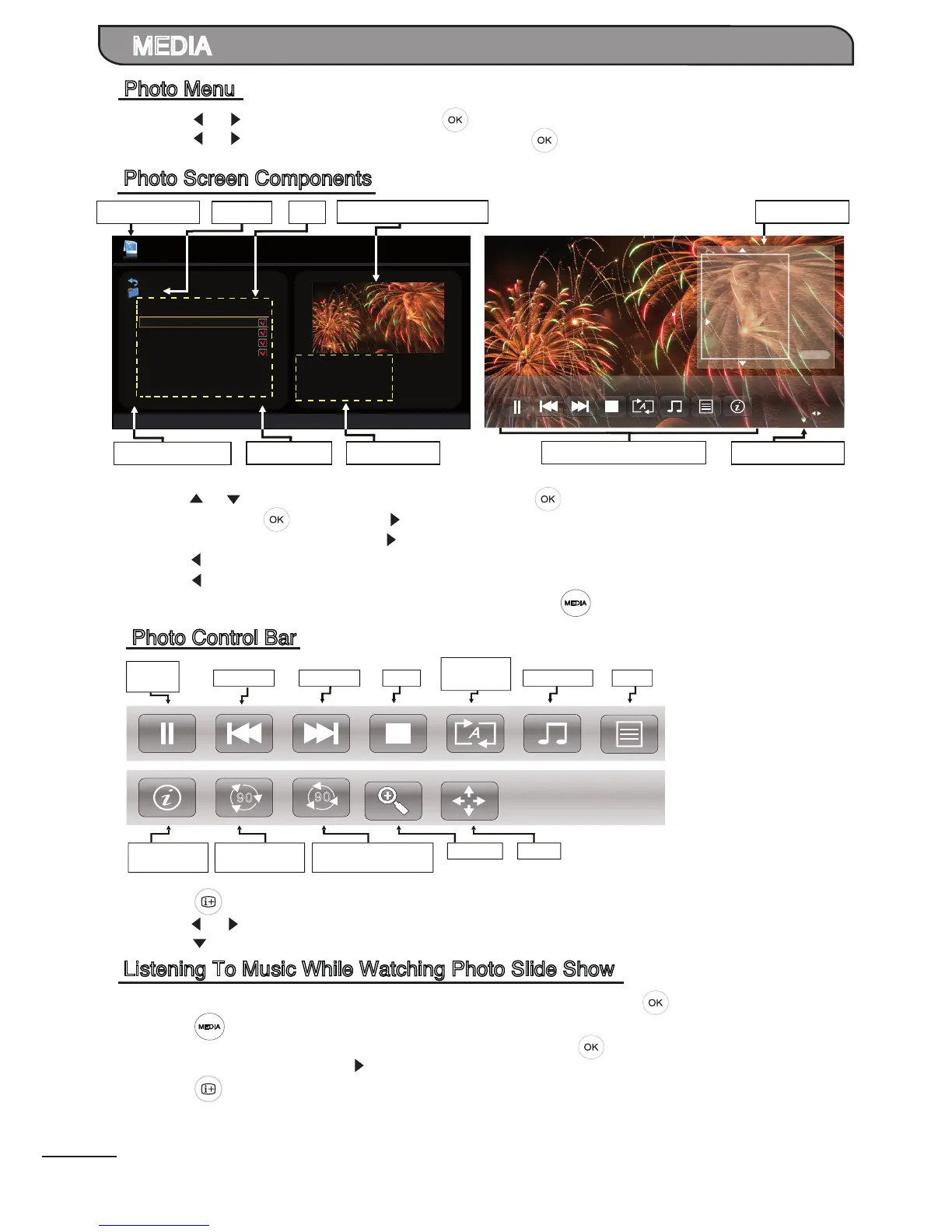
1. Press [ ] / [ ] to select PHOTO. Press [ ] to enter.
2. Press [ ] / [ ] to select the desired drive and press [ ] to enter.
1. Press [ ] / [ ] to select the desired folder and press [ ] to open the folder, select the desired
photo le using [ ] and press [ ] to start playing.
2. If no photo le is selected, press [ ] to commence photo slideshow.
3. Press [ ] to stop photo slideshow and return to Photo list.
4. Press [ ] to return to the previous menu.
5. You may return to Media Player main menu by pressing [ ].
1. Press [ ] to display Photo Control Bar while playing photo slideshow.
2. Press [ ] / [ ] to select the desired settings.
3. Press [ ] to exit from Info bar. Alternatively, it will disappear after 5 secs when no key pressed.
1. Go to MUSIC menu, select the music les to be played by pressing [ ].
2. Press [ ] to return to Media Player main menu.
3. Go to PHOTO menu to select the desired folder and press [ ] to open the folder or select the
desired photo le and press [ ] to start playing.
4. Press [ ] to display Photo Control Bar, select ‘Music’ option to start playing the music les
selected previously.
Photo Menu


 To Next Page
 Loading...