Page 9INF6502WB/INF6502LC/INF7002WB/INF7002LC User Guide
Connecting to Other Devices
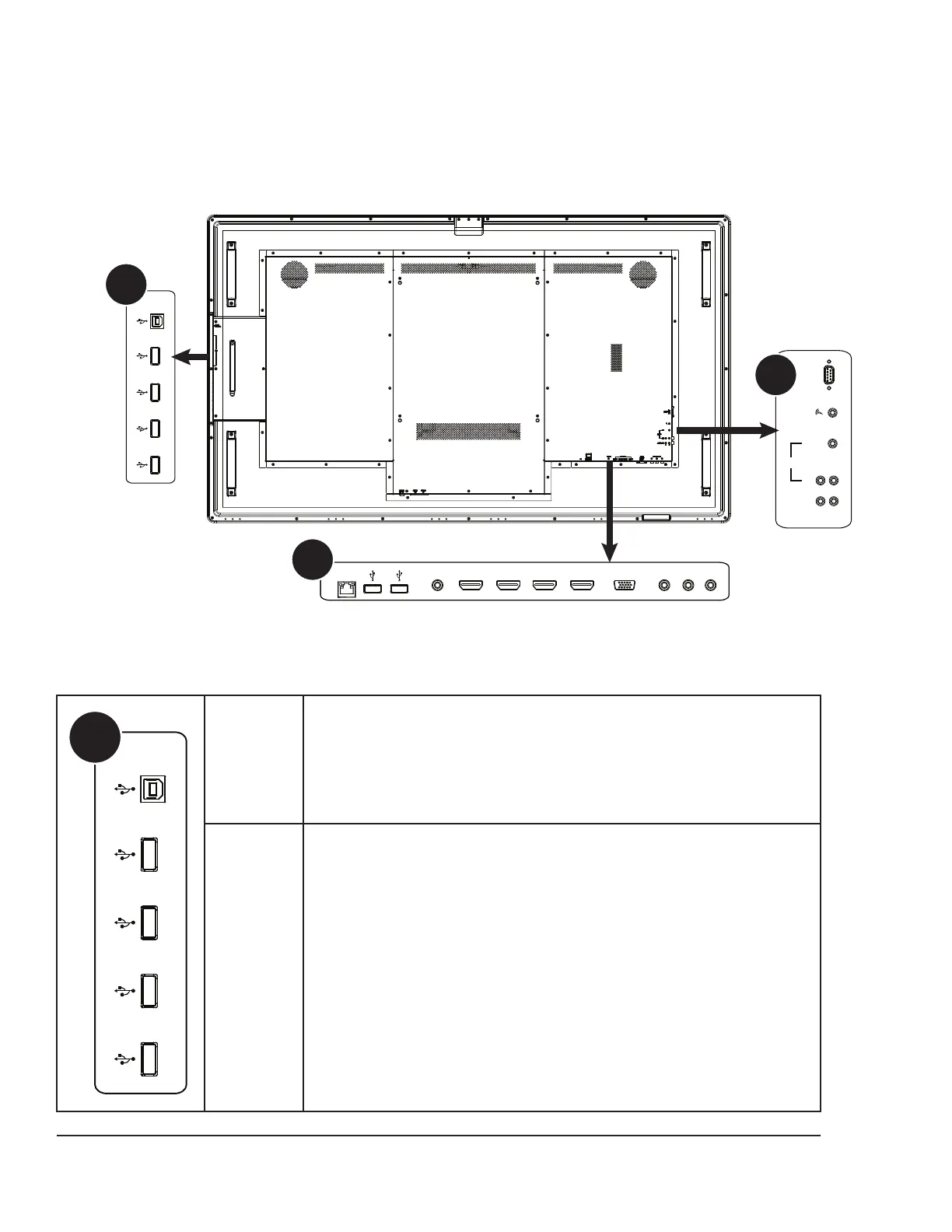
A full range of digital and analog video inputs and audio source devices can be connected to the connection panels on
the back and side of the monitor. Available jacks include: HDMI In (4), PC In (1), Composite Video (1), Component RCA
(1), RS232 (1), Audio In 3.5mm (1), Audio In RCA (1-R/L), Microphone In (1), USB-B for touch control (1), USB 2.0-A (4),
and Audio Out RCA (1-R/L).
L R
Audio
Audio OUT
IN 1
IN 2
A
B
C
HDMI3HDMI4
RS232
HDMI1HDMI2 COMPONENTVIDEO PC IN
TOUCH
CONTROL
USB
RJ45
TOUCH
CONTROL
USB
A
TOUCH
CONTROL
Connect a Type A to Type B USB cable from the monitor to an external
computer in order to use the touchscreen gestures on the monitor.
USB 1-4
Connect a wireless mouse, USB thumb drive or other USB device to this
USB Type A 2.0 connector.



 To Next Page
 Loading...





