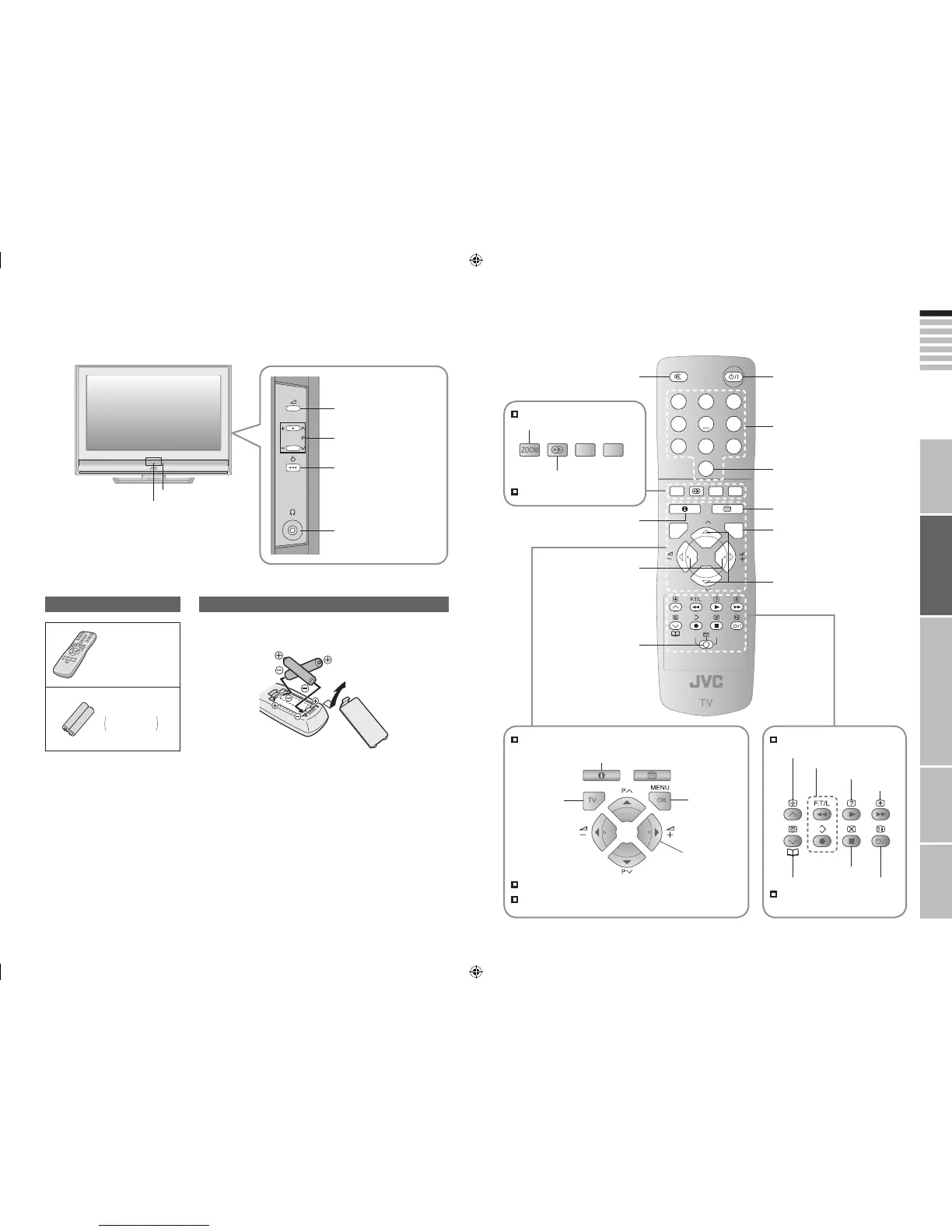
Names of all the parts
When operating a JVC VCR
or DVD (P. 21)
Turn on “3D CINEMA SOUND” (P. 17)
Hold the current page
Bookmark pages
Reveal hidden pages
Enlarge the text
Switch briefly
between teletext and TV
To index page
Turn On / Off (Standby)
Change the channel / page
Watch video, etc. (P. 21)
Display on-screen menu / set
(P. 25)
To teletext (P. 19)
Change the channel / page
When watching TV / Video
Change the aspect ratio (P. 17)
Mute
When viewing teletext (P. 19)
Use two “AA/R6” dry cell batteries. Insert the batteries from the - end, making
sure the + and - polarities are correct.
Channel information
(P. 17)
When viewing teletext (P. 19)
Insert the batteries
Remote control
(RM-C1508)
“AA/R6” Batteries
Check accessories
For confirming
the TV works
Switch between
“VCR / g / DVD”
(P. 21)
Volume
View sub-pages
When using TV’s menu
When watching TV (P. 17)
When viewing teletext (P. 19)
To previous screen
Display
on-screen
menu / set
Select settings in
menus
Return to TV
Volume
Power On / Off
Remote control sensor
To headphones (P. 13)
Power lamp
ON: Lit (Green)
OFF: Unlit
Change channel
/ volume (P. 17)



 To Next Page
 Loading...








