Setting Up Your Printer
22 Kodak ESP 7 Printer User Guide
5 Press or as needed to change the default value. The default value is displayed at
the right margin of the setting. When the setting is highlighted, the current value is
bracketed between the
andsymbols.
6 Press
OK to save the setting(s).
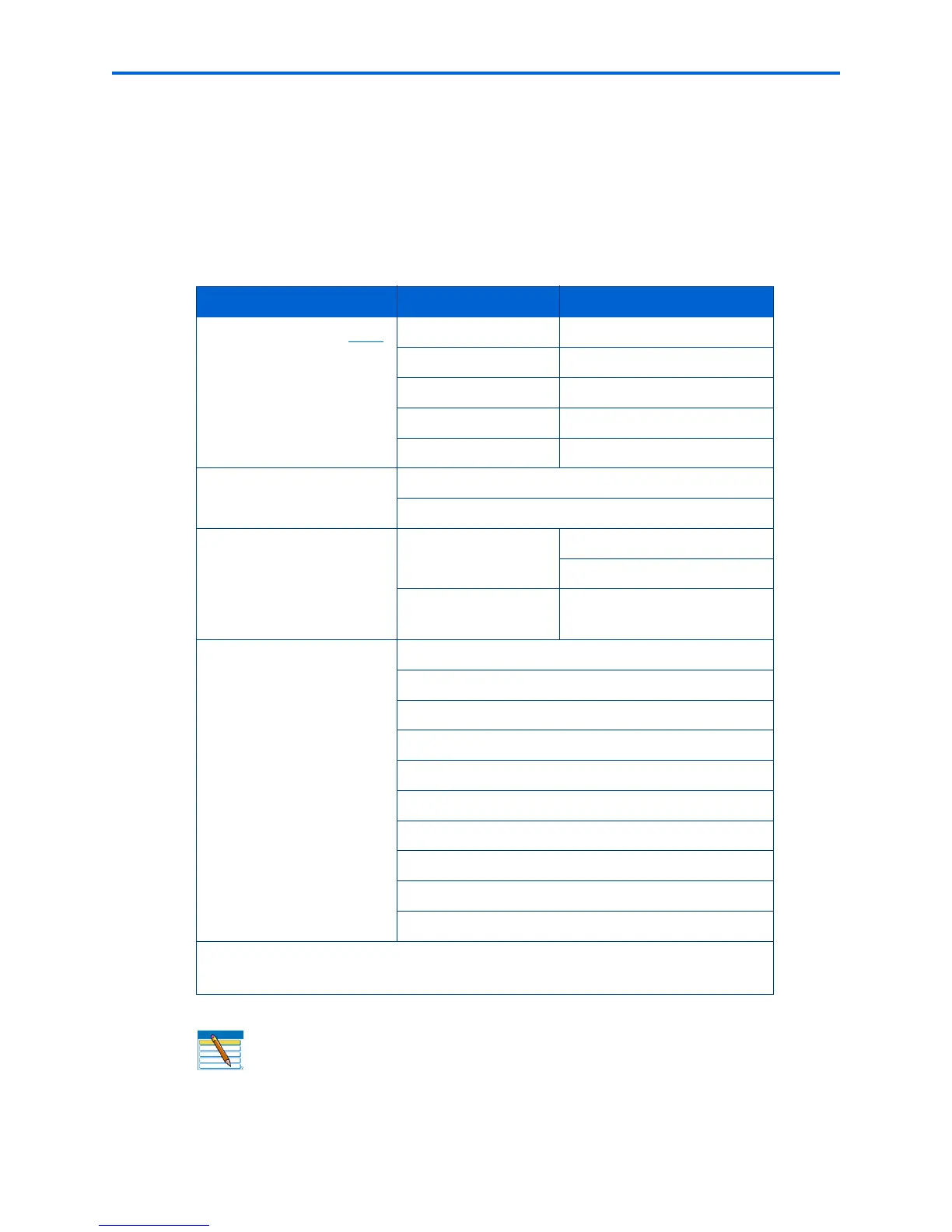
Printer settings options
Menu Options Options Settings
Date and Time (
see Note
below)
Year 2007 - 2099
Month January - December
Day 1 - 31
Hour 0 - 12 or 0 - 23
Minute 00 - 59
Tagged Image Printing
On
Off
Control Panel Settings Button Sounds
On
Off
Time to Low Power
1-4 hours, in .5 hour
increments
Language
English (U.S.)
English (International)
Deutsch
Français
Français (Canada)
Italiano
Español
Castellano
Português
Nederlands
Note:
Restoring the factory defaults from the Reset All Settings option will not
change the settings for any of the following:
Language, Date and Time.
Note: Setting the date and time via the control panel is a separate task from
stamping the date and time on photo prints. You can also synchronize the printer's
date and time using the Home Center software.



 To Next Page
 Loading...