EasyManua.ls Logo

LG 32PC5 series - PC Setup

LG 32PC5 series
98 pages
Print Icon
To Next Page IconTo Next Page
To Previous Page IconTo Previous Page
Loading...
28
EXTERNAL EQUIPMENT SETUP
HDMI IN HDMI/DVI IN
AUDIO
(RGB/DVI)
RGB
(PC)
2C IN
ROL)
AV 1V 1 AVV 2
RGB OUTPUT
AUDIO
VIDEO
AUDIO
COMPONENT IN
AV 2 AV 1
RS-232C IN
(CONTROL&SERVICE)
ANTENNA
IN
HDMI INHDMI/DVI IN
12
RGB IN (PC)
AUDIO IN
(RGB/DVI)
1
2
AV 1 AV 2
VIDEO
AUDIO
NENT INCOMPONENT IN
AV 2V 2 AV 1
RS-232C IN
(CONTROL&SER(CONTROL&SERVICE)VICE)
ANANTENNA
IN
HDMI INHDMI INHDMI/DVI IN
1 2
RGB IN (PC)
AUDIO INAUDIO IN
(RGB/DVI)(RGB/DVI)
RGB OUTPUT
AUDIO
1
2
PC SETUP
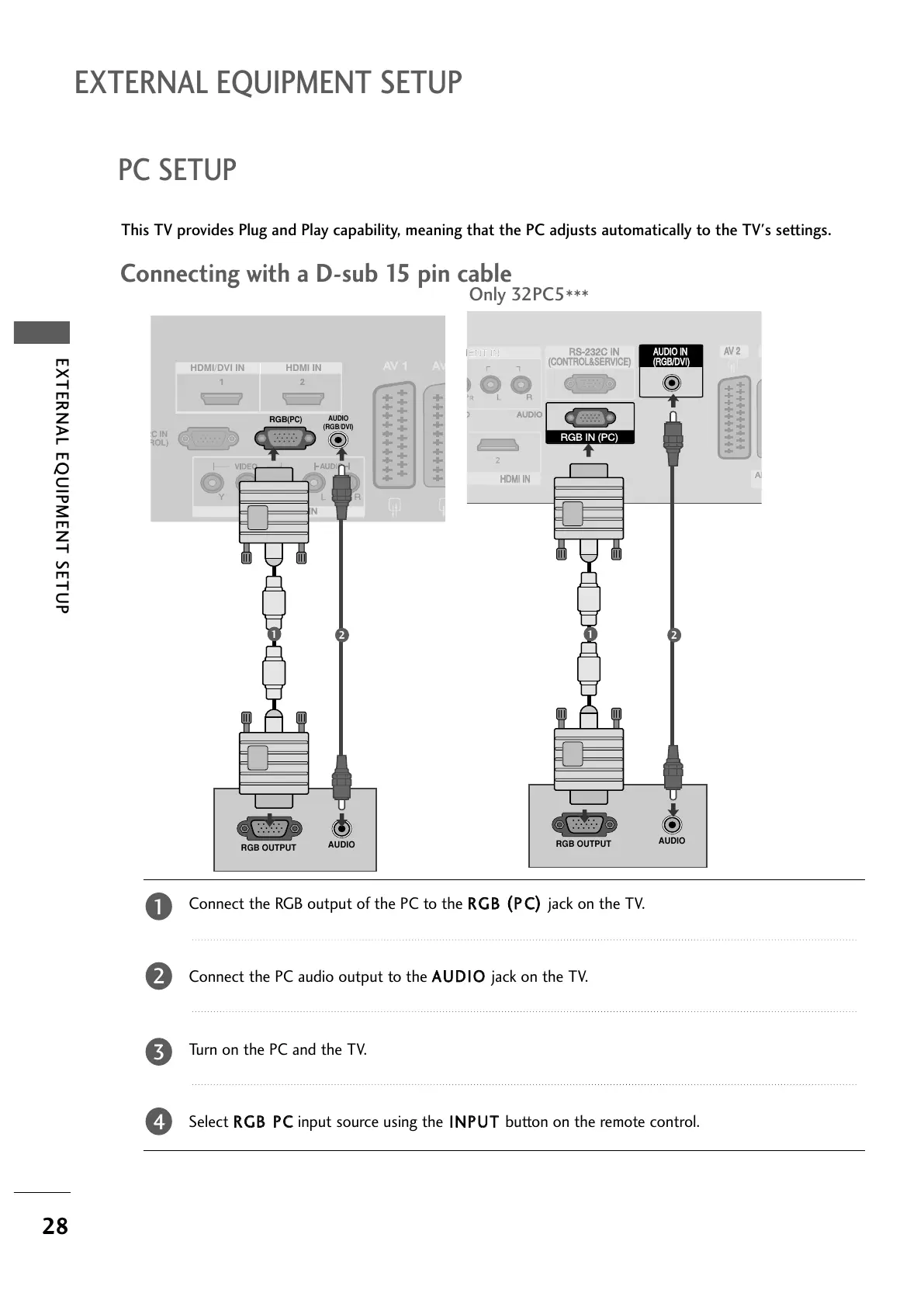
This TV provides Plug and Play capability, meaning that the PC adjusts automatically to the TV's settings.
Connecting with a D-sub 15 pin cable
Connect the RGB output of the PC to the
RRGGBB
((
PP CC
))
jack on the TV.
Connect the PC audio output to the
AAUUDDIIOO
jack on the TV.
Turn on the PC and the TV.
Select
RRGGBB PPCC
input source using the
IINNPPUUTT
button on the remote control.
2
3
4
1
Only 32PC5
***

All manuals and user guides at all-guides.com

Table of Contents

Related product manuals