-11-
5. PROPER OPERATION
5-1 Loading the system software to the control box
When the brand new machine is operated first time or when the control box is adjusted for the
repairing, the system software has to be loaded to the control box.
For this loading, please take the following procedure.
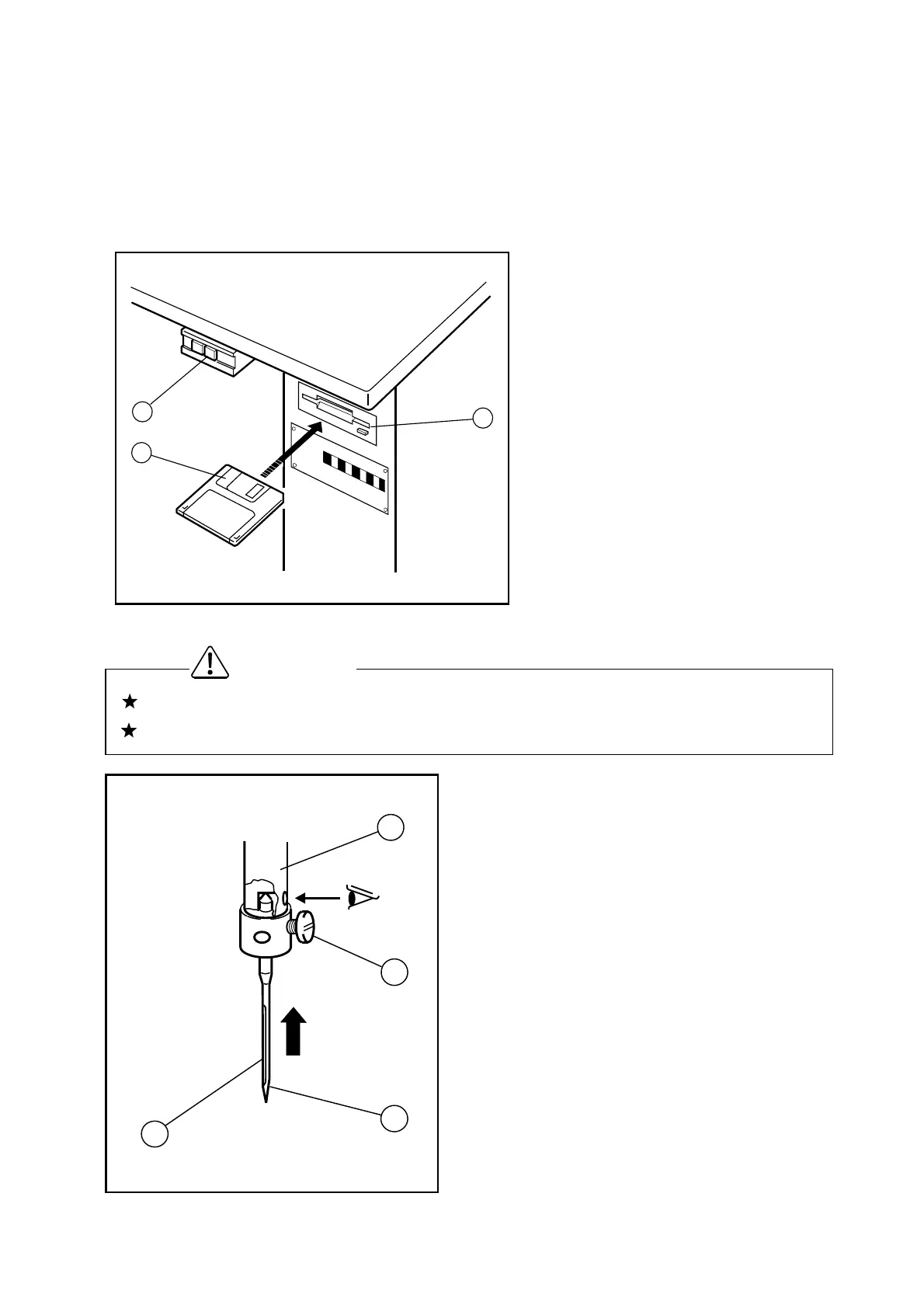
(1) Insert the system floppy disk printed
[ F1 ] (NO.2) into the disk drive (NO.3)
of the control box.
The system floppy disks are enclosed
in the accessory box.
(2) Turn the power switch (NO.1) ON.
(3) Load the system software with
following the instructions [Method of
PLK-E03BT system installing].
(4) After loading the system software,
keep the system floppy disks with in
care.
5-1 Installation of the needle
(1) Loosen the needle set screw (NO.1) then,
insert the new needle (NO.2) until the needle
head is reached the end of the hole of the
needle bar (NO.3).
(2) Fasten the setting screw (NO.1) with facing the
needle groove (NO.4) to the front.
Please make sure to turn the power switch OFF before installing or replacing the needle.
Please pay attention for the fingers not to be wounded by the needlepoint.
Caution
1
2
4
3
O
F
F
O
N
1
2
3



 To Next Page
 Loading...