33
P
R
E
L
IMI
N
A
RY
Learning to Use Your Phone
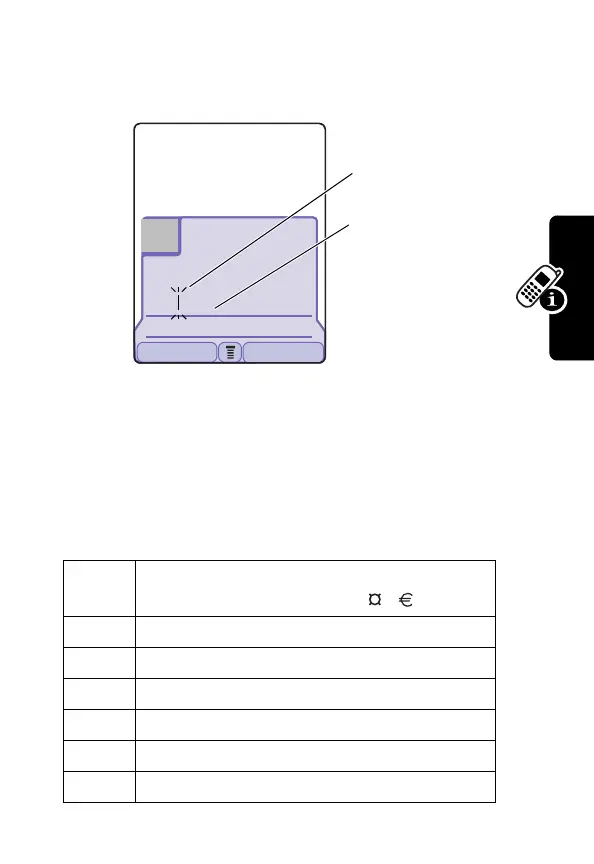
When you enter 3 or more characters in a row, your phone
may guess the rest of the word. For example, if you enter
prog
you might see:
If you want a different word, such as
progress
, continue
pressing number keys to enter the remaining characters.
Character Chart
Use this chart as a guide for entering spaces, numbers,
letters, symbols, and other characters with the Tap
method.
1
space . 1 ? ! , @ _ & ~ : ; "
- ( ) ' ¿ ¡ % £ $ ¥
2
a b c 2 ä å á à â ã
α
β
ç
3
d e f 3
δ
ë é è ê
φ
4
g h i 4 ï í î
γ
5
j k l 5
λ
6
m n o 6 ñ ö ø ó ò ô õ
ω
7
p q r s 7
π
ß
σ
Msg:
Prog ram
DELETE OK
59
446
Üô
Flashing cursor
indicates insertion
point.
In
Tap
, press
S
right to accept the
word, or press
*
to reject it and
enter a space after
prog
.


 To Next Page
 Loading...