72
Connecting to a Printer
Connecting to Televisions, Computers and Printers
Connecting the Camera and Printer
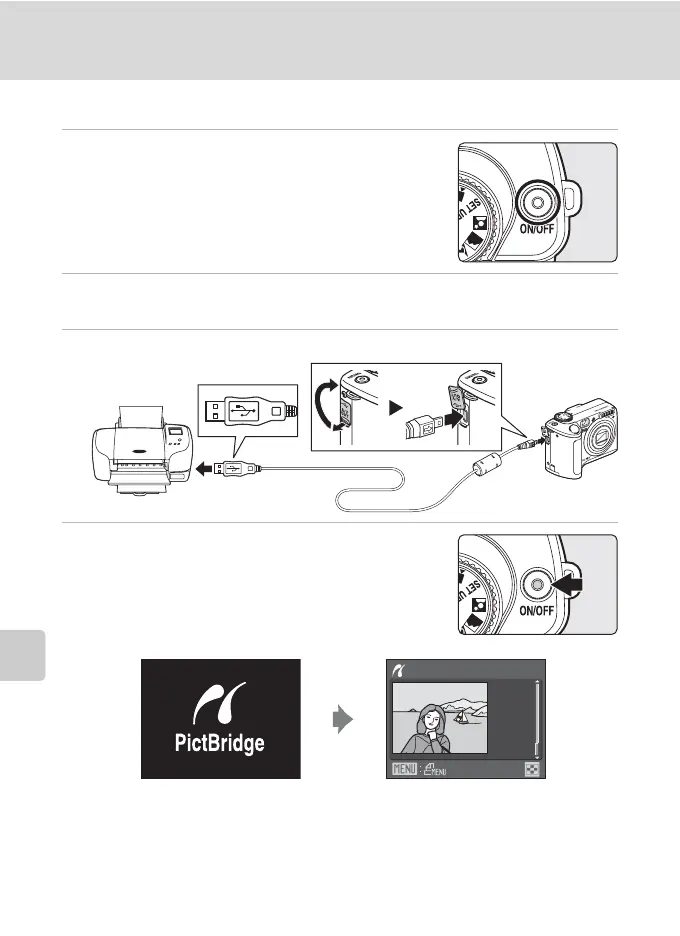
1 Turn off the camera.
2 Turn on the printer.
Check printer settings.
3 Connect the camera to the printer using the supplied USB cable.
4 Turn on the camera.
When connected correctly, the PictBridge startup screen
1 will be displayed in the camera monitor. Then the
print selection screen will be displayed 2.
B Connecting the USB Cable
Be sure that the connectors are oriented correctly, and do not use force, to connect the USB cable.
When disconnecting the USB cable, do not pull the connector at an angle.
Print selection
15/11
2007
NO. 32
[ 32]
1
2


 To Next Page
 Loading...









